The best app development company USA buyers can hire is the one whose skills, pricing model, and post-launch support match your app, not the one with the loudest brand. Hatzs Dimensions suits companies that want native iOS, native Android, or React Native work alongside AI and data engineering. Simpalm suits teams that want a US-based agency with a published hourly rate band. TechAhead suits buyers who want every framework handled by one team. Zoolatech suits high-scale consumer and enterprise platforms. Riseup Labs suits products that add AI features to a cross-platform app.
The problem is that thousands of firms claim to build custom mobile apps, their portfolios look alike, and few of them state what they charge. This article compares five mobile app development companies in the United States on what you can check: which platforms they build for, who each one fits, and how they price the work.
One disclosure first. Hatzs Dimensions is our company, so it is listed first. The other four are ordered by how clearly they fit a specific kind of buyer, not by a universal score. Where a company publishes a rate, you will see it. Where it does not, you will see what to ask for instead.
1. Hatzs Dimensions
Hatzs Dimensions is a custom software and AI company that builds native iOS, native Android, and React Native apps for businesses that also need data, cloud, or AI work around the app. It is the strongest fit when the app is one part of a larger product.
A fixed price only helps if you define the scope before the first sprint.
What it builds
The mobile team works in the standard toolchain for each platform. The company also lists app maintenance with 24/7 monitoring, so the app keeps up with new OS releases after launch.
Around the app: AI agents, data engineering, cloud, and UI/UX design
Who it suits and what it costs
This company suits CTOs, founders, and product leaders at companies from Series A startups to Fortune 500 enterprises. The team is senior-only, with 7+ years of experience. It reports 250+ clients and 98% retention, and it cut insurance operations costs by 30% for BrokerOS.
Pricing follows two engagement models. The Fixed Price Model sets scope, timeline, and budget upfront. Dedicated Teams scale as your workload shifts. There is no public rate card, so bring your target platforms, feature list, and integrations to get a real quote.
2. Simpalm
Simpalm is a US-based mobile app development company in Rockville, Maryland, founded in 2009. It builds iOS, Android, and cross-platform apps for startups, SMBs, enterprises, and nonprofits, and it is the pick here for buyers who want a domestic partner.
A published rate band lets you sanity-check any quote before you sign.
What it builds
Simpalm covers the full path from product strategy to maintenance. Its design and consulting work sits alongside development, which helps first-time app owners who still need to shape the idea.
iOS and Android development
Flutter and React Native cross-platform apps
UI/UX design and product strategy
AI-powered mobile applications
App maintenance, modernization, and support
Who it suits and what it costs
Simpalm suits buyers who want a US-based team with design and strategy included. Its team runs roughly 50 to 150 people, which is large enough for a full build and small enough to get attention.
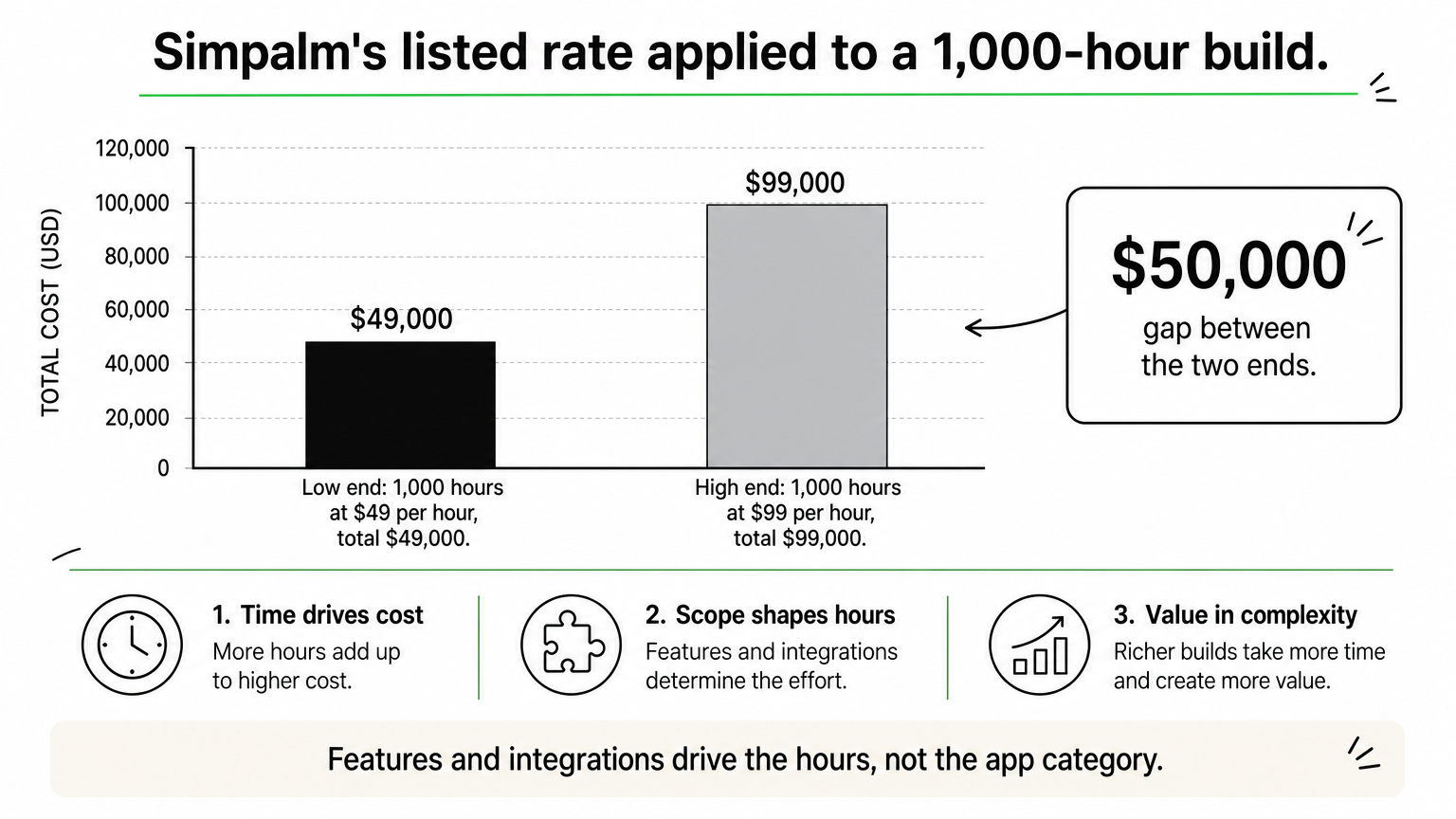
Its listed rate is $49 to $99 per hour. As an illustration, a 1,000-hour build at that band comes to $49,000 to $99,000. Your real total depends on scope, because features and integrations drive the hours, not the app category.
3. TechAhead
TechAhead, based in Agoura Hills, California, is a good choice for companies that want native iOS, native Android, Flutter, and React Native handled by one team. That range lets you pick a framework on merit instead of on what a vendor happens to offer.
Choose the framework after the product requirements, because switching later costs more.
What it builds
The value here is breadth under one roof. If you are still deciding between a native pair and a shared codebase, one team can price and argue both options.
Native iOS
Native Android
Flutter
React Native
Who it suits and what it costs
TechAhead suits companies that are undecided between native and cross-platform. Ask for a written recommendation with tradeoffs. A native pair means two codebases to build and test, while a cross-platform build shares most of its code.
No rate is published here, so request an estimate per platform and compare a native quote against a cross-platform quote for the same feature list. The gap tells you what native performance costs you.
4. Zoolatech
Zoolatech, based in Miami, Florida with global delivery, focuses on enterprise mobile platforms, high-scale consumer apps, and long-term product engineering. It fits larger companies planning a multi-year roadmap, not a quick prototype.
Apps with millions of users are a product engineering problem before they are a mobile problem.
What it builds
The pitch is sustained engineering rather than a one-off launch. That matters when your app must carry heavy traffic, integrate with internal systems, and keep shipping for years.
Enterprise mobile platforms
High-scale consumer apps
Long-term product engineering
Distributed delivery teams
Who it suits and what it costs
Zoolatech suits established companies with a long roadmap and an internal product owner. A smaller team with a single MVP in mind will likely find one of the other four a tighter fit.
Rates are not published. Ask whether work is priced per project or per team, since long-term engagements often use team-based pricing. Also ask how delivery hours overlap with your working day.
5. Riseup Labs
Riseup Labs, based in New York with global delivery, builds AI-powered mobile apps, cross-platform products, and scalable product engineering. It suits teams that want AI features inside a custom mobile app development project from day one.
An AI feature changes your backend, data, and compliance needs, not just your screens.
What it builds
Its focus is cross-platform delivery paired with AI capability. That pairing works best when the AI logic and the mobile interface are planned together.
AI-powered mobile apps
Cross-platform development
Scalable product engineering
Delivery from New York and global teams
Who it suits and what it costs
Riseup Labs suits startups and product teams adding AI to a cross-platform app. Check what share of the budget goes to the mobile build and what share goes to AI and backend work.
Rates are not published. Request a quote that splits mobile, backend, and AI line items, and confirm which time zones the team covers so reviews and stand-ups happen at workable hours.
How to choose among these five
Pick on fit, not rank. If your app depends on AI, data, or cloud work, start with Hatzs Dimensions. If you want a domestic agency with a published rate, look at Simpalm. If you are unsure whether to go native, talk to TechAhead. For heavy-traffic platforms, consider Zoolatech, and for AI features in a cross-platform app, consider Riseup Labs.
Whichever you shortlist, send each firm the same feature list and ask for the same breakdown by platform and by phase. If you want a quote built around your scope, talk to Hatzs Dimensions about your app.
The best enterprise AI agents are the ones that fit the systems you already run, respect your permissions, and leave an audit trail. For a Microsoft 365 shop, that is usually Microsoft Copilot Studio. Salesforce teams start with Agentforce, Google Cloud teams with Gemini Enterprise Agent Platform, and regulated firms with IBM watsonx Orchestrate. RPA-heavy teams look at UiPath, engineering-led teams at LangChain, and companies with unusual workflows at a custom build from a partner like Hatzs Dimensions.
The problem is that every vendor now says "agent." You are comparing products that range from a low-code builder for HR requests to a code framework for custom multi-agent systems. This article explains what enterprise AI agents are and how they work. Then it walks through seven options with the same lens: how each works, who it suits, what it costs, and where it falls short.
We build and ship AI agents into production for mid-sized and large companies. The judgments below come from integration work, governance reviews, and rollouts, not from vendor feature sheets. Where a price is not public, we say so instead of guessing.
What enterprise AI agents are and how they work
Enterprise AI agents are software systems that use a large language model to pursue a goal across your business tools, with the security, permissions, and audit logging a large organization requires. They plan steps, call systems such as your CRM or ticketing tool, and act, while people step in for approvals and exceptions.
What makes an agent enterprise-grade is not the model, it is the permissions, logging, and controls around it.
The loop: perceive, plan, act
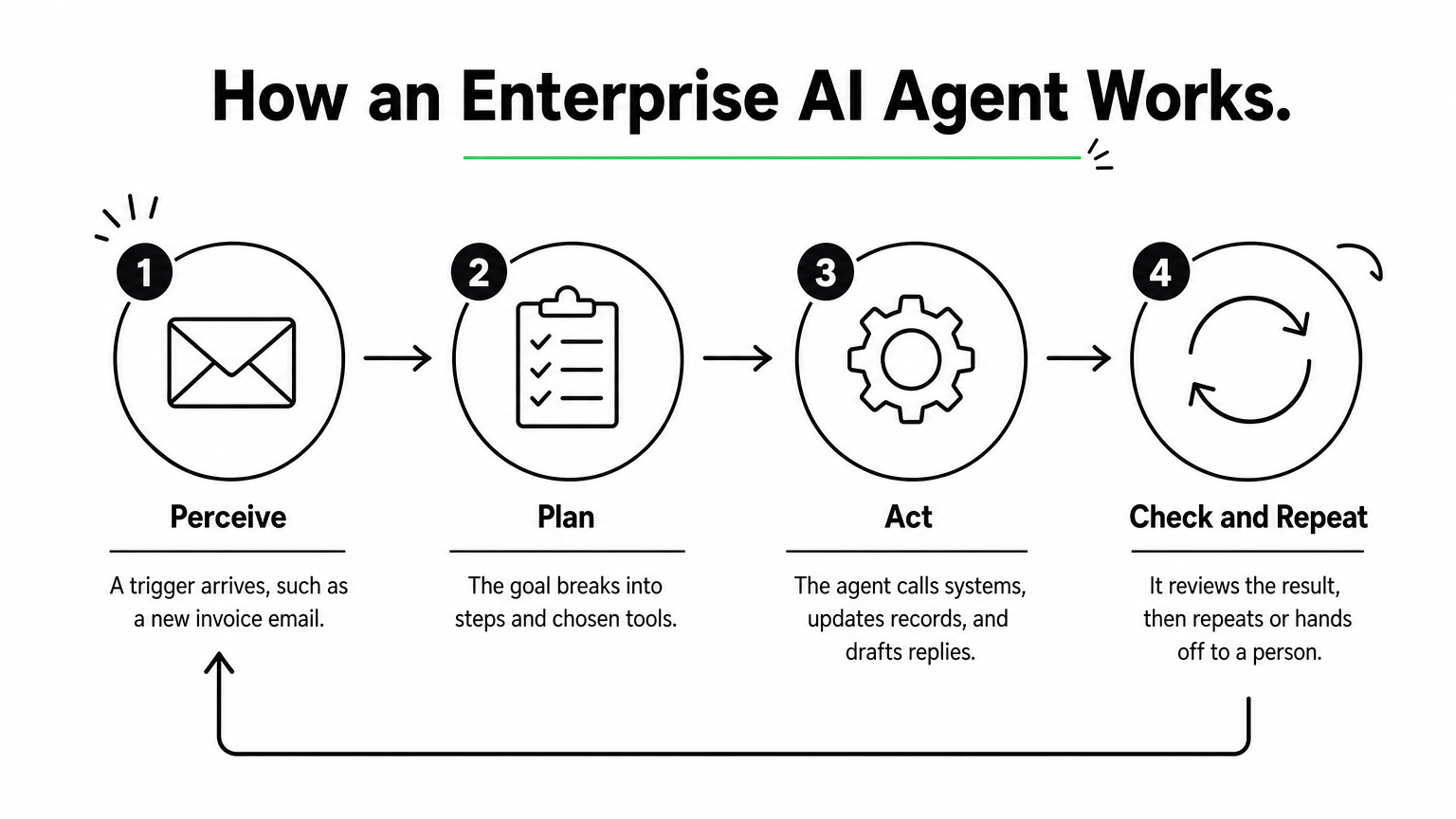
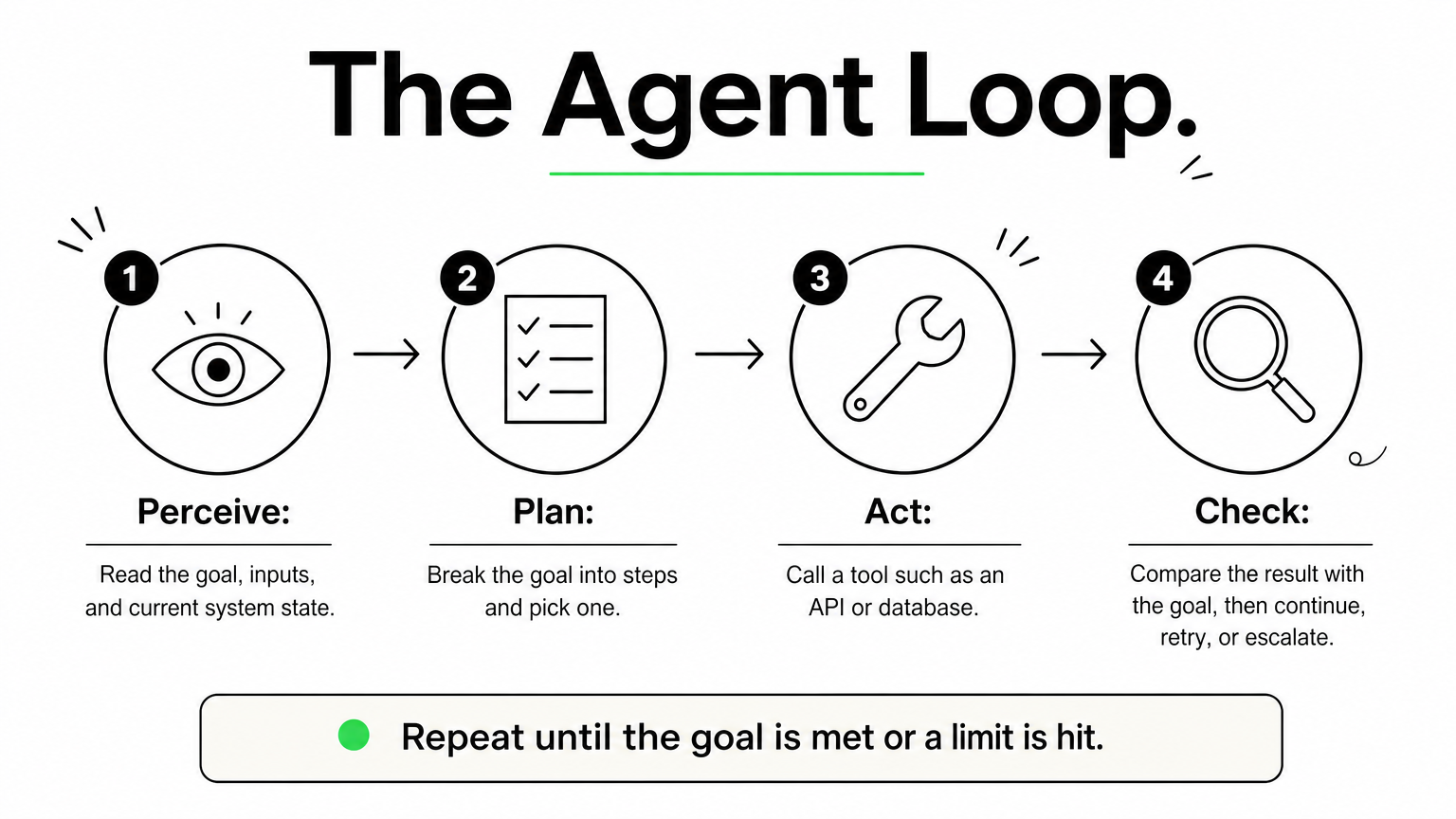
Every agent runs the same loop. It perceives a trigger, such as a new invoice email or a support ticket. It plans by breaking the goal into steps and choosing tools. It acts by calling APIs, updating records, or drafting a reply, then checks the result and repeats until the work is done or a person takes over.
A plain chatbot stops at the answer. An autonomous AI agent keeps going until the task is complete. Four controls turn that loop into something an enterprise can run:
Identity and permissions: the agent inherits the access of the user or role it serves, through SSO and role-based access control.
Audit logs: every tool call and decision is recorded with who triggered it and what data it touched.
Human approval: risky steps, such as payments or customer-facing replies, pause for a person.
Data controls: masking, residency rules, and model access policies keep sensitive data inside approved boundaries.
How they differ from copilots, chatbots, and RPA
The main difference is who starts the work and how much of it the software can finish alone. The table sets the four common tools side by side.
Tool
Who starts the work
Handles messy input
Typical scope
Chatbot
The user asks a question
Somewhat
Answers and FAQs
Copilot
The user prompts it
Yes
Drafts and suggestions inside one app
RPA bot
A schedule or trigger
No, needs fixed rules
Scripted clicks and data entry
Enterprise AI agent
A trigger, rule, or goal
Yes
Multi-step work across several systems
In practice these layers combine. Many agents call RPA bots as one of their tools.
Onboarding with verification, provisioning, and compliance agents
Most modern LLM-based enterprise agents are goal-based with tool access. The more ambitious deployments stack them into hierarchical or multi-agent setups.
1. Hatzs Dimensions
Hatzs Dimensions builds custom enterprise AI agents around your systems, data, and compliance rules instead of selling a fixed product. Choose it when no off-the-shelf platform matches your workflow.
Pick a custom build when your workflow is the competitive advantage, not a template.
How it works
Engagements follow four stages: discovery and planning, design and prototyping, development and testing, then deployment and support. The team covers AI agent design, GenAI consulting, data engineering and integration, and AI governance and compliance, so the agent, its data pipelines, and its controls come from one group.
Because the agents are custom, they can sit on top of whichever model, cloud, and systems of record you use. A senior-only engineering team with 7+ years of shipping enterprise AI into production does the build. One insurance client cut operations costs by 30%.
Who it suits and what it costs
It suits CTOs, CIOs, and product leaders at mid-sized and large companies, especially in insurance, banking, healthcare, and logistics. These are teams whose processes do not map to a vendor template, or who need one agent spanning several systems under strict governance.
AI agent pricing is scoped per engagement. You can pick dedicated teams when requirements will keep evolving, or fixed-price projects when you need budget certainty. There is no public price list.
Strengths and limits
Strength: the agent is built around your data, workflows, and compliance needs, with less dependence on one vendor’s roadmap.
Strength: strategy, design, AI, cloud, and long-term support come from one team, backed by 250+ clients and 98% retention.
Limit: time to first value is longer than switching on a prebuilt agent.
Limit: you need a business owner who can make product decisions during discovery.
2. Microsoft Copilot Studio
Microsoft Copilot Studio is a low-code builder for agents that live inside Microsoft 365, Teams, and the Power Platform. It is the quickest route to enterprise AI agents if your company already runs on Microsoft.
If your people already live in Teams and Outlook, the agent should live there too.
How it works
Makers describe an agent in natural language, attach knowledge sources and Power Platform connectors, and publish it to Teams, Microsoft 365, or a website. Identity runs through Microsoft Entra, so the agent respects the same sign-in and access rules as the rest of your tenant.
Administration sits in the Power Platform admin center. Policies there control which connectors makers can use and which data stays inside the tenant. Systems outside the Microsoft estate, such as SAP, Workday, or Salesforce, may need custom connectors.
Licensing is based on capacity and usage rather than a simple flat fee. Model it against your expected conversation volume. Microsoft adjusts the billing units from time to time, so confirm current terms before you budget.
Strengths and limits
Strength: governance and identity are inherited from your Microsoft tenant, which shortens security review.
Strength: low-code building lets non-engineers ship useful agents quickly.
Limit: cross-system work outside Microsoft usually means extra engineering.
Limit: usage-based costs are hard to forecast until you have real traffic.
3. Google Gemini Enterprise Agent Platform
Google Cloud’s Gemini Enterprise Agent Platform is a platform to build, scale, govern, and optimize agents, with model selection and tooling in one place. It fits cloud-first companies that already run data and applications on Google Cloud.
The platform earns its place when your data already lives in Google Cloud.
How it works
Google presents the platform as a single environment for choosing models, building agents, and governing them once they run. Google’s agent tooling has been known for grounding agents in enterprise data and handling multimodal input such as text, images, audio, and video.
If you have used Vertex AI, ask your Google Cloud representative how the new platform relates to your existing projects before you migrate. Do not assume one-to-one feature parity. Check the current documentation for model availability, regional deployment, and compliance certifications.
Who it suits and what it costs
It suits data-heavy organizations on Google Cloud that have an ML or platform engineering bench. Think document analysis, visual inspection, or agents sitting on BigQuery data.
Pricing is consumption-based, so cost depends on model usage, volume, and regions. Plan for someone to own cost monitoring, because token-heavy agents can grow expensive without limits in place.
Strengths and limits
Strength: deep fit with Google Cloud data services and a broad choice of models.
Strength: governance and scaling features sit alongside the build tools.
Limit: teams without engineering depth may struggle with cost tuning and model management.
Limit: value drops if your systems of record live elsewhere.
4. Salesforce Agentforce
Salesforce Agentforce puts agents directly on your Salesforce data and workflows. It is the natural choice among enterprise AI agents when the CRM is where customer work happens.
An agent that reads live CRM records beats one that reads a nightly copy.
How it works
Agents operate on Salesforce’s own data model, so they work with current records and no synchronization layer. They can trigger and respond to Salesforce Flow automations. The Einstein Trust Layer applies data masking and filtering before a request reaches a model.
Every action is logged inside Salesforce. When an agent cannot resolve a case, it escalates to a person in Service Cloud with the conversation context attached.
Who it suits and what it costs
It suits sales, service, and marketing operations teams that treat Salesforce as the system of record. Lead qualification, case triage, and CRM hygiene are the common first uses.
Agentforce is sold as an add-on to Salesforce, with usage-based pricing. Salesforce has changed its pricing models over time, so get a current quote and compare it against your expected volume of agent actions.
Strengths and limits
Strength: inherited permissions, sharing rules, and audit trails from the Salesforce platform.
Strength: fast deployment for teams already configured on Salesforce.
Limit: orchestration across ERP, HR, and ITSM systems often needs MuleSoft or custom API integration work.
Limit: it adds little if your customer data lives in another CRM.
5. IBM watsonx Orchestrate
IBM watsonx Orchestrate is built for regulated enterprises that need explainable, auditable automation across HR, procurement, and IT. It stands out among enterprise AI agents for how much weight it puts on traceability.
When a regulator might ask why the agent did that, traceability is the feature.
How it works
The platform orchestrates agents and tools through a catalog of pre-built agents and skills, with integrations for systems such as SAP, Salesforce, and ServiceNow. Each action can be traced back to the data, rules, and model reasoning behind it.
Governance is a first-class part of the product, not an add-on. That matters for audit teams, who can review decision trails without asking engineers to reconstruct them.
Who it suits and what it costs
It suits banks, insurers, healthcare providers, and other large organizations where compliance review is a gating step. It also suits companies with sprawling back-office systems that need one orchestration layer.
Pricing is negotiated at the enterprise level. Expect a longer procurement and implementation cycle than a SaaS-native option, and budget for it.
Strengths and limits
Strength: audit and explainability depth that suits regulated workflows.
Strength: pre-built integrations with common enterprise systems.
Limit: slower to deploy than agents native to a system you already use.
Limit: heavier than needed for a small team with a few simple workflows.
6. UiPath AI agents
UiPath adds language-model agents to the automation platform many enterprises already use for RPA. If you have hundreds of existing robots, enterprise AI agents from UiPath let you add reasoning without starting over.
The cheapest agent is the one that reuses automations you already trust.
How it works
An agent decides and extracts, while UiPath robots execute. Orchestrator handles scheduling, access, and audit trails. Action Center routes exceptions to people with full context, and Document Understanding reads invoices, forms, and contracts.
That mix is useful for processes that cross modern APIs and legacy desktop applications. The agent handles the unstructured judgment, and the robots handle the clicks.
Who it suits and what it costs
It suits enterprises with an established UiPath footprint and process teams who already know its tooling. Finance operations, claims processing, and back-office document work are typical fits.
Licensing is layered across robots, AI services, and orchestration, which makes cost modeling harder than a per-user plan. Ask for a bundled estimate based on the processes you actually plan to automate.
Strengths and limits
Strength: reuse existing robots, queues, and exception handling.
Strength: mature document understanding and a broad connector marketplace.
Limit: its desktop heritage means cloud-only environments may need extra engineering.
Limit: resilient cross-system agents often require experienced UiPath developers.
7. LangChain with LangGraph
LangChain and its LangGraph framework are open source toolkits for engineering teams that want to code and own their agent stack end to end. They give the deepest control of any option here, in exchange for the most work.
A framework gives you control, and you pay for it in engineering hours.
How it works
Developers define agent logic, tools, memory, and multi-step graphs in code, in languages such as Python and TypeScript. LangSmith, the commercial layer, adds tracing, evaluation, and deployment, which helps you debug long, branching agent runs. Alternatives such as CrewAI take a similar code-first approach, focused on role-based agent teams.
Nothing about security or compliance comes preconfigured. You choose the hosting, the access controls, and the logging, which suits teams with strong opinions about all three.
Who it suits and what it costs
It suits engineering-led enterprises with a platform team, custom requirements, and a willingness to maintain what they build. It does not suit teams that want business users to build agents themselves.
The frameworks are free. LangSmith has a free developer tier and paid seat-based plans, plus custom enterprise terms. The real cost is engineer time, hosting, and the governance layer you have to build.
Strengths and limits
Strength: maximum flexibility over models, tools, and agent behavior, with strong observability.
Strength: no dependence on one vendor’s application ecosystem.
Limit: SLAs, security, and compliance are your responsibility.
Limit: non-technical colleagues cannot contribute directly to agent design.
How to compare and shortlist enterprise AI agents
Shortlist by your system of record first, then by governance needs, then by how much engineering you can commit. Most enterprise AI agent decisions are settled by those three, not by model quality.
Start with where your data lives, because the agent has to live next to it.
Comparison at a glance
Option
Best fit
Build effort
Pricing model
Hatzs Dimensions
Custom, multi-system workflows
Partner-led
Fixed-price or dedicated team
Microsoft Copilot Studio
Microsoft 365 and Azure estates
Low-code
Capacity and usage
Gemini Enterprise Agent Platform
Google Cloud data and ML teams
Medium to high
Consumption
Salesforce Agentforce
Salesforce-centered customer work
Low to medium
Usage-based add-on
IBM watsonx Orchestrate
Regulated, audit-heavy enterprises
Medium
Negotiated contract
UiPath AI agents
Existing RPA estates
Medium
Multi-SKU licensing
LangChain with LangGraph
Engineering-led custom stacks
High
Free frameworks, paid tooling
Six questions to ask every vendor
Run the same checklist against each option. Gaps show up fast.
Where does the agent get its permissions, and can it ever exceed the user’s?
Can you see every tool call and decision in a log your auditors can read?
Where does data go, and what residency and masking controls exist?
Which steps require human approval, and can you configure them per workflow?
Can you switch or add models without rebuilding the agent?
How is usage metered, and what does a month of real traffic cost?
The big four and the top three
No official ranking names a "big four" or a "top three." The four large vendors that appear on most enterprise shortlists are Microsoft, Google, Salesforce, and IBM, because each owns a cloud, a suite, or a system of record. If you need three starting points, take the one that matches your estate: Copilot Studio for Microsoft, Agentforce for Salesforce, and Google’s platform for Google Cloud. Treat them as starting points, not verdicts.
Choosing your first enterprise agent platform
Pick the platform that sits closest to your data, check it against the six governance questions, and start with one contained workflow. Native platforms win on speed when your systems line up. Frameworks win on control when you have engineers to spare. A custom build wins when the workflow itself is what sets you apart.
If your processes span several systems, or your compliance team needs controls that off-the-shelf tools do not offer, a senior build partner can save months of rework. You can plan your enterprise AI agent with the Hatzs Dimensions team and start with a scoped first workflow.
Agents architecture in AI is the structural design of an AI agent: the model that reasons, the memory it reads and writes, the planning logic that breaks a goal into steps, the tools it calls, and the orchestration layer that ties these parts together. In plain terms, it is the blueprint that decides how an agent takes in information, chooses what to do next, and acts on the world without a human steering every step.
This guide goes past the bare definition. You will see why architecture matters more than most teams expect, how to assemble an agent layer by layer, which agent types and design patterns exist, and how a real system fits together. Use it to scope a first agent or to diagnose one that already misbehaves.
At Hatzs Dimensions, our senior engineers design and ship AI agents into production for enterprises and growth-stage companies. The advice below comes from that work. Pick the simplest architecture that meets the requirement, then add complexity only where it earns its place.
Why agents architecture in AI matters
Architecture matters because it decides what your agent costs, how fast it responds, and whether you can trust what it does. The same language model can power a dependable system or an erratic one, depending on how you wire it. Good agents architecture in AI is what turns a clever demo into something you can run in production.
Architecture sets cost, latency, and reliability
Every reasoning step in an agent is usually a model call. A loop that thinks one step at a time sends the full conversation history to the model on every turn, so cost and latency grow with each step. A fixed plan that a cheaper model executes costs less, but it adapts poorly when a step returns something unexpected. You are always trading one property against another.
Cost: the number of model calls per task, and the size of the model behind each one.
Latency: sequential steps add up, while parallel branches shorten the wait.
Reliability: loops can drift off task, and every added step is another chance to fail.
Auditability: a clear structure shows which component made which decision, which risk and compliance teams will ask about.
Model choice is one decision. Architecture is the decision that contains all the others.
Agentic versus non-agentic systems
A plain language model takes an input and returns an output. That is enough for summarizing, drafting, and answering a question from a single prompt. An AI agent adds a loop: it observes its situation, reasons about what to do, acts through a tool, and checks the result before deciding again. Some designs add a learning step so the agent improves with feedback.
The distinction also separates workflows from agents. A workflow follows a path you defined in advance, which suits repeatable jobs such as validating records. An agent chooses its own steps, which suits open-ended problems such as research or coding. If your task has a fixed path, build a workflow and enjoy the lower cost and tighter control.
Is ChatGPT an agent or an LLM?
ChatGPT is a product, and a large language model is one component inside it. The model generates text. Around it sit the application layer, memory features, and tools such as web search, file analysis, and code execution. When those tools and a decision loop let the product pick its own next step and act on outside systems, it behaves as an agent.
So the useful question is not about brand names. Ask whether the system chooses its own next action and changes something beyond the chat window. If it does, you are dealing with an agent and need to design for it.
How to build an AI agent architecture layer by layer
Build the architecture in layers: input, reasoning, memory, planning, tools, and orchestration, with guardrails around all of them. Each layer has one job, and each forces one design decision that you should settle before you write code.
The core components and the decision each one forces
Component
Its job
Decision it forces
Perception (input layer)
Receives messages, events, documents, or API data and normalizes them
Which formats and triggers does the agent accept?
Reasoning model
An LLM interprets context and chooses the next action
One large model, or smaller models per task?
Memory
Holds task state and past knowledge
What persists, for how long, and who can read it?
Planning
Breaks a goal into steps and revises when results surprise
Plan upfront, or step by step?
Tool use
Calls APIs, databases, code runners, and browsers
Which tools, and with what permissions?
Orchestration
Controls order, loops, handoffs, retries, and stop conditions
One agent, or several?
Memory deserves extra care. Working memory holds the state of the current task, such as which steps are done and what data you already have. Long-term memory stores past interactions and knowledge, usually reached through retrieval from documents or databases. Retrieval also grounds answers in real data, which reduces hallucination.
Two cross-cutting pieces sit around every layer in agents architecture in AI. Guardrails limit what the agent may do, for example by capping spend or requiring approval before any write action. Observability records every model call, tool call, and decision so you can debug and audit later. Teams often skip both until the first incident, then add them under pressure.
Each component is a decision you make once on purpose or many times by accident.
A build order that keeps risk low
Order matters as much as the parts. Start small and let real failures justify each addition.
Define the task boundary and a measurable success criterion.
Start with a single model call plus retrieval, and test it against real examples.
Add tool integrations one at a time, read-only first and write access last.
Add a reasoning loop only when a single pass demonstrably fails.
Add long-term memory only for facts the agent must carry across sessions.
Build evaluation and logging before launch, not after.
Split into multiple agents only when one agent’s context or tool list becomes unmanageable.
Types of AI agent architectures
AI agent architectures are classified in two ways: by how the agent decides, and by how many agents cooperate. The first gives you the classic agent types. The second gives you single-agent and multi-agent systems and their topologies.
The five classic agent types
These five types come from classical AI and still describe the decision logic inside modern systems.
Type
How it decides
Example
Simple reflex
Condition-action rules on the current input only
A rule that flags a known spam phrase
Model-based reflex
Keeps an internal picture of the world
A robot vacuum tracking mapped rooms
Goal-based
Searches for actions that reach a defined goal
A route planner
Utility-based
Scores outcomes and picks the best tradeoff
A pricing engine balancing margin and conversion
Learning
Improves its behavior from feedback
A recommendation system
Modern LLM agents usually blend goal-based, utility-based, and learning behavior. Related labels describe the same ideas from another angle. Reactive designs map situations straight to actions, deliberative designs plan from an internal model, and cognitive designs such as belief-desire-intention separate what the agent knows, what it wants, and what it has committed to doing.
Single-agent and multi-agent systems
A single-agent system has one decision-maker with centralized control. It is simpler to build, cheaper to run, and far easier to debug. Its limits show up when one agent must juggle many domains or high volume.
A multi-agent system splits work among specialized agents that coordinate, hand off, or run in parallel. You gain specialization and speed, and you pay with coordination overhead and harder debugging. Default to a single agent and split only when you can name the specific limit you hit.
Vertical, horizontal, and hybrid topologies
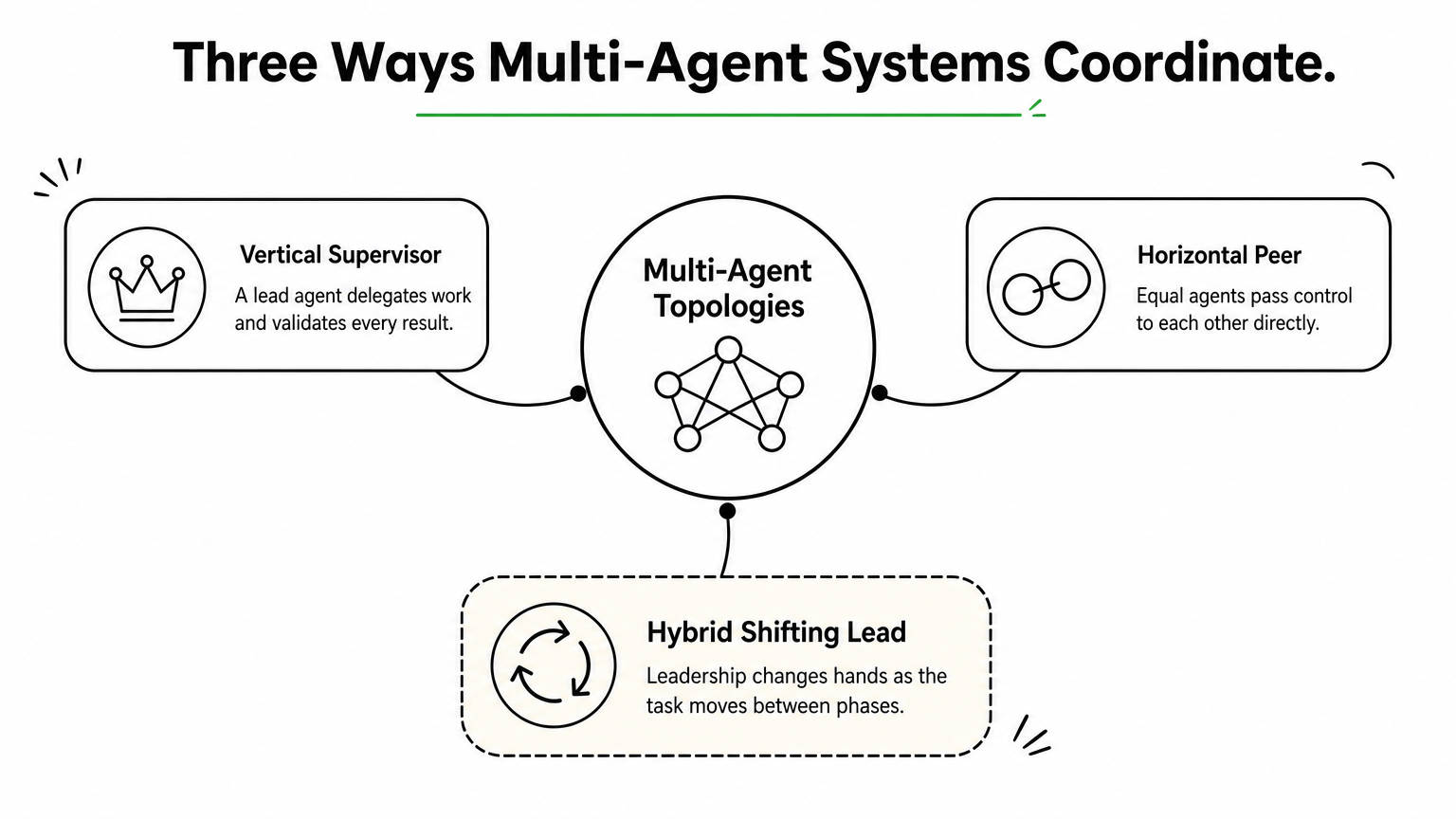
Multi-agent systems follow one of three shapes:
Vertical (supervisor): a lead agent decomposes the task, delegates, and validates results. Accountability is clear, but the lead can become a bottleneck and a single point of failure.
Horizontal (peer): equal agents pass control to each other. It suits brainstorming and conversational handoffs, but needs clear protocols or it turns chaotic.
Hybrid: leadership shifts with the phase of the task. It is the most versatile and the hardest to manage.
Choose the least complex topology that still fits the task, because every extra agent adds a coordination cost.
Design patterns for structuring an agent system
A small set of patterns covers most production AI agents architecture. Some compose model calls into workflows, and others shape how a single agent reasons. Knowing both sets lets you match the pattern to the problem instead of reaching for a fashionable one.
Workflow patterns for composing model calls
Pattern
How it works
Use it when
Prompt chaining
Each call takes the previous output, with optional checks between steps
The task has fixed sequential steps, such as extract, classify, format
Routing
A classifier sends each input to the right handler, model, or tool
Inputs vary in type or difficulty
Parallelization
Independent subtasks run at once, or one task runs several times and results are voted on
You need speed or higher confidence
Orchestrator-workers
A central model splits the task, assigns workers, and adapts the plan
You cannot predict the subtasks in advance
Evaluator-optimizer
One model generates, another critiques against criteria, and the first revises
Quality is checkable, for example by running tests
Reasoning patterns for a single agent
ReAct is the common default. The agent thinks, acts, observes the result, and thinks again. It is flexible, but it plans one step at a time and pays for a full model call at every step.
Plan-and-execute has a planner write the whole plan first, then a lighter executor carries it out. It is cheaper for tasks with clear dependencies, but it needs a replan step to recover when a result surprises it. Reflection lets the agent critique its own output or failure, store the critique, and retry with it in context. Use it when the same mistakes keep recurring across runs.
How to choose between them
Work from the most constrained pattern toward the most open one. If the steps are known, chain them. If inputs differ, add a router. If subtasks are unpredictable, use orchestrator-workers. If you can check quality automatically, add an evaluator. Reach for a free-running agent loop last, and only when you cannot predict the path ahead of time.
The more predictable the task, the less autonomy the architecture should grant.
A worked example and the mistakes to avoid
A claims intake agent shows how the layers fit together in agents architecture in AI, and a short list of common mistakes shows where they usually break. The example is illustrative, but the structure applies to many document-heavy processes.
Example: an insurance claims intake agent
Imagine an agent that handles incoming claims. Here is how each layer maps to a design choice:
Perception: accepts emails, web forms, and attached photos or PDFs, then extracts structured fields.
Routing: a classifier sends simple claims, such as a clearly covered glass repair, down a fixed prompt chain. Ambiguous claims go to an orchestrator.
Memory and retrieval: the agent retrieves the policy text and keeps the claim’s state, so it never guesses at coverage terms.
Tools: read access to the policy database, and write access to the claims system only through an approval step above a set amount.
Evaluator: a second check confirms that extracted fields match the source documents before anything is saved.
Human review: low-confidence or high-value claims go to an adjuster with the agent’s reasoning attached.
Notice that most of this is a workflow. The autonomous part is limited to the cases that need it.
Mistakes that sink agent projects
Going multi-agent too early is the most common error. A single agent with the right tools and prompts solves more problems than teams expect. The second is granting write access without an approval step, which turns a reasoning error into a real-world one.
Other frequent mistakes:
Skipping an evaluation set, so nobody can tell whether a change helped.
Stuffing all history into the prompt instead of retrieving what is relevant.
Leaving out stop conditions, which lets loops run up cost.
An agent is only as safe as its permissions and as good as its evaluation.
Turning the blueprint into a working system
Agents architecture in AI comes down to a few honest decisions: what the agent perceives, how it reasons, what it remembers, which tools it may touch, and who controls the loop. Start with the simplest structure that solves the task, add a pattern only when a real failure demands it, and keep guardrails and logging in place from day one.
If you are weighing these choices for your own product or process, an experienced second opinion saves months. Talk to the Hatzs Dimensions team about designing and shipping your AI agent architecture.
Agents in AI are software systems that perceive their environment, decide what to do, and take actions to reach a goal with little or no human direction. Today, most AI agents put a large language model (LLM) at the center and give it tools such as search, databases, and business software. The practical difference from a chatbot is simple. A chatbot answers, while an agent does the work.
This guide explains what AI agents are in plain terms. You will see why they matter, how they work step by step, the five classic types plus multi-agent systems, and how they differ from LLMs like ChatGPT. You will also get real examples you can recognize. The last section shows how to start without taking on needless risk.
Hatzs Dimensions builds AI agents for enterprises and growth-stage companies. The advice here comes from shipping agents into production, not only from textbooks.
Why AI agents matter
AI agents matter because they turn a goal into finished work across several systems, something chatbots and fixed scripts cannot do. For a business, that means less manual handoff time on repetitive, multi-step processes. For you as a reader, it explains why so many teams are rethinking how they automate.
They finish tasks instead of describing them
The main reason agents in AI matter is that they close the gap between knowing and doing. A chatbot can explain how to reschedule a delivery. An agent checks the order system, finds the next open slot, updates the record, and emails the customer. You give it a goal, and it works out the steps.
Classic automation, such as a script or a robotic process automation bot, follows a fixed path. It breaks when an invoice arrives in a new format or a required field is missing. An agent reads the situation, picks a different route, and handles the variation a rigid script cannot. That is the difference between a tool that follows steps and a system that chooses steps.
An agent turns a goal into a sequence of actions, and that is what makes it more than a chatbot.
Where the value shows up
The value concentrates in work that is repetitive, multi-step, and spread across several systems. Four patterns come up again and again:
Time back on multi-step workflows. Claims intake, vendor onboarding, and lead qualification each touch three to six systems. An agent moves through them without waiting in anyone’s queue.
Coverage around the clock. Agents do not need shifts, so requests that arrive overnight get handled before your team logs in.
Consistent decisions. The same rules apply to the tenth case and the ten-thousandth, which matters in regulated work such as insurance and banking.
Connected systems. Agents call APIs, so they bridge your CRM, ERP, ticketing tool, and email without a custom integration for every pair.
Why the timing is now
Agents are not a new idea. Researchers have studied them for decades, and the standard textbook on the field, Russell and Norvig’s Artificial Intelligence: A Modern Approach, is organized around the concept. What changed is the reasoning ability of LLMs. Earlier agents needed hand-written rules for every situation. An LLM can read an unstructured email, interpret the intent, and decide the next step in plain language.
Two other things matured at the same time. Tool calling lets a model request an action, such as a database query, in a structured format that software can execute. Open standards such as the Model Context Protocol, introduced by Anthropic in 2024, make it easier to connect agents to data and tools. Building a useful agent is now an engineering project rather than a research project.
Timing does not remove the limits, though. Every step an agent takes is a chance to be wrong, and errors compound across a long run. Section six covers how to pick work where that risk is manageable.
How AI agents work, step by step
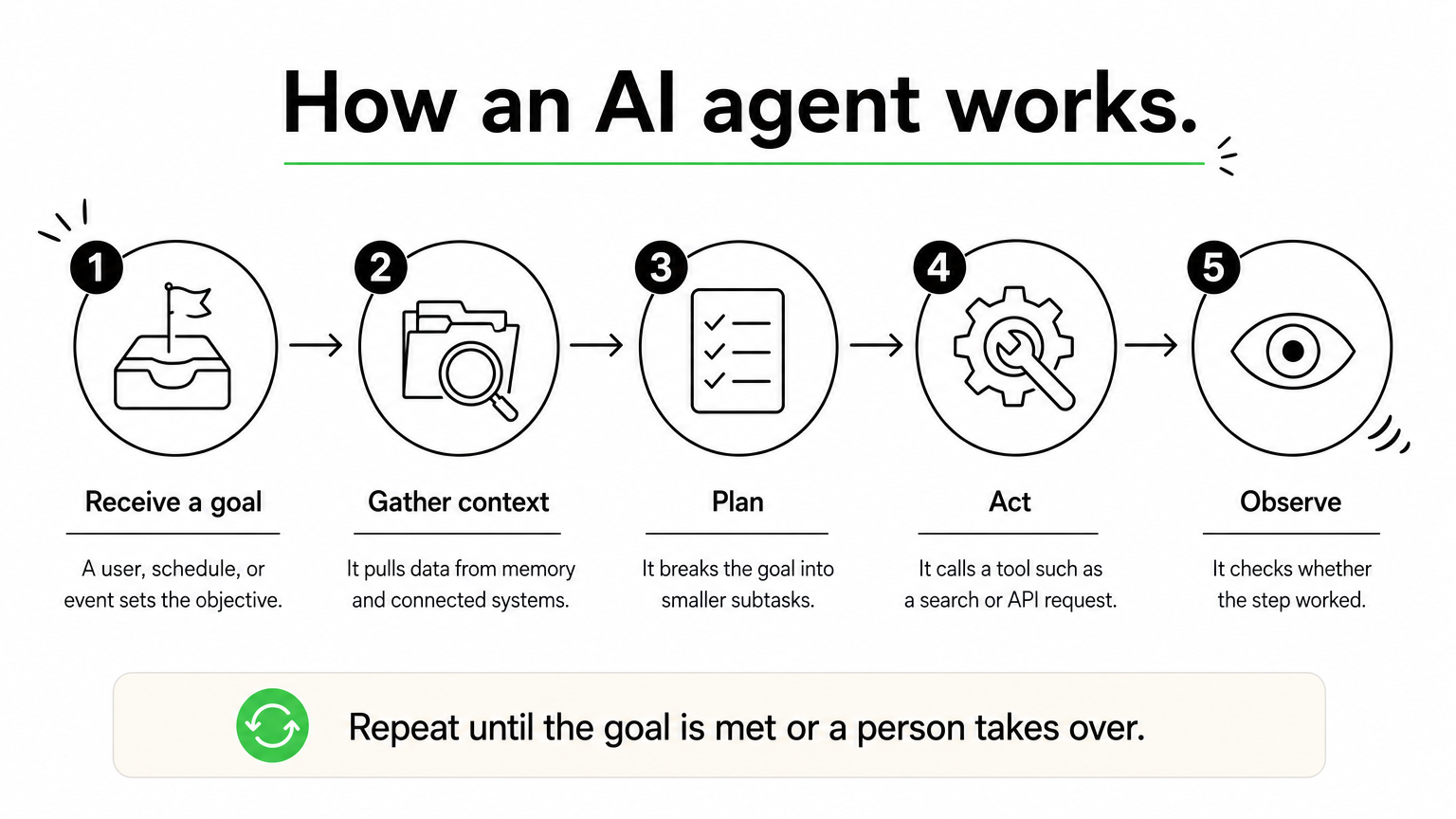
An AI agent works by repeating a loop. It reads its goal and context, plans a next step, uses a tool to act, checks the result, and continues until the goal is met or it needs a human. That loop is what separates how AI agents work from a single prompt and reply.
The agent loop
Most agents, whatever the framework, follow the same six moves:
Receive a goal. A user, a schedule, or an event such as a new support ticket triggers the agent with an objective and constraints.
Gather context. It reads the input and pulls relevant data from memory, documents, or connected systems.
Plan. The model breaks the goal into subtasks and picks the next one.
Act. It calls a tool: a search, a database query, an API request, or a code run.
Observe. It reads the tool’s result and checks whether the step worked.
Repeat or stop. It updates the plan and loops again, finishes, or hands off to a person.
Two design patterns are common. In the ReAct pattern, the agent thinks, acts, and observes after every step, which suits tasks where the next move depends on what it just learned. In plan-first approaches, such as ReWOO, the agent drafts the whole plan before calling any tool. That cuts redundant tool calls and lets a person approve the plan before anything runs.
Every agent, simple or advanced, is a loop of deciding, acting, and checking the result.
The parts inside an agent
An agent is more than a model. It is a model wrapped in instructions, tools, memory, and controls. This table shows what each part does:
Part
What it does
Example
Model (LLM)
Interprets instructions, reasons, and decides the next step
A hosted LLM reading an incoming claim email
Instructions
Defines the role, goal, rules, and limits
"Process first notice of loss. Never approve payouts."
Tools
Lets the agent act outside the model
CRM API, SQL query, web search, email sending
Memory
Holds context within a task and across tasks
Customer history, earlier decisions, past errors
Guardrails
Limits permissions and adds approvals, logs, and stop conditions
Human sign-off before a refund is issued
Memory deserves a closer look. Short-term memory is the working context of the current task. Long-term memory is stored outside the model, usually in a database, so the agent can recall earlier cases and preferences. Without it, an agent starts from zero every time.
A worked example: claim intake
Picture an insurance agent that handles new claims. A customer emails photos and a description of damage. The agent reads the message, then queries the policy system to confirm coverage. It notices that the police report is missing and sends a request for it. When the report arrives, it summarizes the file for an adjuster.
Notice what the agent did not do. It never approved the payout. The instructions and permissions stop it at the summary, so a person makes the final call on money. Each step used a different tool, and each result changed what came next. That adaptive, tool-driven behavior is the whole idea behind agents in AI.
Types of AI agents
The classic taxonomy sorts AI agents into five types by how much they reason: simple reflex, model-based reflex, goal-based, utility-based, and learning agents. Each type adds a capability to the one before it. Modern systems also combine agents into multi-agent and hierarchical setups.
The five types compared
This table lines up the five types side by side:
Type
How it decides
Memory
Everyday example
Simple reflex
Fixed if-then rules on the current input
None
A thermostat that starts heating at 8 PM
Model-based reflex
Rules plus an internal model of the world
Tracks state
A robot vacuum that remembers cleaned areas
Goal-based
Searches and plans action sequences toward a goal
Yes
A navigation system finding a route
Utility-based
Scores outcomes and picks the best trade-off
Yes
A route planner weighing time, fuel, and tolls
Learning
Improves from feedback and past results
Grows over time
A recommendation engine that sharpens with use
Read the table top to bottom and you see a pattern. Simple reflex agents react to what they see right now. Model-based agents add a memory of the world. Goal-based agents look ahead, and utility-based agents weigh competing options instead of accepting the first path that works. Learning agents can sit on top of any of these and get better with experience.
Which type fits which job
Simple reflex agents are still the right answer when conditions are stable and fully observable. A rule that routes invoices under a set amount to automatic approval does not need an LLM. LLM-based agents are usually goal-based, because they plan steps toward an objective. They become utility-based when you give them scoring criteria, such as "minimize cost while keeping delivery under two days."
Learning needs a careful definition in business settings. It usually means the system stores feedback and improves its prompts, retrieval, and rules over time. It rarely means retraining the underlying model on the fly. Be skeptical of any vendor that claims an agent "learns by itself" without explaining where the feedback is stored and who reviews it.
Use the simplest agent type that does the job, because every extra capability adds cost and risk.
Multi-agent and hierarchical systems
A multi-agent system uses several agents in one shared environment. They can cooperate, compete, or both. A common setup has one agent that researches, one that drafts, and one that reviews. In a marketplace, one agent might represent a buyer while another represents a seller. Each agent has a narrow role, which keeps its instructions and tool list short and easier to test.
A hierarchical system adds a manager. A top-level agent plans and delegates, and worker agents execute. A drone delivery fleet works this way: one layer assigns deliveries, and each drone handles its own navigation. The structure mirrors a human team, but it also multiplies failure points and cost. Start with a single agent, and split it only when its instructions and tools become too crowded to manage.
How AI agents differ from LLMs and ChatGPT
An LLM generates text from a prompt. An AI agent uses an LLM as one component inside a system that plans, calls tools, remembers, and acts. The LLM is the brain, and the agent is the whole worker, including hands and a to-do list. Not every agent needs an LLM, since a thermostat is an agent without one.
Side-by-side differences
This table summarizes the practical gaps between a plain LLM or chatbot and an agent:
Question
LLM or chatbot
AI agent
Main output
Text, code, or images
Completed actions and outcomes
Who controls the steps
You, prompt by prompt
The agent, within set limits
Access to outside systems
None unless added
Tools and APIs by design
Memory
Current conversation window
Short-term and long-term stores
Multi-step goals
One reply at a time
Plans and iterates
Main risk
Wrong or invented text
Wrong actions with real consequences
The last row is the one executives should remember. A bad chatbot answer wastes a minute. A bad agent action can send an email, move money, or change a record. That is why agents come with permissions, logs, and approvals that a chat window never needs.
An LLM can say what should happen, while an agent can make it happen.
Is ChatGPT an agent or an LLM?
ChatGPT is a product built on LLMs. The underlying GPT models are LLMs, and ChatGPT is the application around them. In ordinary chat, it behaves as an assistant. You ask, it answers, and you decide the next step.
The label shifts when ChatGPT uses tools. When it browses the web, runs code, or works through a multi-step task using its agent features, the system decides the next step instead of you, and it acts agentically. The same holds for other chat products. Agency is a spectrum, not a brand. A good test is to ask who decides the next step and who carries it out. The more the system does both, the more agentic it is.
Examples of agents in AI
Examples of agents in AI range from a thermostat to a fraud monitor, and the business versions now include LLM-powered agents that handle claims, orders, and research. Looking at both ends shows that the concept is old and the current wave is about new capability, not new vocabulary.
Everyday examples
You have likely used agents without calling them that. A few familiar ones:
Self-driving features read sensors, plan a path, and control steering and braking in a continuous loop.
Smart home systems adjust heating, lighting, and energy use based on occupancy and time of day.
Game opponents observe the board, plan moves, and respond to your play.
Fraud detection systems watch transactions and flag or block those that look wrong.
Business examples
Business agents are most useful when they own a defined part of a workflow and hand off at clear points. This table shows realistic jobs and where the human stays involved:
Handles order status, returns, and exchanges across the order system and carrier
Staff handle disputes and exceptions
Logistics
Re-plans routes and notifies customers when delays occur
Dispatcher approves major changes
Banking and finance
Monitors transactions and assembles evidence for a case
Analyst decides on account actions
Healthcare
Drafts administrative paperwork and summarizes records
Clinician reviews before use
Software
Triages bug reports and proposes fixes in a test environment
Engineer reviews before merge
What about lists of the "big" AI agents?
There is no official "big four" of AI agents. Lists that use the phrase usually name agent products from large vendors, and they change quickly. A vendor’s name tells you little about whether a product fits your work.
Judge any agent by four things instead. Check what tools it can use, what it is permitted to change, how its actions are logged, and where a person can step in. Those answers matter far more than the brand on the box.
How to start with AI agents safely
To start with AI agents, pick one narrow, high-volume workflow, give the agent limited permissions, keep a person on high-impact decisions, and measure results against a baseline before you expand. This approach keeps early failures small and gives you real data on whether agents in AI pay off for your business.
Choose the first workflow
The best first workflow is boring. It is frequent, well understood, and expensive in staff hours. Check it against these criteria:
High volume. Hundreds or thousands of cases a month give you enough data to evaluate.
A clear definition of done. You can say exactly what a correct outcome looks like.
Accessible systems. The data and actions are available through APIs, not locked in screens.
Cheap errors. Mistakes are caught easily and cost little to fix.
Rules plus judgment. The work follows patterns but includes enough variation that scripts keep breaking.
Poor first picks are open-ended strategy work and anything that moves large sums without review. Save those for later, once the team trusts the system.
Set guardrails before launch
Guardrails are part of the design, not a late add-on. At a minimum:
Least privilege. Give the agent only the permissions its job needs, and nothing more.
Human approval for high-impact actions. Payments, mass emails, and contract changes need a person to confirm.
Limits on steps and time. Cap the number of loops so a confused agent cannot run indefinitely or call the same tool repeatedly.
Full action logs. Record every tool call and decision so you can audit what happened.
A test set of real cases. Run the agent against past cases, including messy ones, before it touches live work.
Reliability math explains why these limits matter. If each step is 95% reliable, a ten-step run succeeds only about 60% of the time. Fewer steps and checks between them are the cheapest way to raise reliability. In regulated industries, add governance and compliance review from the start.
The safest agent is the one with the least access it needs and a person watching the actions that cannot be undone.
Then expand in stages. Run the agent in shadow mode, where it drafts and a person decides. Move to suggestions, then to actions with approval, and finally to autonomy for low-risk cases only. Hatzs Dimensions follows a similar path on client projects: discovery and planning, design and prototyping, development and testing, then deployment and support. Whether you build in-house or with a partner, widen autonomy only as the data supports it.
Where to go from here
AI agents are software systems that pursue a goal by looping through planning, acting, and checking results. An LLM usually supplies the reasoning, while tools, memory, and guardrails make it useful and safe. The five classic types show how much reasoning an agent has, and the right choice is always the simplest one that does the job. Chatbots answer, and agents act, so they need tighter controls.
If you are weighing where agents could remove manual work in your company, start with one workflow and one measurable goal. You can talk with Hatzs Dimensions about designing and building your first AI agent, from discovery through production support.
A good e commerce mobile app development company has shipped real stores or marketplaces, connects payments, inventory, and shipping without drama, and stays with you after launch. Hatzs Dimensions suits growth-stage and enterprise teams that want AI and data built into the app. Chop Dawg and Goji Labs suit founders who want a strategy-led build. Space-O Technologies and Light IT Global suit buyers who want scale or offshore pricing. Designli, Mobcoder, Trango Tech, and NMG Technologies each fit a narrower need.
The problem is that every agency claims ecommerce experience. Their websites use the same words, and quotes for similar apps can run from about $40,000 to $220,000. A wrong pick costs you months and often a rebuild. This article puts nine companies side by side so you can see what each builds, who it fits, and how it prices its work. It then shows you how to choose and what an ecommerce app really costs.
Hatzs Dimensions builds custom web and mobile products, so it sits first on the list, and we hold ourselves to the same checklist as the other eight. The details on those eight come from their public claims. Confirm every figure in a discovery call before you sign anything.
1. Hatzs Dimensions
Hatzs Dimensions is a software development and AI company that builds custom web and mobile apps. It is a strong ecommerce app development company pick when your store app has to do more than show a catalog and take a payment.
Services and focus
Hatzs Dimensions covers custom web and mobile app development, application architecture, UI/UX design, cloud infrastructure, and AI and data engineering under one roof. For a store, that means the app and the systems behind it, such as recommendations, support automation, and reporting, come from one team. Delivery follows four stages: discovery and planning, design and prototyping, development and testing, then deployment and support.
Machine learning, AI agents, data engineering and integration, and BI
Cloud solutions and secure infrastructure management
Who it suits
Hatzs Dimensions fits mid-sized and large retailers, ecommerce brands, and growth-stage companies that treat the app as a core system. The team is senior-only, with 7+ years of experience shipping enterprise-grade AI systems into production. It reports 250+ clients worldwide, 100+ software experts, and 98% client retention.
Its published case studies show how it measures outcomes, for example a 30% cut in insurance operations costs, 300% more lead conversion capacity, and 40% higher customer engagement. Those projects are outside retail, so ask for the closest retail equivalent. If you only need a basic storefront wrapper on a tight budget, a smaller shop will fit better.
Choose Hatzs Dimensions when your app must connect to your data and AI, not sit apart as a standalone storefront.
Pricing and engagement
You can work with Hatzs Dimensions through a dedicated team or a fixed-price project. Fixed price suits a defined MVP with a clear feature list. A dedicated team suits a roadmap that will keep changing after launch.
Pricing comes from a scoped proposal after discovery. Arrive with your must-have features, your platform choice, and the systems the app must connect to, and you will get a tighter number.
2. Chop Dawg
Chop Dawg is a full-service app studio that has been operating since 2009 and has delivered more than 500 apps. It builds online stores, two-sided marketplaces, and mobile commerce apps for iOS, Android, and the web.
Services and focus
The ecommerce work covers product catalogs, secure checkout, subscription billing, and connected admin dashboards. One reported project is The Showcase, a collectibles marketplace with secure auctions, advanced bidding, and in-app transactions. That kind of two-sided logic is where many agencies struggle.
Custom store, marketplace, and mobile commerce builds
UX/UI design and prototyping for product, cart, and checkout
Stripe, PayPal, shipping, tax, inventory, and analytics integrations
Post-launch support, performance tuning, and scaling help
Who it suits
Chop Dawg suits founders launching a first store and established sellers who want to scale online. It is especially relevant if your idea is a marketplace, because buyers, sellers, payouts, and disputes multiply the work.
It is a less obvious match if your main goal is AI-driven personalization or deep enterprise system integration. In that case, ask what data and ERP work it has done before.
Chop Dawg is the pick when your idea is a marketplace and you want a team that has built several.
Pricing and engagement
Chop Dawg offers a free 45-minute consultation and proposals with fixed budgets and timelines. That fixed-scope approach gives you a number you can compare against other bids.
Bring a ranked feature list to the call. Ask which features sit in the first release and which wait for later, because that split decides most of the price.
3. Goji Labs
Goji Labs is a Los Angeles digital product agency, founded in 2014, that has shipped more than 500 digital products. Ecommerce and retail are both on its list of verticals, which makes it a credible e-commerce app development company for teams that want strategy before code.
Services and focus
Its process starts with product strategy, then moves through UX/UI design, development, and launch. Past clients include WWF, Mitsubishi, and KCRW, which shows it handles brands with real audiences.
Mobile app development for ecommerce and retail brands
Custom software for online selling platforms
UX/UI design and product strategy consulting
Who it suits
Goji Labs suits teams that know the business problem but not the exact product. If you are still deciding between a native app, a marketplace, or a loyalty-first build, its strategy-first process is useful.
The trade-off is that a strategy phase adds time before development starts. If you already have a signed-off spec and wireframes, you may pay for work you do not need.
Goji Labs is strongest when you still need to decide what to build, not only how to build it.
Pricing and engagement
Expect a scoped quote after a strategy conversation rather than a rate card. Costs usually follow the number of screens, integrations, and platforms.
Ask whether strategy and design are priced separately from development. A separate first phase lets you leave with a spec and tender the build if the fit is poor.
4. Space-O Technologies
Space-O Technologies has operated since 2010 with global delivery and reports more than 4,400 mobile apps built. It is an e commerce mobile app development company with a wide track record and a broad bench.
Services and focus
Its ecommerce work includes multi-vendor marketplaces, payment integrations, inventory management, and scalable storefront architecture. The team stresses product discovery and checkout friction, which are the two places most store apps lose sales.
Multi-vendor marketplace and storefront development
Payment and inventory management integrations
Mobile apps for iOS and Android
Design and strategy for startups, SMEs, and enterprises
Who it suits
Space-O suits buyers who want volume of experience and a team large enough to staff a project quickly. Multi-vendor marketplaces are a clear strength.
A headline app count covers every category, not just stores. Ask how many of those apps were ecommerce and request two live examples you can download and test yourself.
A big app count proves capacity, not ecommerce skill, so ask for live retail apps you can install.
Pricing and engagement
Global delivery often means lower hourly rates than a US-only team, though rates vary by team location and seniority. Request an itemized estimate that separates design, development, QA, and project management.
Also ask who will be your day-to-day contact and what hours they work. Time-zone overlap affects how quickly bugs and feedback loops close.
5. Light IT Global
Light IT Global was founded in 2006 in Ukraine and now employs more than 100 professionals. It reports over 500 custom projects for clients in Europe, the United States, and Japan.
Services and focus
The team builds iOS and Android apps, ecommerce platforms that connect to payment gateways, and the interfaces on top. It reports a mobile commerce platform built for Pfizer’s global operations, covering transactions, inventory management, and real-time analytics.
Native iOS and Android apps for commerce and customer engagement
Secure, scalable ecommerce platforms with payment gateway integration
UX and visual design to lift engagement
Who it suits
Light IT Global suits B2B and operations-heavy commerce, where ordering, stock, and reporting matter as much as the shopping screens. Its long history also suits buyers who prefer an established vendor to a young studio.
It is less of a fit if you want an in-person workshop with your team each week. Remote delivery works well, but you need to plan for it.
Light IT Global fits commerce where inventory and reporting carry as much weight as the shopping screens.
Pricing and engagement
Offshore teams typically cost less per hour than US-based ones, but the saving only holds if scope stays tight. Agree on a written feature list and change-request process before kickoff.
Ask for a sample sprint report and a reference client in a similar industry. Both reveal how it communicates when a timeline slips.
6. Designli
Designli is a software firm founded in 2013 by Joshua Tucker and Keith Shields, based in Greenville, South Carolina. It combines UX/UI design with mobile, web, and cross-platform development, which suits an ecommerce mobile app development company shortlist for design-led builds.
Services and focus
Designli helps clients define product goals, target users, and market strategy before building. It markets itself to non-technical founders and advertises a working MVP in 30 days.
Professional UX/UI design for intuitive interfaces
Product definition covering goals, users, and market strategy
Cross-platform apps for iOS, Android, and the web
Who it suits
Designli suits first-time founders who need a partner to translate an idea into a clear product. A fast MVP also lets you test demand before committing a full budget.
Its public portfolio includes a surgeon learning platform and a rental management web app, not a storefront. That is not a flaw, but ask to see retail or checkout work before you sign.
Designli is a good fit for design-led MVPs, as long as you verify its checkout experience first.
Pricing and engagement
A 30-day MVP implies a tight, fixed scope. Pin down what is inside that scope, such as payments, push notifications, and an admin panel, and what costs extra.
Then ask what happens after day 30. A good plan names who owns the roadmap, the bug fixes, and the first round of user feedback.
7. Mobcoder
Mobcoder is a mobile app and custom software company founded in 2011. Its clients span healthcare, finance, and retail, and it offers app design, development, testing, and deployment.
Services and focus
Its best-known ecommerce example is a B2B ecommerce app reportedly built for General Mills, with a dedicated rewards program that made vendors more engaged. It also builds native iPhone and iPad apps in Swift and Objective-C.
Native iOS ecommerce apps using Swift and Objective-C
Mobile and web experiences designed for ease of use
Continuous support and updates after launch
Who it suits
Mobcoder suits companies that sell to other businesses and want ordering plus loyalty or rewards in the same app. Teams that care about a native iOS experience will also find its skill set relevant.
If you need a cross-platform build for a consumer audience on both iOS and Android, confirm which frameworks it would use and why.
Mobcoder fits B2B ordering and rewards, where repeat purchase matters more than browsing.
Pricing and engagement
Mobcoder’s offer includes ongoing support and updates, so ask for that as a separate monthly line item. Support is easy to underprice and hard to replace later.
Ask who owns the code and the app store accounts at handover. You want your company name on both from day one.
8. Trango Tech
Trango Tech was founded in 2017 and works across mobile app development, web development, and IT consulting. It offers Shopify development, including store builds, app development, and integrations, which makes it practical for platform-based stores.
Services and focus
Trango Tech builds customized ecommerce platforms and also does enterprise software, automation, integration, and cloud-based infrastructure. It is reported to serve niches such as food delivery, fashion, and fitness, with stacks including Flutter, React Native, Angular, and Laravel.
Customized ecommerce platforms and Shopify development
Software for enterprise systems, automation, and integration
Cloud solutions for storage, scalability, and infrastructure
Who it suits
Trango Tech suits brands already on Shopify that want a custom mobile app on top, or startups in the niches above. Flexible stacks mean you are not locked into one framework.
It is a younger firm than several others here. Ask for a recent reference and talk to that client directly.
Trango Tech makes sense when your store already runs on Shopify and you want an app layered on top.
Pricing and engagement
Because Trango Tech sells both platform work and custom builds, quotes can vary widely. Ask whether you are paying for a Shopify theme, a custom app, or both, and what each deliverable includes.
A cross-platform build with Flutter or React Native usually costs less than two native apps. Ask for both estimates so you can see the gap.
9. NMG Technologies
NMG Technologies offers web and mobile app development, ecommerce solutions, custom software, and digital marketing. It serves startups, SMEs, and large enterprises in sectors such as healthcare, finance, retail, and education.
Services and focus
NMG builds custom ecommerce platforms on Shopify, Magento, and WooCommerce, plus native and cross-platform apps for iOS and Android. A reported project is the Musicbed mobile app, where users browse and purchase music licenses directly from their devices.
Custom ecommerce development on Shopify, Magento, and WooCommerce
Native and cross-platform mobile apps
Scalable, user-friendly apps tailored to each client
Who it suits
NMG suits brands that already run on a major commerce platform and want a mobile app plus marketing support from one vendor. The digital marketing line helps when you need launch traffic, not just a finished app.
If you plan to build a headless or fully custom backend, check its architecture experience beyond the platform plugins.
NMG is a practical choice when you want a store, an app, and launch marketing from one vendor.
Pricing and engagement
Start by asking NMG to split the quote into platform work, app work, and marketing. Bundled proposals hide where the money goes.
Then ask which parts you could buy separately. A good partner will tell you honestly if one piece is cheaper elsewhere.
How to choose an ecommerce app development company
Choose the e commerce mobile app development company that can show live retail apps, explain its integration approach, and commit to a fixed first-release scope. Everything else is secondary to those three tests.
Criteria that separate strong from average
Weigh each candidate against the same list, and see how to choose a software development company for the wider checks. Skip any firm that cannot answer the first three.
Live retail apps you can download, with a reference client you can call
Experience with your payment gateway, ERP, inventory, and shipping systems
A written scope for the first release, with a change-request process
Security practices for card and personal data, including PCI DSS awareness
Post-launch support terms and who owns the code and store accounts
Review quality, since three-star directory reviews on Clutch and similar platforms are often more informative than five-star ones
Side-by-side comparison
The table condenses what each company publicly claims. Treat the track record column as a starting point for questions, not proof.
Company
Public track record
Best fit
Hatzs Dimensions
250+ clients, 100+ experts, 98% retention
Enterprise and growth-stage stores needing AI and data
Chop Dawg
500+ apps since 2009
Marketplaces and first-store founders
Goji Labs
500+ digital products since 2014
Strategy-led builds
Space-O Technologies
4,400+ mobile apps reported, since 2010
Multi-vendor and high-volume projects
Light IT Global
500+ projects since 2006
B2B and operations-heavy commerce
Designli
Founded 2013
Design-led MVPs
Mobcoder
Founded 2011
B2B ordering and loyalty
Trango Tech
Founded 2017
Shopify-based stores and niche verticals
NMG Technologies
Musicbed app, three commerce platforms
Platform-based stores with marketing
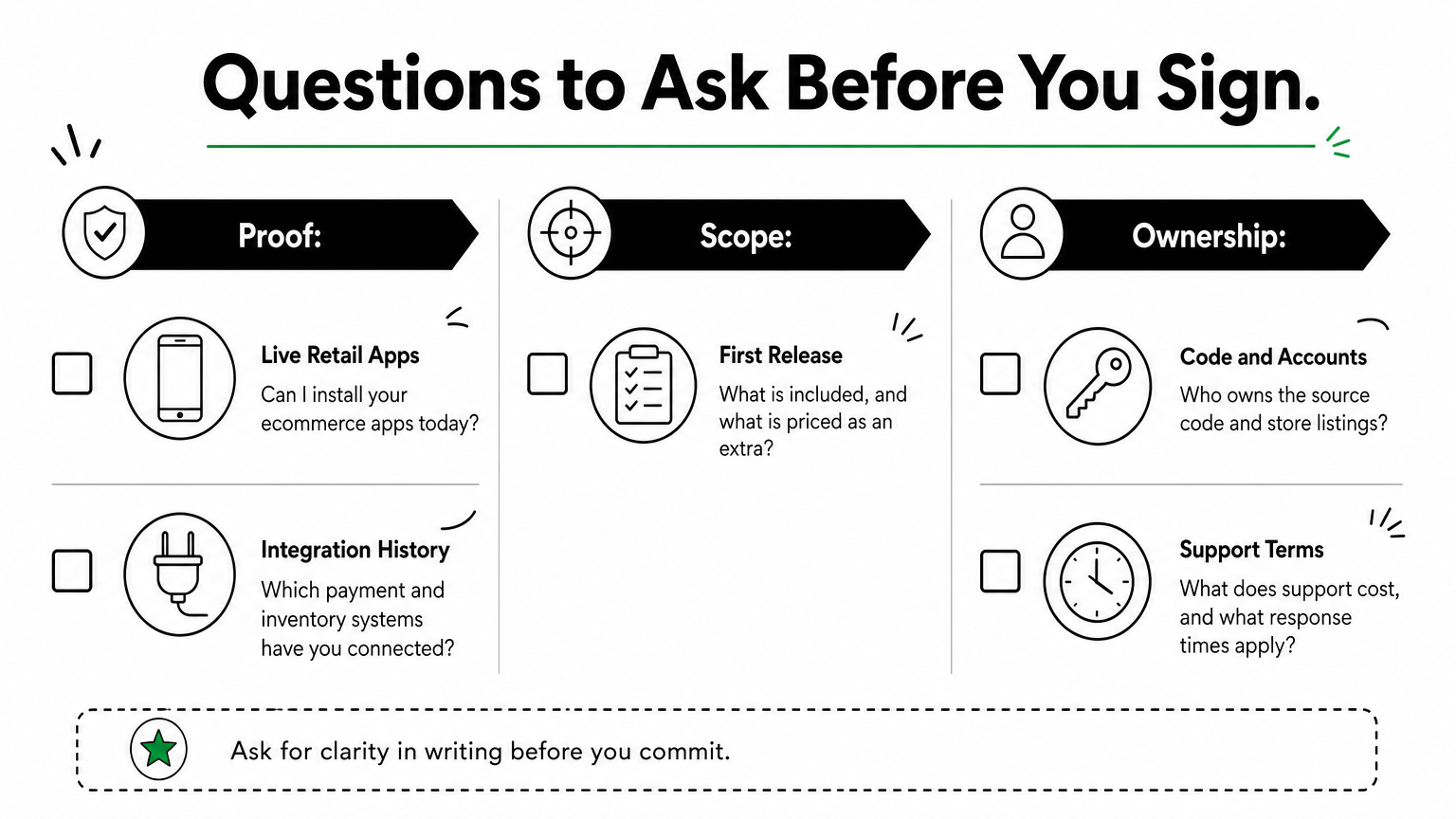
Questions to ask before you sign
Use the same questions on every call so the answers compare cleanly.
Which of your shipped apps are ecommerce, and can I install them today?
Who will be on my team, and how many years has each person shipped?
What is in the first release, and what is priced as an extra?
Which payment, shipping, and inventory systems have you integrated before?
Who owns the source code, the cloud accounts, and the app store listings?
What does support cost after launch, and what response times do you commit to?
The best vendor is the one whose answers stay specific when you ask for proof.
How much an ecommerce mobile app costs
Most ecommerce mobile apps cost between $40,000 and $220,000 for a first version, depending on features, platforms, and integrations. Treat those figures as a planning range, not a quote, because your scope decides where you land.
Typical price ranges
A first version commonly takes three to four months and somewhere around 1,090 to 1,400 developer hours. Multiply that by the team’s hourly rate and you see why quotes spread so widely. Commonly cited hourly estimates by country look like this:
Region
Typical hourly rate
USA
$50 to $200
Canada
$50 to $150
Mexico
$40 to $120
UK
$50 to $125
Australia
$50 to $125
India
$25 to $100
Philippines
$25 to $75
What drives the price up
Scope drives cost more than location, as this guide to what drives custom software cost explains. Two native apps cost more than one cross-platform build. Marketplace logic, subscription billing, and custom admin dashboards add hours. So do integrations with your ERP, CRM, or warehouse system.
Advanced features raise the bill again. Voice search, image search, recommendations, chatbots, and multi-currency support are valuable, but none belongs in a first release unless it directly drives sales.
How to keep the budget under control
Ship a lean first release with search, filters, a wish list, solid checkout, push notifications, and an admin panel. Then let real user behavior tell you which advanced features earn their cost. Budget for app maintenance as well. Operating system updates, bug fixes, and security patches continue long after launch.
Pay for the features that move conversion first, and let user data justify the rest.
Picking your shortlist
The best ecommerce partner is the one that can prove retail experience, explain how it connects your payments and inventory, and commit to a clear first-release scope. Use the nine companies above to build a shortlist of three, run the same questions on each, and compare fixed-scope quotes rather than headline rates.
Start with the team that matches your situation. Marketplaces point to Chop Dawg or Space-O Technologies. Strategy-first builds point to Goji Labs. Platform-based brands point to Trango Tech or NMG Technologies. B2B ordering points to Mobcoder or Light IT Global, and design-led MVPs point to Designli.
If your store app needs to connect to data, automation, and AI from day one, book a scoping conversation with Hatzs Dimensions about your ecommerce software development and bring your feature list.
AI agents integration is the work of connecting an AI agent to the data sources, tools, and business systems it needs, so it can read current information and take real actions instead of only generating text. In practice, that means giving the agent secure access to your CRM, help desk, database, or ERP through APIs, webhooks, or a standard such as the Model Context Protocol, with permissions that match what the agent is allowed to do.
A language model on its own knows only its training data and whatever you paste into the prompt. Integration is what lets it check an order, update a ticket, or route a lead. This guide explains why integration decides whether an agent works, how to build it step by step, which methods and platforms fit which job, and how to keep the result secure.
Hatzs Dimensions builds AI agents and the data and integration layers behind them for companies ranging from Series A startups to Fortune 500 teams. The advice below comes from that production work.
Why AI agents integration matters
Integration matters because an agent is only as useful as the systems it can see and change. Without it, even a strong model guesses, and those guesses show up as wrong answers your users notice.
An agent without integrations can only talk
An unconnected agent works from its training data and the text in the prompt. It cannot know that a customer’s order shipped this morning, that a contract renewal is due Friday, or that an invoice was already paid. Integration fixes this in two directions. Read access gives the agent current context, and write access lets it act on that context by updating a record or sending a message.
This is also what separates an agent from a chatbot. A chatbot answers a question. An agent completes a task across several systems. That is why ai agents integration is usually the hardest and most valuable part of an agent project, more than the choice of model.
An agent is only as capable as the systems it can read and the actions it is allowed to take.
What integration changes in practice
The same model behaves very differently depending on what you connect it to. Here is how the connections shape four common AI agent use cases.
Agent
Reads from
Acts on
Support agent
Help desk, order system, knowledge base
Drafts replies, updates ticket status, starts a refund request
Flags mismatched invoices, prepares entries for review
Notice that every row needs at least two systems. Real business processes rarely live in one application, so the value of the agent grows with the number of systems it can coordinate.
Where the payoff shows up
Connected agents tend to pay off in three places. Accuracy improves because answers come from live records, not memory. Speed improves because the agent handles the handoffs between tools that people used to do by hand. Auditability improves because every read and write goes through a connection you can log and review.
How to integrate AI agents with your systems
Integrate one workflow at a time. Define the job, list what the agent must read and write, connect it with the least access that works, test on real data, and release it behind human approval before you loosen the controls.
Define the job and map every read and write
Start with a single workflow that has a measurable result, such as first-response time on support tickets. Then list every piece of data the agent must read and every action it must write. That list is your integration spec. If it includes a system that nobody on your team can describe, you have found your first risk.
The seven steps to build and release
Follow this order. It keeps the scope small and surfaces problems while they are cheap to fix.
Pick one workflow with a clear owner and a number you can track.
List the systems and the exact reads and writes the agent needs.
Set up authentication with OAuth or scoped API keys, using the minimum permissions.
Define each tool with strict input and output schemas, so the agent never guesses parameters.
Test on real, messy data, including empty fields, duplicates, and failed calls.
Release behind human approval for any action that changes money, access, or customer records.
Monitor and widen, adding autonomy only where the logs show the agent is reliable.
Most teams rush step 5 and pay for it later. Test data is clean, and production data is not.
Start narrow, connect with the least access that works, and widen only after the agent earns trust.
Clean up messy data before the agent sees it
Agents misread ambiguous data. A field called "status" could mean employment status in one system and record status in another, and an agent that picks the wrong meaning can take the wrong action. The fix is to normalize data into a consistent schema and describe every field in plain language inside the tool definition.
Return only the fields the task needs. Smaller, cleaner responses cut cost and latency, and they leave less room for the model to wander. For retrieval-heavy agents, this cleanup also makes the embeddings you store more accurate.
Choosing integration methods and platforms
The right method depends on how predictable the workflow is. Use direct APIs, webhooks, or a unified API for fixed workflows, and use tool calling through MCP when the agent must decide which tool to use. For most teams, a platform that manages authentication and logging saves months.
The main methods side by side
Method
Best for
Watch out for
Direct API calls
Core systems you control and depend on
Maintenance when vendors change endpoints
Webhooks
Real-time triggers such as a new qualified lead
Retries, duplicate events, and signature checks
SDKs
Vendors that provide ready-made client libraries
Version drift and uneven vendor support
MCP servers
Agents that choose tools dynamically
Server quality varies, and token handling needs care
Low-code iPaaS (Zapier, n8n, Workato)
Fast, visible workflows and internal automation
Limited custom logic and little data normalization
Unified API
Many apps in one category, such as HR or CRM
Narrow coverage and limited access to custom fields
Agent integration platform
Managed authentication, tool execution, and logs
Added vendor dependency and cost
Most production systems combine two or three of these. An agent might read through an API, receive events through webhooks, and send notifications through a low-code workflow.
A simple rule for picking
Ask whether the steps are known in advance. If the workflow is static, as in "when a ticket arrives, look up the order, then draft a reply," a plain API or unified API integration is cheaper, faster, and easier to test. If the agent has to decide between many tools based on a free-form request, a tool-calling approach through the Model Context Protocol fits better.
Predictable flows should stay predictable. Do not give an agent freedom where a fixed sequence would do the job.
Use fixed integrations for fixed workflows, and give the agent tool choice only where the task truly varies.
Build, buy, or bring in a partner
Weigh four factors. Count the number of systems you must connect, since each native integration takes real engineering and ongoing upkeep. Consider how much custom logic you need, because platforms handle common patterns well but struggle with unusual ones. Check compliance requirements such as data residency and audit trails. Finally, be honest about team capacity, because integrations break at inconvenient times.
If your engineers are better used on the product itself, buy the commodity connections and build only the parts that differentiate you. A partner with senior engineers can design that split with you and own the delivery.
Securing and operating integrated agents
An integrated agent holds real access to real systems, so security is part of the design, not a final check. Enforce user-level permissions, treat outside content as untrusted, and log everything the agent does.
Respect permissions on every call
The agent must never reveal or change anything the requesting user could not reach directly. If a user asks about a file they cannot open, the agent should return nothing about it, regardless of how the request is phrased. Pass the user’s identity through to each connected system where possible, and give any shared service account the least privilege it needs.
Treat outside content as untrusted
Agents read emails, tickets, documents, and web pages, and any of those can contain hidden instructions. This is called prompt injection, and it has caused real data leaks in agent setups that connected to code repositories. Defend against it by keeping retrieved text separate from instructions, allowlisting the tools each agent may call, and requiring human confirmation for high-risk actions such as deleting records or sending payments.
Monitor, retry, and plan for change
Integrations fail. Tokens expire, rate limits hit, and vendors change their APIs. Build for that from day one:
Log every tool call with its inputs, outputs, and errors.
Retry with backoff, and make write actions idempotent so a retry never creates a duplicate.
Alert on error spikes and on unusual volumes of reads or writes.
Track API versions and test again whenever a connected vendor announces a change.
If you cannot see what your agent did and why, you cannot trust it with more access.
Start with one connected workflow
AI agents integration comes down to a few decisions. Give the agent current data to read and limited actions to take. Match the method to how predictable the workflow is. Test on messy data, enforce permissions on every call, and log everything. Teams that follow this order ship agents that people actually rely on.
Pick the workflow where a missing connection costs you the most today, and build that one first. If you want a senior team to design and run the integration layer with you, have Hatzs Dimensions build your AI agent integrations from discovery through deployment and support.
The best AI agents builder is the one your team can actually maintain. If nobody on your team writes code, start with a no-code platform like Zapier, Gumloop, or Relay.app. If you have engineers and want control over hosting and cost, look at n8n, Dify, or LangChain. If the agent touches regulated data or core systems, a custom build from a partner like Hatzs Dimensions is the safer path. A good pick connects to the apps you already use, lets you swap models, shows what the agent did, and pauses for human approval before risky actions.
The problem is that dozens of AI agents tools promise all of this. Demos hide the hard parts, and free plans run out the moment you test real volume. This guide compares ten AI agent development tools and platforms, from free and no-code to fully custom. For each one you get how it works, who it suits, its strengths and limits, and what it costs.
We build production AI agents for enterprises and growth-stage companies at Hatzs Dimensions, so we know where self-serve platforms hold up and where they break. We list ourselves first as the custom option, and we tell you plainly when a platform is the better choice.
What an AI agents builder does and how to choose one
What an AI agents builder actually does
An AI agents builder is software that lets you give an AI model a goal, connect it to your tools and data, and let it decide which steps to take. You write the instructions, the model reasons about the situation, and the agent calls tools such as your CRM, inbox, or database to finish the job. The builder supplies the model connections, the tool integrations, and the controls around them.
The distinction that matters most is agent versus workflow. A workflow follows a fixed path, so the same input produces the same steps every time. An agent picks its own steps from the tools it has. Most platforms below build both, and the better ones let an agent call workflows as tools. If you are new, build the reliable workflow first, then let an agent decide when to run it. Without solid tools, even a strong model has nothing useful to do.
An agent is only as useful as the workflows and tools you give it.
Four ways to build an AI agent
Yes, you can build your own AI agent, and you do not need to be a developer to do it. The agent development tools in AI fall into four groups:
No-code platforms (Zapier, Gumloop, Relay.app, Lindy): describe the job in plain English or arrange blocks on a canvas. Setup takes minutes to hours.
Low-code builders (n8n, StackAI, Dify): a visual canvas plus code nodes when you need them. They handle complex logic but have a steeper learning curve.
Code frameworks (LangChain, CrewAI, AutoGen): full control in Python or JavaScript. You own testing, hosting, and monitoring.
Custom builds by a partner: a team designs, ships, and runs the agent against your own systems.
Nearly every self-serve option has a free plan or trial. Use it to prove one workflow before you pay for anything.
Six criteria for choosing agent development tools
Score every AI agent tool against the same six questions before you look at price.
Model flexibility. Different models are better at writing, coding, and research. A platform locked to one vendor limits you later.
Integration depth. List the apps your team already uses and check that each one is covered natively, not through a fragile custom API call.
Human approval and guardrails. The agent should pause before it sends external email, deletes records, or spends money.
Observability. You need run logs, error handling, and a way to replay a failed run.
Data control and compliance. Check SOC 2, HIPAA, and GDPR coverage, and whether you can self-host or deploy in your own cloud.
Pricing model. Per-execution, per-task, credit, and per-seat pricing behave very differently at volume.
Run a one-week pilot on a single, boring, high-volume task. Estimate a month of real usage from that pilot, then compare it with each platform’s pricing model.
1. Hatzs Dimensions: custom-built AI agents
How it works
Hatzs Dimensions is not a self-serve AI agents builder. It is a software development and AI company that designs, builds, and runs agents inside your own systems. The work follows a four-stage delivery process: discovery and planning, design and prototyping, development and testing, then deployment and support. Related services cover GenAI consulting, intelligent automation, data engineering and integration, and AI governance and compliance.
In a build vs. buy decision, custom makes sense when a platform’s ceiling becomes your ceiling. An agent that reads from a legacy claims system, follows audit rules, or serves thousands of customers needs your own architecture, your own guardrails, and a model choice you control. You get an agent shaped around your process instead of a process bent around a template.
When the agent touches core systems or regulated data, build it properly instead of configuring a template.
Who it suits
CTOs, CIOs, VPs of engineering, founders, and product leaders at mid-sized and large companies are the usual buyers. Hatzs Dimensions works across banking, financial services, insurance, healthcare, retail, logistics, and SaaS, so regulated and complex environments are familiar ground.
Good fit: the agent must integrate with internal systems, pass a compliance review, or scale beyond platform limits.
Good fit: you have no in-house AI engineers, or you have outgrown a no-code tool.
Poor fit: you want a personal assistant running by this afternoon. Use a platform below.
Strengths and limits
The strengths come from the team and its track record. Weigh them against the trade-offs of any custom project.
A senior-only engineering team with 7+ years of experience shipping enterprise-grade AI into production.
100+ experts across AI, data, cloud, and product engineering, so one partner covers the agent, the data pipeline, and the infrastructure.
250+ clients worldwide and 98% client retention, with results such as a 30% cut in insurance operations costs and 300% more lead conversion capacity.
Limit: a first working version takes longer than on a no-code tool.
Limit: the cost is higher than a monthly subscription, so the use case should justify it.
Pricing
There is no public price list, because scope drives AI agent development cost. Engagements run on two models: fixed-price projects when the scope is defined, and dedicated teams when requirements will evolve.
A practical path is to prototype the first workflow in a cheap platform from this list. Then bring that prototype and its lessons into discovery, so the custom build starts from proven requirements.
2. n8n: low-code control for technical teams
How it works
n8n is a workflow automation platform with a visual canvas, and as an AI agents builder it is the strongest pick for technical teams. You connect nodes for triggers, apps, code, and an AI Agent node built on LangChain. The agent gets a model, memory, and a set of tools, and it decides which tool to call. You can chain several agents, add approval steps at any point, and connect outside tools over MCP.
Hosting is the real differentiator. You can run n8n on your own servers or use n8n’s cloud, which matters for data residency and air-gapped environments. Pricing counts executions, and a full workflow run is one execution no matter how many steps it has, so complex agents cost less than on task-based tools.
n8n trades a gentler learning curve for control over hosting, data, and cost.
Who it suits
Developers, technical operations teams, and automation agencies get the most from n8n. Non-technical teams usually stall during setup.
Good fit: you need self-hosting, strict data residency, or custom API logic.
Good fit: your agents run long, multi-step workflows where per-task pricing would hurt.
Poor fit: marketing or HR teams who want to build without engineering help.
Strengths and limits
n8n offers a large community and a deep template library, so you rarely start from a blank canvas.
A big library of community templates and plenty of tutorials.
Code nodes let you drop into JavaScript when the visual blocks run out.
Execution-based pricing stays predictable on complex workflows.
Limit: the interface is less welcoming to beginners.
Limit: self-hosting means you handle servers, patches, and uptime, and organization-wide governance is largely a do-it-yourself job.
Pricing
The self-hosted Community edition is free. Cloud plans start with Starter at $20 a month billed annually for 2,500 executions, and Pro runs about $50 a month billed annually for 10,000 executions. The self-hosted Business plan is $800 a month billed annually with 40,000 executions, and Enterprise is custom. Month-to-month billing costs a bit more. Remember that self-hosting is free of license fees, not free of infrastructure and maintenance time.
3. Zapier Agents: no-code reach across 9,000 apps
How it works
Zapier is the veteran automation tool, and it now works as an AI agents builder inside the same editor. You describe the agent in plain English, and Zapier’s Copilot builds the workflow for you. Agents can browse the web, use live data sources, and act across 9,000+ connected apps. Zaps can also include agentic steps, so a workflow loops through tool calls while keeping run history and error handling.
Safety controls are a selling point. Zapier offers AI Guardrails that scan for sensitive data, prompt injection, and toxic output, and it supports human approval steps. You can call models from Anthropic, OpenAI, and Google inside one agent, and Zapier MCP lets tools like Claude or ChatGPT reach its app library.
If your tools are mainstream and your team is non-technical, Zapier gets an agent running fastest.
Who it suits
Zapier suits business teams that already live across many SaaS apps and want agents without involving engineering.
Good fit: sales, support, and operations teams with long app stacks.
Good fit: companies that need audit logging and SOC 2 Type II coverage.
Poor fit: teams that need self-hosting, or that must confirm HIPAA coverage first.
Strengths and limits
The breadth of integrations is hard to match, and the platform is stable and well documented.
Maintained integrations with thousands of apps, so connections rarely break.
Human-in-the-loop approvals and guardrails built in.
Model flexibility inside a single agent.
Limit: agents are priced separately from the core Zapier plans, so you may pay for two.
Limit: costs climb as task volume grows.
Pricing
Zapier has a free plan with 100 tasks a month. Professional starts at $19.99 a month billed annually. Agents have their own plans: Agents Free includes 400 activities a month, and Agents Pro is $33.33 a month billed annually for 1,500 activities. Team and Enterprise tiers add shared workspaces, SSO, and admin controls. Estimate your monthly task volume first, because that number decides what you pay.
4. Gumloop: shared agents for whole teams
How it works
Gumloop is a no-code AI agents builder built around a visual canvas. Agents are the primary interface, and existing workflows become callable tools that agents invoke when needed. Anyone with the right permissions can create an agent or skill, and the rest of the organization can run it. A skills system lets an agent update its own playbook when you correct a mistake, so the same error does not repeat.
Gumloop supports 35+ AI models without extra API keys and hosts MCP servers so you can connect agents to tools with an MCP endpoint. It has around 100 native integrations, fewer than Zapier, and it adds a browser agent for sites without APIs.
Gumloop works best when many people will share and improve the same agents.
Who it suits
Marketing, sales, and operations teams that want a shared library of agents will feel at home. Think of an SEO brief agent that copywriters reuse, or a weekly task triage agent.
Good fit: teams rolling out agents company-wide with unlimited seats.
Good fit: users who want to choose between several AI models.
Poor fit: niche stacks that need integrations beyond the native library.
Strengths and limits
Gumloop is newer than the big automation names, which shows in both directions.
Unlimited seats on paid plans, billed on credits at the org level.
Agents improve as people give feedback and edit them.
Limit: a smaller community and ecosystem than Zapier or n8n.
Limit: credit usage varies by step type, so costs are harder to forecast at scale.
Limit: higher-end controls such as VPC deployment sit on the custom Enterprise tier.
Pricing
There is no permanent free plan, but new accounts get a 14-day free trial of Pro. Pro starts at $37 a month, or about $30 a month billed annually, with 20,000 credits and unlimited seats and agents. Enterprise is custom and adds role-based access control, SCIM and SAML, audit logs, and VPC options. Test with your real workflow during the trial, since credit burn tells you more than the price list.
5. Relay.app: the easiest first agent
How it works
Relay.app is the lightest AI agents builder on this list. You name your agent, write a short job description, and build the first workflow in minutes, without reading documentation. Agents run on triggers, workflows are visual with an AI assistant beside them, and tables store your data. MCP server support connects the agent to outside tools.
Human approval is part of the design, so you can put a person in the loop before an agent acts. Relay is SOC 2 and GDPR compliant, which covers many small-business security questions.
Relay.app is the quickest way to learn what an agent can do for your team.
Who it suits
Relay suits solo operators and small teams that use mainstream apps and want to test agents without a heavy platform.
Good fit: a team of a few people automating its first workflows.
Good fit: anyone who wants every feature on a free plan to evaluate.
Poor fit: HR, finance, or sales operations teams with niche tools, and anyone who needs enterprise governance.
Strengths and limits
Relay trades depth for simplicity, and you should expect to outgrow it if usage expands.
Simple onboarding and a free plan that includes all platform features.
Clear, visual workflows that non-technical users can read.
Limit: the integration library is a fraction of Zapier’s.
Limit: advanced features such as step-level filters and built-in error handling are thin.
Limit: audit logs and granular permissions are missing.
Pricing
The free plan includes all features with 200 steps a month. Paid plans start at $19 a month for 750 steps, and a Team plan from $59 a month covers 1,500 steps and up to 10 users. AI credits are tracked separately from standard steps, so watch both counters during your trial.
6. Lindy: an AI teammate for inbox and sales
How it works
Lindy works like an AI teammate more than a blank-canvas AI agents builder. You describe what you want in plain English, and it builds agents that handle inbox triage, meeting prep and follow-up, lead qualification, and support tasks. You can message it by text, and it also works inside Slack threads and mentions. It connects to tools such as Gmail, Slack, Salesforce, and Notion, and it learns from your corrections over time.
The flow editor underneath is simpler than in n8n or Zapier. Branching and fallback paths are limited, so Lindy is stronger at repeated personal or team tasks than at complex business processes.
Lindy shines at high-frequency admin work that is too small for a full workflow builder.
Who it suits
Executives, founders, salespeople, and support teams get the best results.
Good fit: you want an assistant that preps meetings, drafts replies, and updates the CRM.
Good fit: a customer support or sales team wants specialized agents quickly.
Poor fit: you need to orchestrate cross-department processes with complex logic.
Strengths and limits
Lindy is fast to start and clear in focus.
A simple interface and a wide integration range for its focus areas.
Plain-English setup with no canvas wiring.
Limit: every active user is billed, so cost grows as you roll it out.
Limit: large jobs such as research reports can burn through credits quickly.
Limit: it is not built for deep, branching business workflows.
Pricing
Lindy offers a free trial with starter credits. Paid plans are billed per user and by credits: entry plans sit roughly in the $30 to $50 per user per month range depending on tier and billing, and higher tiers add credits and computer use. The Enterprise tier adds audit logs and HIPAA support with a signed BAA. Confirm current rates on the pricing page, then multiply by the number of people who will actually use it.
7. StackAI: enterprise agents on internal data
How it works
StackAI is an enterprise AI agents builder with a drag-and-drop interface. Its strength is grounding agents in your own information. Built-in data loaders and knowledge bases feed retrieval-augmented generation (RAG), so the agent answers from your documents, databases, and APIs instead of guessing. You can export code to extend workflows outside the platform.
Deployment is flexible: cloud, Virtual Private Cloud, or on-premise for strict data rules. Compliance coverage includes SOC 2, HIPAA, and GDPR on the Enterprise tier.
StackAI fits when the hard part is trusted internal data, not clever prompts.
Who it suits
Mid-sized and large organizations in regulated industries, such as wealth management, construction, and logistics, are its core audience.
Good fit: agents must answer from internal documents and databases.
Good fit: security review requires VPC or on-prem deployment.
Poor fit: a small startup that only needs a couple of simple agents.
Strengths and limits
StackAI feels more modern than many legacy enterprise tools, and it leans toward production use.
A clean builder interface and useful templates.
RAG pipelines, APIs, and webhooks for agents that touch internal systems.
Limit: there is a learning curve, and some users report a smaller integration set.
Limit: debugging gets harder as workflows grow.
Limit: compliance features are locked to the Enterprise tier.
Pricing
The free plan gives you 500 runs a month, 2 projects, 1 seat, and community support. Enterprise is custom priced and adds dedicated infrastructure, dedicated solution engineers, SSO, and access controls, and it requires a sales call. Use the free plan to test one data-heavy agent before you start that conversation.
8. OpenAI Agent Builder and ChatGPT workspace agents
How it works
OpenAI offers two routes. Agent Builder is a visual canvas where you drag and drop nodes, connect tools, and design agentic workflows. ChatGPT workspace agents live inside ChatGPT: you describe the job, connect tools, and deploy it, and the agent becomes a shared resource for your team. Workspace agents can also be used in Slack.
Admin controls are a strong point. Roles set who can browse, run, build, and publish agents, and a Compliance API gives admins visibility into each agent’s configuration and run history. As an AI agents builder, though, both options run on OpenAI’s models only.
If your team already lives in ChatGPT, the shortest route to a working agent is the one you already pay for.
Who it suits
Teams that have standardized on ChatGPT Business or Enterprise will get the least friction.
Good fit: your workflows sit in Gmail, Outlook, SharePoint, Slack, GitHub, HubSpot, or Atlassian.
Good fit: you want admin governance without adding another vendor.
Poor fit: you need Claude or Gemini for some tasks, or wide app coverage.
Strengths and limits
The appeal is low friction and shared governance.
One login and one bill with your existing ChatGPT workspace.
Shared agents with granular permissions.
Limit: you cannot swap in other vendors’ models.
Limit: the connector set is narrow compared with automation platforms.
Limit: it suits individual and team tasks better than complex multi-system workflows.
Pricing
Workspace agents are included with ChatGPT Business, listed at about $20 per user per month, and higher plans, with credit-based usage on top. Agent Builder pricing follows OpenAI’s platform usage terms, so check the current pricing page before you budget. Model choice is limited here, so price the lock-in alongside the monthly fee.
9. Dify: open-source platform between easy and technical
How it works
Dify is an open-source platform for building LLM apps and agents. It sits between easy-to-use and developer-focused tools. You design agents and workflows on a visual canvas, attach knowledge bases for retrieval, and connect tools and model providers. You can self-host it or use its hosted version.
That mix makes it one of the more practical AI agent development tools for small engineering teams. Developers get an API and control over the stack, while less technical teammates can still read and adjust a workflow visually.
Dify gives a small team a visual builder without giving up the option to self-host.
Who it suits
Dify suits startups, internal tool teams, and developers who want an open-source AI agents tool they can run themselves.
Good fit: you want to prototype RAG apps and agents quickly.
Good fit: you want to avoid vendor lock-in on models and hosting.
Poor fit: you need a polished library of thousands of app connectors.
Strengths and limits
Open-source flexibility is the main draw.
Self-hosting for data control, plus a visual interface for collaborators.
Support for many model providers, so you can switch as models improve.
Limit: you manage deployment, updates, and security when self-hosting.
Limit: enterprise governance and app integrations are not as deep as on commercial platforms.
Pricing
The open-source edition is free to self-host, so your costs are servers and model API usage. Dify also sells hosted plans, and their tiers change, so check the current pricing page. Budget for a developer who owns the deployment, because that person is the real cost.
10. LangChain and LangGraph: code-first agent development
How it works
LangChain is an open-source framework for developers who want low-level control. It provides components for models, prompts, tools, memory, and retrieval in Python and JavaScript. LangGraph, its companion library, models an agent as a graph of steps with state, which suits long-running, multi-step agents with branches and loops. Optional hosted tooling covers tracing and evaluation.
Other code frameworks compete here. CrewAI organizes several role-based agents that collaborate. Microsoft’s AutoGen is open source under the MIT license, but it is now in maintenance mode, and Microsoft Agent Framework is its successor. For new projects, check the framework’s current status first.
Code frameworks give you full control, and full responsibility for testing and operations.
Who it suits
Engineering teams building agents as part of a product, or with requirements no platform meets, should start here.
Good fit: custom tool use, unusual architectures, or deep integration with your codebase.
Good fit: teams with the skills to test, monitor, and host agents in production.
Poor fit: business teams with no developers, who should use a platform or a partner.
Strengths and limits
Flexibility is unmatched, but nothing is handled for you.
No platform ceiling, no per-task fees, and full ownership of the code.
A large community and many examples.
Limit: APIs change quickly, so upgrades take effort.
Limit: you build your own approvals, logging, evaluation, and deployment.
Limit: reaching production safely takes more time than any no-code route.
Pricing
The frameworks are free and open source. You pay for model API calls, infrastructure, engineering time, and any hosted tracing or evaluation service you add. For most teams, engineering hours are the biggest cost. If that makes the economics unclear, a build partner can take on the engineering while you keep the requirements.
AI agent builders compared side by side
The comparison table
Here is every option on one screen. Prices reflect published plans and can change, so confirm them before you commit.
Tool
Type
Free option
Paid pricing
Best for
Hatzs Dimensions
Custom build
None, quote-based
Fixed-price or dedicated team
Regulated, complex, or scaled agents
n8n
Low-code
Free self-hosted Community edition
Cloud from $20/month billed annually
Technical teams, self-hosting
Zapier Agents
No-code
Free plan, Agents Free
Professional from $19.99/month, Agents Pro $33.33/month, both billed annually
Teams with many apps
Gumloop
No-code
14-day trial
Pro from $37/month
Shared team agents
Relay.app
No-code
Free plan, 200 steps
From $19/month
Small teams, first agent
Lindy
No-code
Free trial with starter credits
Per-user plans
Inbox, meetings, sales, support
StackAI
Low-code
Free plan, 500 runs
Custom enterprise
Regulated, data-heavy agents
ChatGPT workspace agents
Platform-native
None separate
Included with ChatGPT Business, about $20/user/month
Teams already in ChatGPT
Dify
Low-code, open source
Free self-hosted
Hosted plans vary
Self-hosted LLM apps
LangChain
Code framework
Free, open source
Optional hosted tooling
Engineering teams
Which AI agent builders are free
Several options are free in a lasting way, though every one has a catch. The self-hosted n8n Community edition, Dify, and LangChain cost nothing in license fees, but you pay for hosting and model usage. Zapier, Relay.app, and StackAI have free plans with caps on tasks, steps, or runs. Gumloop and Lindy offer trials instead of permanent free plans.
For a free AI agent builder with no code, Relay.app and the Zapier free tiers are the easiest starting points. For free with full control, self-host n8n or Dify. Whatever you choose, treat the free tier as a test bench for one real workflow, not as a production plan.
A free plan proves the idea; real volume decides the price.
Costs that hide outside the plan price
The sticker price is rarely the whole bill. Model usage is the first hidden cost. Some platforms bundle it into credits, while others ask you to bring your own API keys. Second, per-seat billing punishes broad rollouts, so a tool that looks cheap for one person gets costly for fifty.
Engineering time is the third. Self-hosting and code frameworks look free until someone has to patch servers, rotate credentials, and debug failed runs at midnight. Count those hours at your real internal rate before you decide that open source is the cheaper option.
How to pick the right AI agents builder
Pick by team and skill level
Match the tool to who will build and own the agent, not to the longest feature list.
No developers, mainstream apps: Zapier or Relay.app.
Shared agents across a department: Gumloop.
Personal or team assistant for inbox and sales: Lindy.
Engineers who want control and self-hosting: n8n or Dify.
Product engineering team building agent features: LangChain and LangGraph.
Regulated data, internal documents, strict security review: StackAI, or a custom build from Hatzs Dimensions.
Already standardized on ChatGPT: workspace agents.
Choose the tool for the person who will maintain the agent in six months, not the one demoing it today.
A four-step path from pilot to production
Most agent projects stall because teams jump from a demo to a rollout. This sequence keeps risk small.
Pick one task. Choose a repetitive, low-risk job with a clear success measure, such as lead qualification or support triage.
Build the workflow first. Get the fixed steps reliable, then give the agent its tools and instructions.
Add approvals and logging. Require human sign-off for external messages and record every run.
Measure for two to four weeks. Track time saved, error rate, and cost per run. Expand only if the numbers hold.
Mistakes that stall agent projects
The most common mistake is automating a process nobody has written down. If you cannot describe the steps and the exceptions clearly, an agent cannot follow them. Write the process in plain language first, and use that text as the agent’s instructions.
Another trap is ignoring AI governance requirements until the end. Security review, data access, and audit trails take longer than building the agent. Ask for them in week one, especially in banking, healthcare, or insurance. Finally, do not pick a platform on model hype alone. Models improve every few months, so favor tools that let you switch.
Start with one workflow, then scale
The right AI agents builder comes down to who builds, who maintains, and how sensitive the data is. No-code tools like Zapier, Gumloop, Relay.app, and Lindy get a first agent live fast. n8n, Dify, and LangChain reward teams that want control. StackAI and custom builds handle regulated, data-heavy work. Pick one workflow, set a measurable goal, and run a short pilot before you commit.
If your agent needs to work inside core systems, follow compliance rules, or scale across the business, bring in a team that has done it before. Talk to Hatzs Dimensions about scoping a custom AI agent, with a fixed-price project or a dedicated team.
Most marketing teams do not have a tooling problem. They have a capacity problem. Email sequences, content calendars, social posts, and lead scoring all need constant attention, and hiring does not scale as fast as the backlog. That is where AI marketing agents come in, and why you are comparing platforms right now.
An AI marketing agent is software that plans and executes marketing tasks on its own, within rules you set. Unlike a basic automation that fires one trigger, an agent reads data, decides the next step, and acts. It can draft and send emails, repurpose content, schedule social posts, and score leads. The best ones keep a human approval step where brand risk is high.
Below, you will find 10 platforms ranked by what they do best across email, content, and social. For each one, we cover core strengths, limits, and who it fits. We build production AI systems for 250+ clients at Hatzs Dimensions, so we also flag integration and governance issues that sales pages tend to skip.
What AI marketing agents are and how they work
The label gets stretched to cover everything from chatbots to workflow tools, a confusion we unpack in AI agents vs agentic AI. A useful definition is narrower. An AI marketing agent pursues a goal, such as "get more trial signups from this segment," and chooses the steps to reach it. You supply the goal, the data access, and the rules. The agent handles the sequence.
The agent loop
Most agents, whatever the vendor, run the same four-step loop. Knowing it helps you separate real agent behavior from a chatbot with a new label.
Read: pull data from your CRM, email platform, analytics, and social accounts.
Decide: use a language model plus your rules to pick the next action.
Act: write the email, schedule the post, update the lead score, or launch the campaign through connected tools.
Report: log what it did, measure the result, and adjust the next run.
Agents versus automation and assistants
Type
Trigger
Multi-step planning
Example
Rule-based automation
Fixed event
Only the path you built
Welcome email after signup
AI assistant
Your prompt
No, one output per request
Draft a subject line
AI marketing agent
A goal or event
Yes, it plans its own path
Rework a stalled nurture sequence and queue it for approval
Rules do not adapt, and assistants wait for you to ask. Agents fill the gap between the two, which is why the decision step matters more than the writing quality when you compare tools.
An agent is judged by the decisions it makes, not by the text it produces.
What they handle well, and where they stall
Agents do best at high-volume, repeatable work with clear success metrics. Think subject-line testing, content repurposing, social scheduling, and lead scoring. These tasks have fast feedback, so the agent can learn what works within days.
They stall when your foundations are weak. Duplicate contacts, stale CRM fields, or an undefined brand voice lead to confident but wrong decisions at scale. That is why the strongest setups pair agents with human approval on anything customer-facing and high-risk, such as pricing claims or regulated messaging.
1. Hatzs Dimensions custom AI marketing agents
What it does
We build custom AI marketing agents around your own workflows instead of selling a fixed product. Each build runs end to end across jobs like these:
Drafting email sequences and picking send times
Repurposing content in your brand voice
Scheduling social posts and triaging replies
Scoring leads and writing results back to your CRM
Best for
Mid-sized and enterprise teams with processes that off-the-shelf tools can’t handle, such as multi-system stacks or regulated messaging. One of our case studies shows lead conversion capacity up 300%.
Skip this route if you only need one channel. A SaaS agent below will ship faster and cost less.
Integrations and data
Agents plug into your CRM, email platform, analytics, and warehouse. Before launch, our data engineers fix duplicate contacts and stale fields, because weak data creates confident wrong decisions.
Custom builds also skip a vendor’s connector catalog, so internal tools and legacy systems can join the loop.
Governance and human approval
Approval gates are built in from day one. Our AI governance and compliance work defines which actions need sign-off and keeps audit logs of every agent decision.
Customer-facing actions should pass a human gate until the agent earns your trust.
Typical defaults require human review for pricing claims, regulated copy, and first sends to new segments.
Pricing and engagement model
There is no public price list, because scope drives cost. You choose between two models when you talk to Hatzs Dimensions:
Model
Fits
Fixed-price project
Defined scope and budget certainty
Dedicated team
Evolving roadmap and multiple agents
2. HubSpot Breeze agents
What it does
Breeze is HubSpot’s family of AI marketing agents built into its own platform, so there is nothing separate to install. The ones that matter for marketers:
Content Agent drafts blog posts, landing pages, and emails.
Social Media Agent writes posts and suggests publishing times.
Prospecting Agent researches leads and drafts outreach.
Customer Agent answers support and sales chats.
Best for
Teams already running Marketing Hub or the HubSpot CRM get the fastest start. It suits small and mid-sized teams that want email, content, and social in one system without stitching tools together. Skip it if your core stack is built around another CRM.
Integrations and data
Agents work from the contact, company, and deal records already in HubSpot, which is the main advantage. The app marketplace adds well over 1,000 connectors for outside tools. Data quality is the catch, because agents inherit every messy field in your CRM. Clean duplicates before you switch anything on.
Governance and human approval
Most marketing output arrives as a draft you review before it publishes, so brand-sensitive copy stays under your control. The Customer Agent can hand a conversation to a person when it cannot resolve the question.
Treat every Breeze draft as a first pass until you have audited a few weeks of output.
Set your brand voice and approval owners up front, not after the first bad post.
Pricing and engagement model
Pricing combines paid hub subscriptions with usage-based HubSpot Credits for heavier agent actions. Some Breeze features require Professional or Enterprise tiers. Rates change often, so confirm current figures on HubSpot’s pricing page before you budget. You can start self-serve, and larger accounts usually go through HubSpot sales.
3. Salesforce Agentforce for Marketing
What it does
Agentforce for Marketing runs AI agents inside Marketing Cloud Next, Salesforce’s marketing platform. You give it a campaign goal, and it plans the work through connected tools. Typical jobs:
Draft campaign briefs and build audience segments
Generate email and message content
Assemble journeys and suggest optimizations
Personalize content for each customer
Best for
Large teams already standardized on Salesforce CRM get the most from it. It suits enterprises with complex segments, several business units, and a dedicated admin or partner to run it. Smaller teams will find the setup heavy, and a lighter tool will go live sooner.
Integrations and data
Agents draw on Data Cloud, which unifies CRM, web, and commerce data into single customer profiles. That gives them more context than a standalone email tool. The trade-off is implementation effort, because you must map sources and set identity rules before the agents produce anything useful.
Governance and human approval
The Einstein Trust Layer masks sensitive data and screens output before it reaches the model, and marketers can review generated content before it sends. Those controls are strong, but they only protect you if someone configures them.
Enterprise guardrails work only when a named person owns the approval rules.
Assign approvers by campaign type before launch.
Pricing and engagement model
Expect two cost layers, and confirm current rates on Salesforce’s pricing page. Purchasing runs through Salesforce sales, often with an implementation partner.
Layer
How it is billed
Platform
Marketing Cloud Next edition licenses
Agent usage
Flex Credits consumed per agent action
Because usage scales with volume, estimate your monthly agent actions before you sign.
4. Jasper agents
What it does
Jasper is a content-first marketing platform, and its agents handle repeatable creative work in a shared workspace. Typical jobs:
Draft blog posts, ad copy, and email copy in your brand voice
Repurpose one asset into social posts and newsletters
Research competitors and audiences before writing
Run multi-step content pipelines from brief to draft
It plans and writes, but it does not send campaigns or score leads.
Best for
Agencies and brand teams that produce high volumes of on-brand copy get the most value. Skip it if you need autonomous sending or lead scoring. Pair it with an email platform from this list instead.
Integrations and data
Agents learn from brand voice settings, style guides, and uploaded knowledge, not live CRM records. Connections include Google Docs, Webflow, Zapier, a browser extension, and an API.
Because it lacks customer data, personalization stays shallow unless you feed it segment briefs.
Governance and human approval
Output lands as editable drafts in the workspace, so nothing publishes without a person. Higher tiers add SSO and admin controls, and Jasper lists SOC 2 compliance, so ask for the current report.
A content agent that cannot publish on its own is the safest first agent to deploy.
Pricing and engagement model
Pricing is seat-based and self-serve, with sales-led terms for larger teams. Rates change often, so confirm them on Jasper’s site.
Plan
How it is sold
Pro
Per-seat subscription, monthly or annual
Business
Custom quote with advanced controls
5. Klaviyo Marketing Agent
What it does
Klaviyo’s Marketing Agent is one of the few AI marketing agents built specifically for ecommerce, and it lives inside the Klaviyo platform. You describe a goal, and it plans the work from your store data. Typical jobs:
Draft campaigns and flows with copy and layout
Choose segments and send times
Suggest tests based on past results
Personalize email and SMS for each shopper
Best for
Online retailers and DTC brands, especially Shopify merchants, get the fastest payoff. Because the agent knows purchase history, it is strongest at email and SMS and light on social. Skip it for B2B lead scoring, where a CRM-centered tool fits better.
Integrations and data
Data comes from Klaviyo’s unified profiles, which combine order, browse, and email engagement history. Native integrations cover Shopify, WooCommerce, BigCommerce, and Magento, plus many helpdesk and ad tools. The catch is that output is only as good as your store sync, so verify that your product catalog and events flow correctly before you switch anything on.
Governance and human approval
Campaigns can be reviewed before they send, and you decide which agent actions are allowed. Keep approval on for discounts, because an agent that over-discounts erodes margin quickly.
Put a human gate on any offer that touches your margins.
Start with approvals on for every campaign, then relax them by campaign type once the results hold up.
Pricing and engagement model
Klaviyo bills by active profiles, with a free tier for small lists. Agent features may depend on your plan and rollout stage, so confirm current availability on Klaviyo’s pricing page before you budget. Most accounts buy self-serve, and larger ones go through sales.
6. Braze AI agents
What it does
Braze is a customer engagement platform, and its BrazeAI agents work inside Canvas journeys across email, push, SMS, and in-app messages. They decide what each customer receives and when. Typical jobs:
Build journey steps from a plain-language goal
Test message, timing, channel, and offer per customer
Generate copy and subject lines for review
Best for
Consumer brands with large audiences and mobile apps get the most value, such as retail, media, and fintech. It is strongest at lifecycle messaging. Skip it for small lists, B2B lead scoring, or social publishing.
Integrations and data
Braze ingests events through SDKs, APIs, and Cloud Data Ingestion from warehouses like Snowflake, BigQuery, and Databricks. Currents streams engagement data back out to your analytics stack. The catch is that agents optimize on the events you send, so sloppy event tracking means sloppy decisions.
Governance and human approval
You can preview and test Canvas steps before launch, and you set the limits an agent works within, such as allowed offers, channels, and frequency caps.
Let an agent optimize inside boundaries you wrote, never beyond them.
Keep a person on new offers and regulated copy, and review decision logs weekly during the first month.
Pricing and engagement model
Braze sells through sales with custom quotes, usually driven by monthly active users and message volume. Agent and decisioning features may be packaged as add-ons, so confirm what your contract includes before you budget. Expect a longer onboarding than self-serve tools.
7. Iterable Nova
What it does
Nova is Iterable’s agentic AI layer for cross-channel messaging, built into its customer engagement platform. Among the AI marketing agents on this list, it focuses on journeys across email, SMS, push, and in-app. Typical jobs:
Draft journeys from a plain-language goal
Write copy that follows your brand voice
Optimize send time and channel per user
Surface audiences likely to convert or churn
Best for
Growth and lifecycle teams at mid-sized to large consumer brands get the most from it, especially when several messaging channels share one audience. Skip it if you need social publishing or long-form content creation. Pair it with a content tool instead.
Integrations and data
Iterable takes in events and profiles through APIs, webhooks, and warehouse or CDP connections such as Snowflake, BigQuery, and Segment. It also offers commerce and CRM connectors, including Shopify and Salesforce. Nova decides from the data Iterable holds, so inconsistent event names and duplicate profiles will skew its choices. Audit your tracking plan before launch.
Governance and human approval
Marketers can review and edit AI-generated journeys and copy before anything goes live. That makes Nova easy to run with a clear split of duties.
Let the agent propose the journey, and let a person approve the launch.
Keep human sign-off on first sends to new segments and on regulated copy.
Pricing and engagement model
Iterable sells through its sales team with custom quotes, usually shaped by user counts and message volume. Nova capabilities may be packaged by plan, so confirm exactly what your contract includes before you budget. Expect a guided onboarding rather than a self-serve signup.
8. Zapier Agents
What it does
Zapier Agents are AI teammates that work across the apps you already use. You describe a job in plain language, give the agent instructions and tools, and it runs on a trigger or a schedule. It is a general-purpose builder, not a marketing-only product. Typical jobs:
Research a new lead and write a summary to your CRM
Draft social posts or email copy and route them for review
Score inbound form fills against your criteria
Post a weekly campaign summary to Slack
Best for
Lean teams and ops-minded marketers get the most from it, especially when your stack mixes many tools and no single platform covers the workflow. Skip it if you need a native email engine or deep per-customer personalization. Zapier orchestrates other tools and does not replace them.
Integrations and data
Reach is the main draw. Agents connect to thousands of apps, including HubSpot, Salesforce, Gmail, Slack, and Google Sheets, and they can browse the web and read uploaded knowledge. The catch is that you design the logic yourself. A vague prompt or a missing field in a connected app produces vague results, so write narrow instructions and test on a handful of real records first.
Governance and human approval
Autonomy is yours to dial. You choose which tools an agent may use, test its runs before turning it on, and review its activity history afterward. Check current settings for approval before an action runs, and use them for anything that sends or publishes.
Start every Zapier agent in draft mode, and let a person press send.
Because one agent can touch many apps, limit its permissions to the accounts the job actually needs.
Pricing and engagement model
Billing is usage-based. Zapier meters agent work in activities, and a free tier lets you test before you commit. Paid plans scale with volume and add team features. Limits and rates change often, so confirm current figures on Zapier’s pricing page. Signup is self-serve, with sales-led plans for larger teams.
9. Lindy
What it does
Lindy is a no-code platform for building AI agents, which it calls Lindies. You describe a job in plain language, choose a trigger, and it assembles the workflow. Typical marketing jobs:
Triage and answer inbound email
Research a lead and draft personalized outreach
Turn a content brief into social post drafts
Log results to your CRM or a spreadsheet
Best for
Founders and small sales and marketing teams get the most from it, especially when inbound and outbound busywork eats the week and no engineer is available. Skip it if you need a native email engine or deep campaign analytics. Lindy automates tasks around your tools and does not replace them.
Integrations and data
Connections cover Gmail, Google Calendar, Slack, HubSpot, and Salesforce, plus thousands of other apps through its integration library. An agent only knows what you give it, so upload brand guidelines and sample emails before you ask for copy.
Governance and human approval
You can add a confirmation step that pauses an agent before it sends or publishes, and you choose which accounts it may touch. Lindy lists SOC 2 compliance, so request the current report if security reviews your tools.
Put a confirmation step in front of every action a customer will see.
Give each agent only the permissions its job needs.
Pricing and engagement model
Pricing is credit-based and self-serve, with sales-led terms for larger teams. Plans and credit allowances change often, so confirm current figures on Lindy’s pricing page.
Tier
How it works
Free
Limited credits to test one workflow
Paid
Monthly credits, more agents and integrations
Enterprise
Custom quote with admin and security controls
10. Sprout Social Trellis
What it does
Trellis is Sprout Social’s AI agent for social media management, built into the Sprout platform. Among the AI marketing agents on this list, it is the social-first option. Typical jobs:
Summarize conversation trends from social listening
Draft captions and replies in your brand voice
Sort and prioritize inbox messages
Surface insights from post and audience performance
It does not send email or score leads.
Best for
Social and community teams that manage several networks and a busy inbox get the most from it. Agencies and mid-sized to large brands fit well. Skip it if you need email, lead scoring, or long-form content. Pair it with an email platform or a content tool like Jasper instead.
Integrations and data
Data comes from the social activity Sprout already collects: publishing history, engagement, inbox messages, and listening topics. Sprout connects to major networks such as Facebook, Instagram, LinkedIn, X, TikTok, and YouTube, plus CRM and helpdesk tools like Salesforce and Zendesk. The catch is that Trellis sees social, not your full customer record, so cross-channel decisions stay with you.
Governance and human approval
Social mistakes are public, so approvals matter more here than almost anywhere. Sprout’s publishing approval workflows and user permissions let you require sign-off before anything goes live.
On public channels, the agent drafts and a person publishes.
Keep a human on replies to complaints and on anything touching legal or crisis topics.
Pricing and engagement model
Sprout sells per-seat plans, billed monthly or annually, with a custom quote at the top tier. Which Trellis features come with which plan can change as they roll out, so confirm current availability on Sprout’s pricing page.
Plan level
How it is sold
Standard to Advanced
Per-seat subscription with a free trial
Enterprise
Custom quote through sales
How to choose the right AI marketing agent
No single platform wins on every channel. Answer three questions in order, and your shortlist usually drops to two or three tools.
Match the agent to your main channel
Begin with the channel that eats the most hours. Specialists beat suites on depth, while suites win on fewer moving parts. Use this table to narrow the field.
Primary need
Best fits from this list
Email and SMS for ecommerce
Klaviyo
Lifecycle messaging at scale
Braze, Iterable Nova
Email, content, and social in one CRM
HubSpot Breeze
Enterprise on Salesforce
Agentforce for Marketing
High-volume on-brand copy
Jasper
Social and community
Sprout Social Trellis
Glue across many tools
Zapier Agents, Lindy
Multi-system or regulated work
Hatzs Dimensions
Check where your data lives
Data decides more outcomes than features do. An agent is only as good as the records it reads, so choose the tool closest to your cleanest data. If your purchase history lives in Shopify and Klaviyo, buy there. If it lives in Salesforce, stay there.
The best agent is the one that sits next to your cleanest data.
Before any demo, run a short readiness check and ask the vendor to show you each answer:
Are contacts deduplicated and fields current?
Does the agent read your CRM natively, or through a connector you must maintain?
Can you see a log of every action it takes?
Can you require approval before sends and publishes?
Decide between buying and building
Buy when one channel and standard workflows cover you, and use our build vs buy framework if the call is close. SaaS agents ship in weeks and cost less to run. Build when your stack spans several systems, your copy is regulated, or you need custom approval rules. That is where a custom build earns its cost.
Guardrails and getting your first agent live
Most failed rollouts of AI marketing agents skip the boring setup, not the tool choice. Spend your first week on limits, and the agent will earn trust faster once it goes live.
Set the guardrails first
Write the rules down before you connect anything. Limit permissions to the accounts the job needs, and cap send volume and spend so a bad loop cannot run all weekend.
An agent without a kill switch is a risk, not a pilot.
Your pre-launch checklist:
A brand voice document with 10 approved and 10 rejected examples
A banned-claims list covering pricing, guarantees, and legal terms
Frequency caps per contact
A weekly review of the agent’s action log
One named owner who can pause the agent immediately
Run a 30-day pilot
Pick one channel and one metric, such as reply rate or trial signups. Keep the scope small enough that you can compare results against a control group and see what the agent changed.
Week
Focus
Human gate
1
Clean data, write rules, connect read-only
Agent cannot act
2
Drafts only
Approve 100% of output
3
Send to a small segment
Approve first sends
4
Compare against baseline
Relax approvals on low-risk tasks
Measure at day 30, then decide to expand, adjust, or stop. If the agent beat your baseline with clean logs, add a second channel. If it did not, fix the data before blaming the tool, starting with a data governance framework.
Picking your first agent
Your best pick comes down to three things: your main channel, where your cleanest data lives, and how much control you need. Choose the tool closest to that data, and you skip most of the problems that sink rollouts.
Start small, whatever you choose. Run a 30-day pilot with one channel, one metric, and a person approving every send. AI marketing agents earn their place by beating a baseline, not by looking impressive in a demo.
If your stack spans several systems or your messaging is regulated, an off-the-shelf tool may not fit. In that case, talk to Hatzs Dimensions about a custom AI marketing agent, and we will scope a pilot with approval gates built in from day one.
You keep hearing that autonomous AI agents will run workflows on their own, but vendor pages rarely say what that means in practice. Some describe a chatbot with a few plugins. Others promise a digital employee. If you are a CTO or product leader deciding where to invest, that gap makes it hard to judge what is real and what is demo-ware.
Here is the short answer. An autonomous AI agent is software that takes a goal, plans the steps, uses tools and data, and acts with little or no human prompting. It differs from a standard assistant because it decides what to do next, not just what to say. It also differs from agentic AI, which is the broader design approach that agents are built on.
This article walks through how these agents work, from perception and planning to tool use and memory. You will see how they compare with agentic AI, real examples across industries, and the top tools worth evaluating. We have shipped enterprise AI systems into production for 7+ years, so we also flag what tends to break once an agent leaves the prototype stage.
Why autonomous AI agents matter for your business
From answering questions to finishing work
Most automation you already own follows fixed rules. A script moves a file, a bot fills a form, and when something unexpected shows up, it stops and waits for a person. Autonomous AI agents handle the unexpected by reasoning about the goal and choosing another route. That shifts the unit of automation from a single task to a whole outcome.
Picture an insurance claims queue. A rules engine can route a document. An agent can read the claim, check the policy, request a missing photo, and pass along only the cases that need an adjuster’s judgment. Your people review exceptions instead of touching every item, which is where the capacity gain comes from.
Where the value shows up
The payoff is clearest in workflows that are high volume, multi-step, and tied to several systems. Those are the jobs where people spend hours copying context between tools. Cost reduction, faster response times, and more capacity without more headcount are the three gains we see most often.
These are results from Hatzs Dimensions client projects:
Area
Outcome
Insurance operations
30% lower operations costs
Lead handling
300% more lead conversion capacity
Customer engagement
40% higher engagement
What you need to price in
Autonomy cuts both ways. An agent that can issue refunds can also issue the wrong refunds, and a mistake in step two carries into steps three through ten. Errors compound across steps, and every tool you hand the agent widens cost, security, and compliance exposure.
The more an agent can do without you, the more you need to know about what it did and why.
So treat the business case as two columns, not one. Savings come from removing manual work, and the offsetting spend goes to monitoring, access controls, and human review for risky actions. Teams that budget for both ship agents that stay in production. Teams that budget only for the first column tend to pause after the first costly mistake.
How autonomous AI agents work
Under the hood, autonomous AI agents run a loop instead of answering once. A language model sits at the center, but the model alone is not the agent. The agent is the model plus the tools, memory, and rules wrapped around it.
The core loop
Every agent cycles through the same four moves until the goal is met or it hits a limit you set.
Perceive: read the goal, the inputs, and the current state of your systems.
Plan: break the goal into steps and pick the next one.
Act: call a tool, such as an API, a database query, or a browser.
Check: compare the result with the goal, then continue, retry, or escalate to a person.
Most production failures happen in the check step. An agent that cannot tell a failed action from a successful one will keep going confidently in the wrong direction, and that is how small errors compound.
An agent is only as autonomous as its ability to verify its own work.
The building blocks
Four components make that loop possible, and you should be able to name each one in any agent you evaluate.
Component
Job
Example
Reasoning model
Plans and decides
A large language model
Tools
Take real actions
CRM API, SQL, email
Memory
Holds context across steps
Task log, vector database
Guardrails
Limit what it may do
Spending caps, approval gates
When a vendor demo looks impressive, ask about the last two rows. Memory and guardrails separate a prototype from something you can safely leave running overnight.
Autonomous AI agents vs. agentic AI and other agents
Autonomous agents and agentic AI
Agentic AI is a way of building systems: you give a model a goal, let it plan, call tools, and adapt to results. An autonomous agent is a specific system built that way and allowed to run with minimal supervision. Some agentic systems keep a person approving every step, so they are agentic without being autonomous.
Agentic describes how a system is designed. Autonomous describes how much freedom you give it.
That distinction matters when you read vendor claims. A product marketed as "agentic" may still stop and ask you before every action.
How other agent types compare
The table below places autonomous agents next to the tools they are most often confused with.
Type
How it decides
Example
Chatbot or assistant
Responds to each prompt, takes no independent action
FAQ bot
Rule-based bot (RPA)
Follows fixed scripts, stops on surprises
Invoice-entry bot
Copilot
Suggests, and you approve
Code completion
Autonomous agent
Plans and acts toward a goal
Claims triage agent
Multi-agent system
Several agents split and review the work
Researcher, writer, and reviewer agents
Most teams should treat autonomy as a dial, not a switch. Start with a copilot that drafts while you approve, then move low-risk actions to full autonomy once your logs show consistent accuracy over a few hundred runs. Refunds, payments, and anything customer-facing can stay behind an approval gate much longer.
Real-world examples of autonomous AI agents
Examples across industries
Autonomous AI agents already run in production, mostly where work is repetitive and spans several systems. The table shows the use cases by industry we see most often, along with the part people still own.
Handles scheduling and prior-authorization paperwork
Staff make clinical decisions
Logistics
Reroutes shipments when delays hit
Dispatchers handle exceptions
Software
Triages bug reports and drafts fixes
Engineers review code
Notice what these have in common. Each agent has bounded authority, and a named person owns the exceptions. None of them is a free-roaming digital employee.
The best first agent has a narrow job, clear limits, and a person who owns the exceptions.
Choose based on integration depth and logging, not demo polish. Run a two-week pilot on one real workflow, and check whether you can replay every action the agent took. If you cannot, keep looking.
How to evaluate and deploy autonomous agents safely
Safe adoption comes down to two habits: judging the agent before you commit, and widening its authority only as evidence builds. The checks below work whether you buy a platform or build your own.
Questions to ask before you commit
Put the same five questions to every vendor and internal team, before any pilot starts:
Can you replay every action, input, and tool call?
Which permissions does the agent hold, and can you limit them per task?
What triggers escalation to a person?
How is accuracy measured, and on whose data?
Where does your data go, and who can see it?
Vague answers to the first two are a dealbreaker. If you operate in healthcare, banking, or insurance, add your compliance team to this AI governance and compliance review on day one, not after the pilot.
Roll out autonomy in stages
Most failed pilots hand an agent too much freedom too early. Autonomous AI agents should earn trust in steps, with a human checkpoint at every stage:
Shadow mode: the agent proposes actions and people perform them. Compare its choices with theirs.
Approval mode: the agent acts only after a person signs off.
Limited autonomy: the agent handles low-risk actions alone, under spending caps and rate limits.
Full autonomy: the agent runs on its own, with alerts and a tested kill switch.
Earn autonomy with logged results, not with a good demo.
Move up a stage only when your logs show steady accuracy across a few hundred runs. Drop back a stage after any serious incident.
Finally, give the agent an owner. One named person should watch the dashboards, review exceptions, and decide when to expand scope. Without that owner, monitoring becomes nobody’s job, and quiet failures pile up unnoticed.
Where autonomous agents fit next
Autonomous AI agents are not digital employees, and they are not smarter chatbots. They are goal-driven software that plans, acts, and checks its own work inside limits you set. The teams that get value from them pick one narrow, high-volume workflow, keep a person on the exceptions, and widen authority only as their logs prove accuracy.
That is the whole playbook. Understand the loop, separate agentic design from real autonomy, and ask hard questions about replay, permissions, and escalation before you sign anything. Do that, and autonomy becomes a dial you control instead of a risk you inherit. Skip it, and errors compound faster than savings.
If you want a senior team to help scope your first pilot, talk to Hatzs Dimensions about building autonomous AI agents that are production-ready, with guardrails and monitoring included from day one.
Most companies do not have a data problem. They have an ownership problem. Reports disagree, nobody knows who can approve access to a customer table, and every AI pilot stalls when someone asks where the training data came from. A data governance framework is what fixes that.
In short, a data governance framework is a documented system of roles, policies, processes, and standards that defines how your organization collects, stores, secures, and uses data. It answers four questions: who owns the data, who can use it, what rules apply, and how you prove it. Most frameworks, including DAMA-DMBOK and the DGI model, are built from the same handful of parts.
Below, you will find the core components of a framework, a side-by-side look at the major models, and practical examples you can adapt. We also cover how to build one step by step. Our team has put these frameworks into production for enterprise and regulated clients, so the guidance comes from delivery work, not theory.
Why a data governance framework matters
Without governance, every team defines data on its own. Sales counts a customer as a signed contract, finance counts an invoiced account, and support counts anyone with a ticket. None of them is wrong, but together they are unreliable. A framework gives the business one set of definitions, owners, and rules, so those arguments end before the quarterly report.
The cost of ungoverned data
Bad data is expensive in ways that rarely show up on one line item. Analysts spend days reconciling spreadsheets instead of analyzing them. Marketing emails the same person three times. Operations ships to stale addresses. Duplicate and inconsistent records drain hours every week, and decisions built on the wrong number are harder to catch than the hours lost.
Ownership is the root cause. When nobody is accountable for a dataset, nobody fixes it. A good framework for data governance names an owner and a steward for each critical domain, so a quality issue has an address. In our delivery work, this one change resolves more problems than any tool purchase.
Regulation and AI raise the stakes
Rules on data keep tightening, and regulators expect evidence, not good intentions. A data privacy governance framework lets you show where personal data lives, why you hold it, and who has touched it. The table shows what common regulations ask of your data practices.
Regulation
What it expects from your data practices
GDPR
Lawful basis for processing, records of processing, data subject rights
CCPA/CPRA
Right to know, delete, and opt out of sale or sharing
HIPAA
Safeguards for protected health information, minimum necessary access
GLBA
Protection of customer financial information
EU AI Act
Documented data governance for training data in high-risk AI systems
AI adds a second layer of risk. Models inherit every flaw in their training data, so a biased or stale dataset becomes a biased or stale decision. If you cannot trace data lineage and consent, you cannot explain an output to an auditor or a customer. AI governance starts with data governance, which is why stalled AI pilots so often trace back to missing ownership.
What you gain in practice
Teams that put a framework in place usually see the same gains, and most appear within the first two quarters:
Trusted numbers: one definition of each key metric, so reports match.
Faster access: clear approval paths replace weeks of email chains.
Lower risk: audit trails, retention rules, and access controls you can show on request.
Cheaper operations: fewer manual fixes, less duplicate storage, less rework.
AI readiness: documented, quality-checked data that models can safely use.
A framework does not slow data use down. It makes data safe enough to use at speed.
Scale is where the payoff grows. A startup can survive on tribal knowledge, but an enterprise data governance framework has to hold across dozens of systems, several regions, and thousands of users. Skipping it early does not save time. It just moves the cleanup to a moment when more data, more teams, and more regulators are involved.
Core components and pillars of a framework
Labels vary between models, but the data governance framework components are nearly the same everywhere. Think of them as six pillars. If one is missing, the others carry extra weight until something cracks.
The six pillars at a glance
Pillar
What it covers
Typical artifact
People and roles
Owners, stewards, governance council
RACI chart
Policies and standards
Usage, retention, naming, definitions
Data policy
Processes
Access requests, issue escalation, change control
Workflow
Data quality
Accuracy, completeness, timeliness
Quality scorecard
Security and privacy
Classification, access, consent
Classification scheme
Metadata and lineage
Glossary, catalog, traceability
Data catalog
Most failed programs over-invest in one row, usually tooling, and ignore the people row. Fix that imbalance first.
People come first
Start with roles and accountability. A governance council of five to eight senior leaders sets priorities and settles disputes. Data owners are accountable for a domain such as customer, product, or finance. Stewards do the daily work: fixing records, maintaining definitions, and answering questions from analysts.
A policy nobody owns is a document, not governance.
Write each role down with its decision rights. If two people think they approve access to the same table, you have recreated the original problem with better titles.
Policies, quality, and metadata
Policies turn intent into rules people can follow. Cover classification, retention, access, and acceptable use, and keep each one to a page or two. Long policies do not get read, and unread policies do not get enforced.
Quality only works when it is measurable. Set thresholds such as "98% of customer records have a valid email" and publish a scorecard each month. Pair that with a business glossary and a catalog, so everyone can see what a field means, where it came from, and who to ask about it.
Security and privacy complete the set. Classify data by sensitivity, tie access to role, and log who touched what. These controls are also the evidence an auditor will ask for first.
Popular data governance frameworks compared
No single model wins every time. The major frameworks overlap heavily, so the real question is which one fits your size, industry, and tolerance for process. If you searched for the DGI data governance framework or DAMA-DMBOK, this comparison shows where each one earns its place.
Side-by-side comparison
The table below lines up the four models we see most often in enterprise work. Use it to narrow the field to one or two candidates before you read the source material.
Framework
Origin
Best for
Main strength
Main drawback
DAMA-DMBOK
DAMA International
Large, mature data teams
Complete vocabulary across 11 knowledge areas
Dense, and too heavy to adopt whole
DGI Framework
Data Governance Institute
Organizations starting out
Simple structure that executives grasp quickly
Light on technical detail
DCAM
EDM Council
Banks and financial services
Capability scoring you can show regulators
Built around financial sector needs
COBIT
ISACA
IT-led, audit-driven companies
Strong controls and audit alignment
Treats data as part of IT governance
DAMA-DMBOK and DGI in practice
DAMA-DMBOK is a reference book, not a recipe. It places data governance at the center of a wheel of 11 knowledge areas, including quality, security, and metadata. Treat it as a shared vocabulary and a gap checklist. Trying to implement every chapter is how a ten-person team stalls for a year.
The DGI framework works better as a starting blueprint. It organizes ten components into three groups: rules, people, and processes. That maps cleanly to the six pillars covered earlier, and it is easy to draw on one slide for a steering committee. Its weakness is technical depth, so you will fill in quality and metadata details yourself.
How to choose
Match the model to your constraints, not to its reputation. A bank under supervisory review will lean toward DCAM because examiners recognize it. A mid-sized retailer with no data office will get further with DGI. In our experience, most clients end up with a hybrid: DGI’s structure for the operating model and DAMA’s definitions for the vocabulary, plus whatever regulatory controls their industry demands.
Pick the model that fits your regulators and your culture, then borrow from the rest.
How to create a data governance framework
Building a framework is less about writing documents and more about getting decisions made. If you want to know how to create a data governance framework that people actually follow, start with one business problem and expand only after it works. The sequence below is the one we use with clients.
Tie it to a business goal. Pick one pain point, such as conflicting revenue reports or an audit finding, and measure it before you begin.
Set the scope. Choose two or three critical domains, such as customer and product. Leave the rest for later.
Name the people. Appoint a council, an owner per domain, and stewards. Use names, not departments.
Assess the current state. List the systems that hold critical data, then score quality, access, and documentation gaps against your chosen model.
Write minimum viable policies. Cover classification, access, quality thresholds, and retention in a page or two each.
Define the processes. Set up access requests, issue escalation, and change approval, each with a response time.
Choose metrics, then tools. Track three to five measures, and buy a catalog only after roles are settled.
Pilot first, then scale
Run the full cycle on a single domain for about 90 days. Customer data is a common choice because every team touches it. Publish the first quality scorecard by week six and log every council decision, so the pilot leaves an audit trail from day one.
Start with one domain, one owner, and one measurable problem.
Once the pilot shows a result, such as a falling duplicate rate or faster access approvals, extend to the next domain and reuse the same roles and templates. Teams that skip the pilot usually produce a polished framework that nobody has tested against real work. Teams that run it get a proven operating model and an internal success story that makes the next rollout easier to fund.
Data governance framework template and diagram
Documents beat discussion only when they are short. A data governance framework template should fit on one page, and a data governance framework diagram should fit on one slide. If either runs longer, people stop reading it.
A one-page template you can copy
Copy the outline below into a shared document and fill in every blank. It mirrors the seven build steps, so each answer comes from work you have already done.
DATA GOVERNANCE FRAMEWORK: [Company name]
1. Business goal: [problem] | baseline: [x] | target: [y]
2. Scope: [domains] | [systems] | [regions]
3. Roles
   Council chair: [name]
   Data owner, [domain]: [name]
   Data steward, [domain]: [name]
4. Policies: classification, access, retention, quality, acceptable use
5. Processes: access request (response time: [x] days),
   issue escalation, change approval
6. Quality thresholds: [field] at or above [x]%
7. Metrics: [3 to 5 measures]
8. Review: council monthly, framework annually
Blanks matter more than prose. A field that says "TBD" next to an owner means nobody is accountable yet, and the template is only a wish list.
A template works only when every blank holds a name or a number.
A diagram executives can read in a minute
Next, draw the structure as layers of accountability. Keep it to one slide, with decision rights flowing down and issues flowing up.
[ Governance council: priorities, disputes ]
                  |
[ Data owners: one per domain ]
                  |
[ Data stewards: quality, definitions ]
                  |
[ Policies | Processes | Standards ]
                  |
[ Customer data | Product data | Finance data ]
Read it top to bottom. Each layer answers to the one above it, and every box has a named person, not a department. Add tools such as your catalog only at the bottom, so nobody mistakes software for the framework itself.
Framework examples for enterprise, big data, and privacy
The six pillars stay the same across organizations. What changes is where you put the weight. These data governance framework examples are composites drawn from our client work, so you can see how the structure bends under different pressures.
Enterprise: a federated model for a multi-region insurer
Large organizations rarely succeed with a fully central team. A federated model works better: a small central office sets policy, and each business domain owns its data. At a typical insurer, the chief data officer chairs the council, with owners for claims, policy, and billing, and stewards embedded in each line of business.
Central office (4 to 6 people): standards, tooling, and monthly scorecards.
Domain owners: approve access and accept quality targets.
Regional leads: adapt policies to local law.
In an enterprise, centralize the rules and decentralize the accountability.
Big data: govern at the point of ingestion
A big data governance framework cannot rely on manual review. Volume and speed are too high, so controls move into the pipeline. Tag and classify data when it lands, and apply stricter rules as it moves toward the zones people actually use. This zone model is common in data lakes.
A privacy-led framework starts with an inventory of personal data: what you hold, why, where it sits, and the lawful basis for using it. Add consent records and retention schedules to that inventory, and assign a privacy officer as the owner.
Requests then become a process with a clock. GDPR gives you one month to answer an access request, and CCPA gives you 45 days. Build the request workflow and deadline tracking once, and every regulation you add later reuses it.
Choosing software to support your framework
Software should serve the framework, not define it. Data governance framework software automates work your roles and policies already describe, which is why tool selection comes last in the build steps. If you buy before owners are named, you end up with an expensive catalog nobody maintains.
What the main tool types do
Most products fall into five categories. Each one supports a specific pillar from earlier.
Tool type
Job it does
Pillar supported
Data catalog and glossary
Search, definitions, ownership
Metadata and lineage
Data quality tools
Profiling, rules, monitoring, scorecards
Data quality
Privacy and access management
Classification, consent, request tracking
Security and privacy
Lineage and observability
Trace data flows, alert on pipeline breaks
Metadata and lineage
Workflow and policy management
Approvals, attestations, audit trail
Processes
Platforms such as Microsoft Purview bundle several categories, which cuts integration work. Specialist tools go deeper on one job. A specialist makes sense when a single pillar, often quality, is your biggest gap.
Questions to ask before you buy
Score every vendor against the same checklist, and ask for answers on your own data, not a polished demo.
Does it connect to your warehouse, CRM, ERP, and cloud storage without custom code?
Can stewards use it without help from engineering?
Does it capture lineage automatically, or only when someone documents it?
Can it enforce policies, or does it only record them?
What is the full cost at rollout, including licenses, integration, and training?
Mistakes that waste the budget
Test before you commit. Run a proof of concept on your pilot domain for 30 days and measure it against the baseline from step one. A tool that cannot move that number will not move it at scale either.
Buy software to enforce decisions you have already made, not to make them for you.
Finally, watch for lock-in and scope creep. Pick tools that export your metadata in open formats, so a vendor change does not erase years of glossary work. Roll features out one domain at a time, and keep the owners from your template in charge of every configuration choice.
Putting your framework to work
A data governance framework works when everyone can see who owns what. The six pillars, the model comparison, the template, and the tooling checklist all serve that goal. Name the owners first, write short policies people will read, and let software enforce decisions you have already made.
Start small. Pick one domain, run it for 90 days, and measure the result against your baseline. A proven pilot beats a polished document, and it gives you the evidence to expand into the next domain with the same roles and templates.
If you want a senior team to design the roles, policies, and tooling, or to connect governance to your AI roadmap, talk to the engineers behind our data governance and BI services at Hatzs Dimensions. We will help you build a framework your teams actually use.