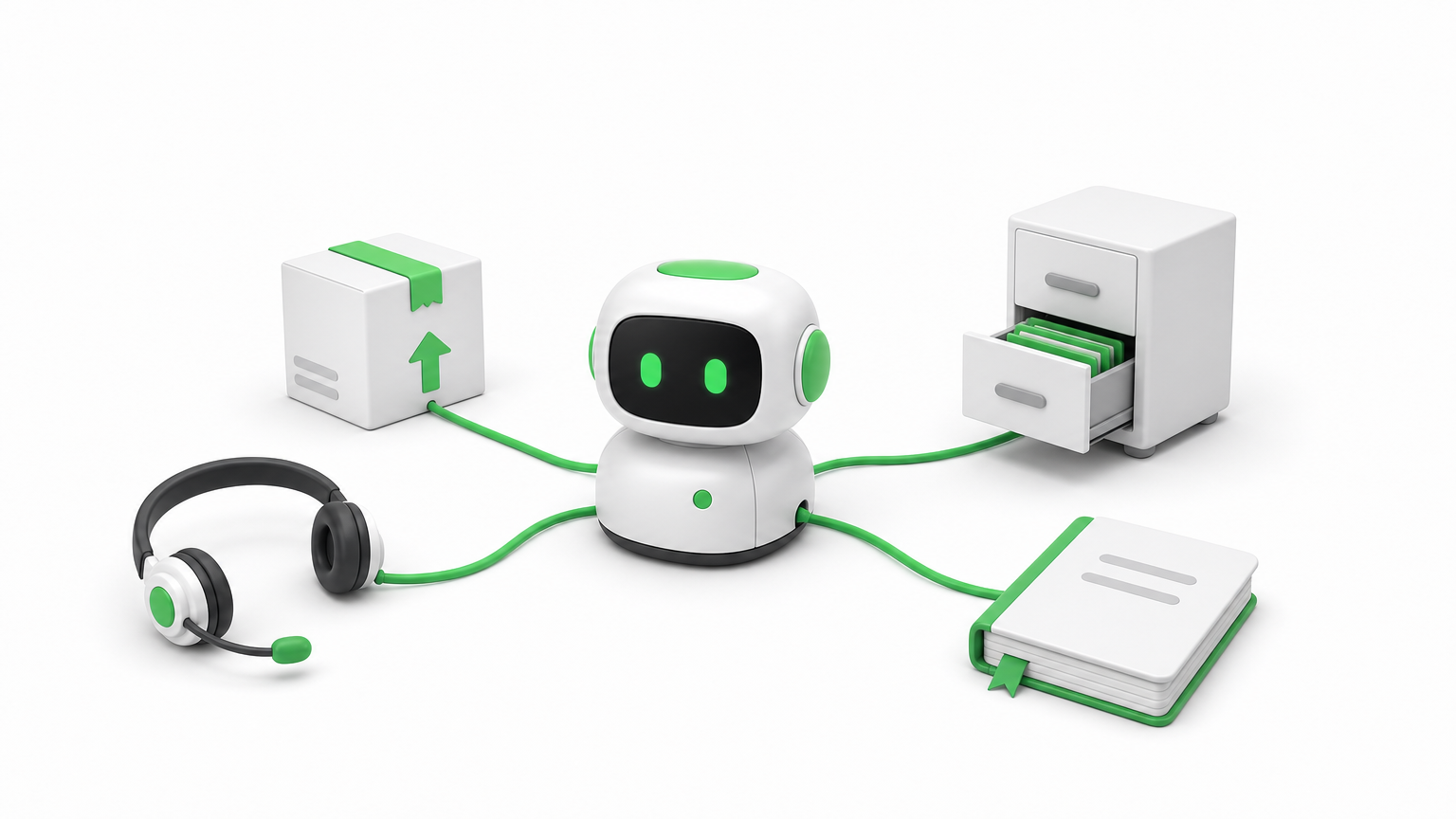
AI agents integration is the work of connecting an AI agent to the data sources, tools, and business systems it needs, so it can read current information and take real actions instead of only generating text. In practice, that means giving the agent secure access to your CRM, help desk, database, or ERP through APIs, webhooks, or a standard such as the Model Context Protocol, with permissions that match what the agent is allowed to do.
A language model on its own knows only its training data and whatever you paste into the prompt. Integration is what lets it check an order, update a ticket, or route a lead. This guide explains why integration decides whether an agent works, how to build it step by step, which methods and platforms fit which job, and how to keep the result secure.
Hatzs Dimensions builds AI agents and the data and integration layers behind them for companies ranging from Series A startups to Fortune 500 teams. The advice below comes from that production work.
Why AI agents integration matters
Integration matters because an agent is only as useful as the systems it can see and change. Without it, even a strong model guesses, and those guesses show up as wrong answers your users notice.
An agent without integrations can only talk
An unconnected agent works from its training data and the text in the prompt. It cannot know that a customer’s order shipped this morning, that a contract renewal is due Friday, or that an invoice was already paid. Integration fixes this in two directions. Read access gives the agent current context, and write access lets it act on that context by updating a record or sending a message.
This is also what separates an agent from a chatbot. A chatbot answers a question. An agent completes a task across several systems. That is why ai agents integration is usually the hardest and most valuable part of an agent project, more than the choice of model.
An agent is only as capable as the systems it can read and the actions it is allowed to take.
What integration changes in practice
The same model behaves very differently depending on what you connect it to. Here is how the connections shape four common AI agent use cases.
Agent
Reads from
Acts on
Support agent
Help desk, order system, knowledge base
Drafts replies, updates ticket status, starts a refund request
Flags mismatched invoices, prepares entries for review
Notice that every row needs at least two systems. Real business processes rarely live in one application, so the value of the agent grows with the number of systems it can coordinate.
Where the payoff shows up
Connected agents tend to pay off in three places. Accuracy improves because answers come from live records, not memory. Speed improves because the agent handles the handoffs between tools that people used to do by hand. Auditability improves because every read and write goes through a connection you can log and review.
How to integrate AI agents with your systems
Integrate one workflow at a time. Define the job, list what the agent must read and write, connect it with the least access that works, test on real data, and release it behind human approval before you loosen the controls.
Define the job and map every read and write
Start with a single workflow that has a measurable result, such as first-response time on support tickets. Then list every piece of data the agent must read and every action it must write. That list is your integration spec. If it includes a system that nobody on your team can describe, you have found your first risk.
The seven steps to build and release
Follow this order. It keeps the scope small and surfaces problems while they are cheap to fix.
Pick one workflow with a clear owner and a number you can track.
List the systems and the exact reads and writes the agent needs.
Set up authentication with OAuth or scoped API keys, using the minimum permissions.
Define each tool with strict input and output schemas, so the agent never guesses parameters.
Test on real, messy data, including empty fields, duplicates, and failed calls.
Release behind human approval for any action that changes money, access, or customer records.
Monitor and widen, adding autonomy only where the logs show the agent is reliable.
Most teams rush step 5 and pay for it later. Test data is clean, and production data is not.
Start narrow, connect with the least access that works, and widen only after the agent earns trust.
Clean up messy data before the agent sees it
Agents misread ambiguous data. A field called "status" could mean employment status in one system and record status in another, and an agent that picks the wrong meaning can take the wrong action. The fix is to normalize data into a consistent schema and describe every field in plain language inside the tool definition.
Return only the fields the task needs. Smaller, cleaner responses cut cost and latency, and they leave less room for the model to wander. For retrieval-heavy agents, this cleanup also makes the embeddings you store more accurate.
Choosing integration methods and platforms
The right method depends on how predictable the workflow is. Use direct APIs, webhooks, or a unified API for fixed workflows, and use tool calling through MCP when the agent must decide which tool to use. For most teams, a platform that manages authentication and logging saves months.
The main methods side by side
Method
Best for
Watch out for
Direct API calls
Core systems you control and depend on
Maintenance when vendors change endpoints
Webhooks
Real-time triggers such as a new qualified lead
Retries, duplicate events, and signature checks
SDKs
Vendors that provide ready-made client libraries
Version drift and uneven vendor support
MCP servers
Agents that choose tools dynamically
Server quality varies, and token handling needs care
Low-code iPaaS (Zapier, n8n, Workato)
Fast, visible workflows and internal automation
Limited custom logic and little data normalization
Unified API
Many apps in one category, such as HR or CRM
Narrow coverage and limited access to custom fields
Agent integration platform
Managed authentication, tool execution, and logs
Added vendor dependency and cost
Most production systems combine two or three of these. An agent might read through an API, receive events through webhooks, and send notifications through a low-code workflow.
A simple rule for picking
Ask whether the steps are known in advance. If the workflow is static, as in "when a ticket arrives, look up the order, then draft a reply," a plain API or unified API integration is cheaper, faster, and easier to test. If the agent has to decide between many tools based on a free-form request, a tool-calling approach through the Model Context Protocol fits better.
Predictable flows should stay predictable. Do not give an agent freedom where a fixed sequence would do the job.
Use fixed integrations for fixed workflows, and give the agent tool choice only where the task truly varies.
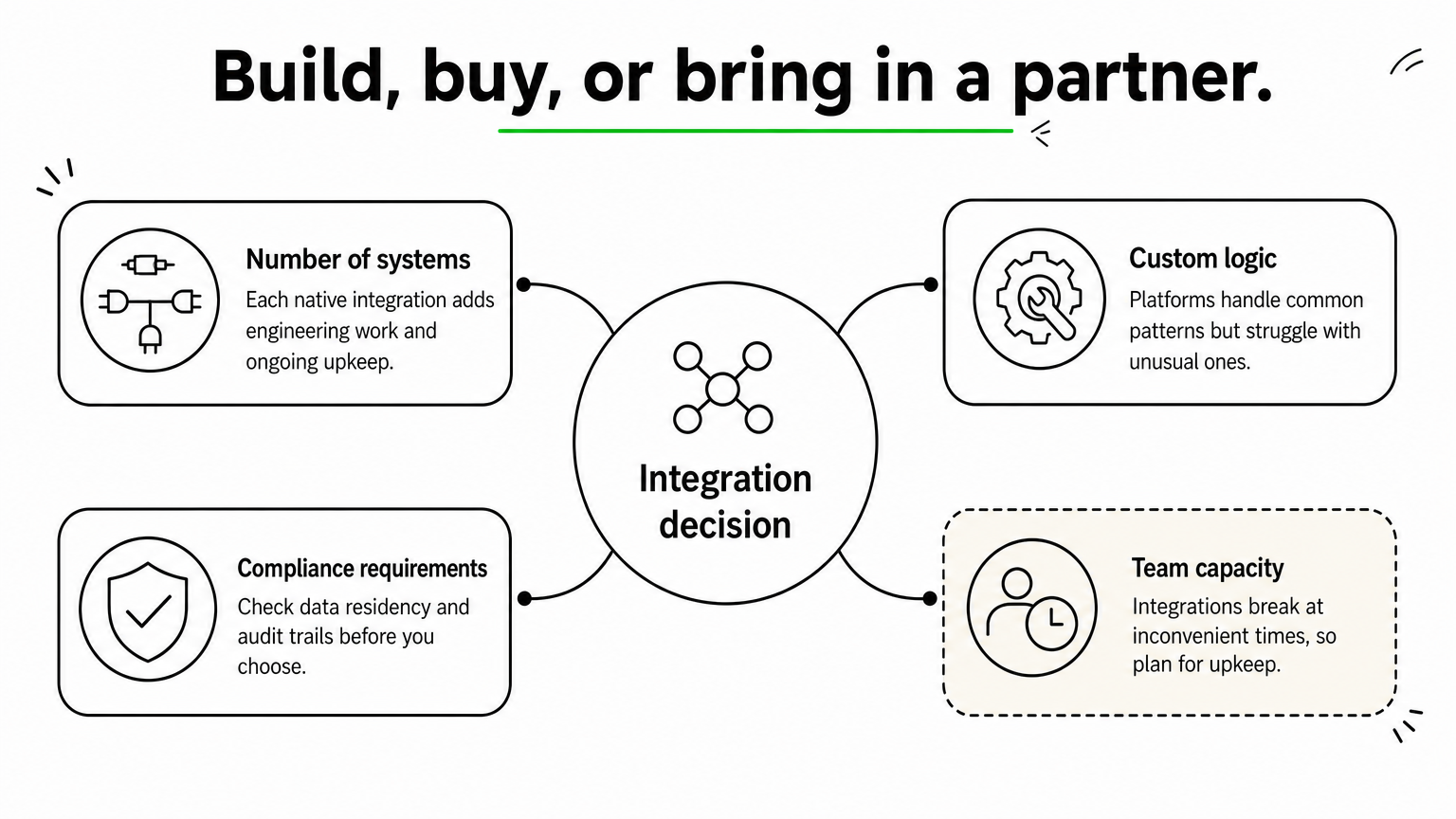
Build, buy, or bring in a partner
Weigh four factors. Count the number of systems you must connect, since each native integration takes real engineering and ongoing upkeep. Consider how much custom logic you need, because platforms handle common patterns well but struggle with unusual ones. Check compliance requirements such as data residency and audit trails. Finally, be honest about team capacity, because integrations break at inconvenient times.
If your engineers are better used on the product itself, buy the commodity connections and build only the parts that differentiate you. A partner with senior engineers can design that split with you and own the delivery.
Securing and operating integrated agents
An integrated agent holds real access to real systems, so security is part of the design, not a final check. Enforce user-level permissions, treat outside content as untrusted, and log everything the agent does.
Respect permissions on every call
The agent must never reveal or change anything the requesting user could not reach directly. If a user asks about a file they cannot open, the agent should return nothing about it, regardless of how the request is phrased. Pass the user’s identity through to each connected system where possible, and give any shared service account the least privilege it needs.
Treat outside content as untrusted
Agents read emails, tickets, documents, and web pages, and any of those can contain hidden instructions. This is called prompt injection, and it has caused real data leaks in agent setups that connected to code repositories. Defend against it by keeping retrieved text separate from instructions, allowlisting the tools each agent may call, and requiring human confirmation for high-risk actions such as deleting records or sending payments.
Monitor, retry, and plan for change
Integrations fail. Tokens expire, rate limits hit, and vendors change their APIs. Build for that from day one:
Log every tool call with its inputs, outputs, and errors.
Retry with backoff, and make write actions idempotent so a retry never creates a duplicate.
Alert on error spikes and on unusual volumes of reads or writes.
Track API versions and test again whenever a connected vendor announces a change.
If you cannot see what your agent did and why, you cannot trust it with more access.
Start with one connected workflow
AI agents integration comes down to a few decisions. Give the agent current data to read and limited actions to take. Match the method to how predictable the workflow is. Test on messy data, enforce permissions on every call, and log everything. Teams that follow this order ship agents that people actually rely on.
Pick the workflow where a missing connection costs you the most today, and build that one first. If you want a senior team to design and run the integration layer with you, have Hatzs Dimensions build your AI agent integrations from discovery through deployment and support.
You keep hearing that autonomous AI agents will run workflows on their own, but vendor pages rarely say what that means in practice. Some describe a chatbot with a few plugins. Others promise a digital employee. If you are a CTO or product leader deciding where to invest, that gap makes it hard to judge what is real and what is demo-ware.
Here is the short answer. An autonomous AI agent is software that takes a goal, plans the steps, uses tools and data, and acts with little or no human prompting. It differs from a standard assistant because it decides what to do next, not just what to say. It also differs from agentic AI, which is the broader design approach that agents are built on.
This article walks through how these agents work, from perception and planning to tool use and memory. You will see how they compare with agentic AI, real examples across industries, and the top tools worth evaluating. We have shipped enterprise AI systems into production for 7+ years, so we also flag what tends to break once an agent leaves the prototype stage.
Why autonomous AI agents matter for your business
From answering questions to finishing work
Most automation you already own follows fixed rules. A script moves a file, a bot fills a form, and when something unexpected shows up, it stops and waits for a person. Autonomous AI agents handle the unexpected by reasoning about the goal and choosing another route. That shifts the unit of automation from a single task to a whole outcome.
Picture an insurance claims queue. A rules engine can route a document. An agent can read the claim, check the policy, request a missing photo, and pass along only the cases that need an adjuster’s judgment. Your people review exceptions instead of touching every item, which is where the capacity gain comes from.
Where the value shows up
The payoff is clearest in workflows that are high volume, multi-step, and tied to several systems. Those are the jobs where people spend hours copying context between tools. Cost reduction, faster response times, and more capacity without more headcount are the three gains we see most often.
These are results from Hatzs Dimensions client projects:
Area
Outcome
Insurance operations
30% lower operations costs
Lead handling
300% more lead conversion capacity
Customer engagement
40% higher engagement
What you need to price in
Autonomy cuts both ways. An agent that can issue refunds can also issue the wrong refunds, and a mistake in step two carries into steps three through ten. Errors compound across steps, and every tool you hand the agent widens cost, security, and compliance exposure.
The more an agent can do without you, the more you need to know about what it did and why.
So treat the business case as two columns, not one. Savings come from removing manual work, and the offsetting spend goes to monitoring, access controls, and human review for risky actions. Teams that budget for both ship agents that stay in production. Teams that budget only for the first column tend to pause after the first costly mistake.
How autonomous AI agents work
Under the hood, autonomous AI agents run a loop instead of answering once. A language model sits at the center, but the model alone is not the agent. The agent is the model plus the tools, memory, and rules wrapped around it.
The core loop
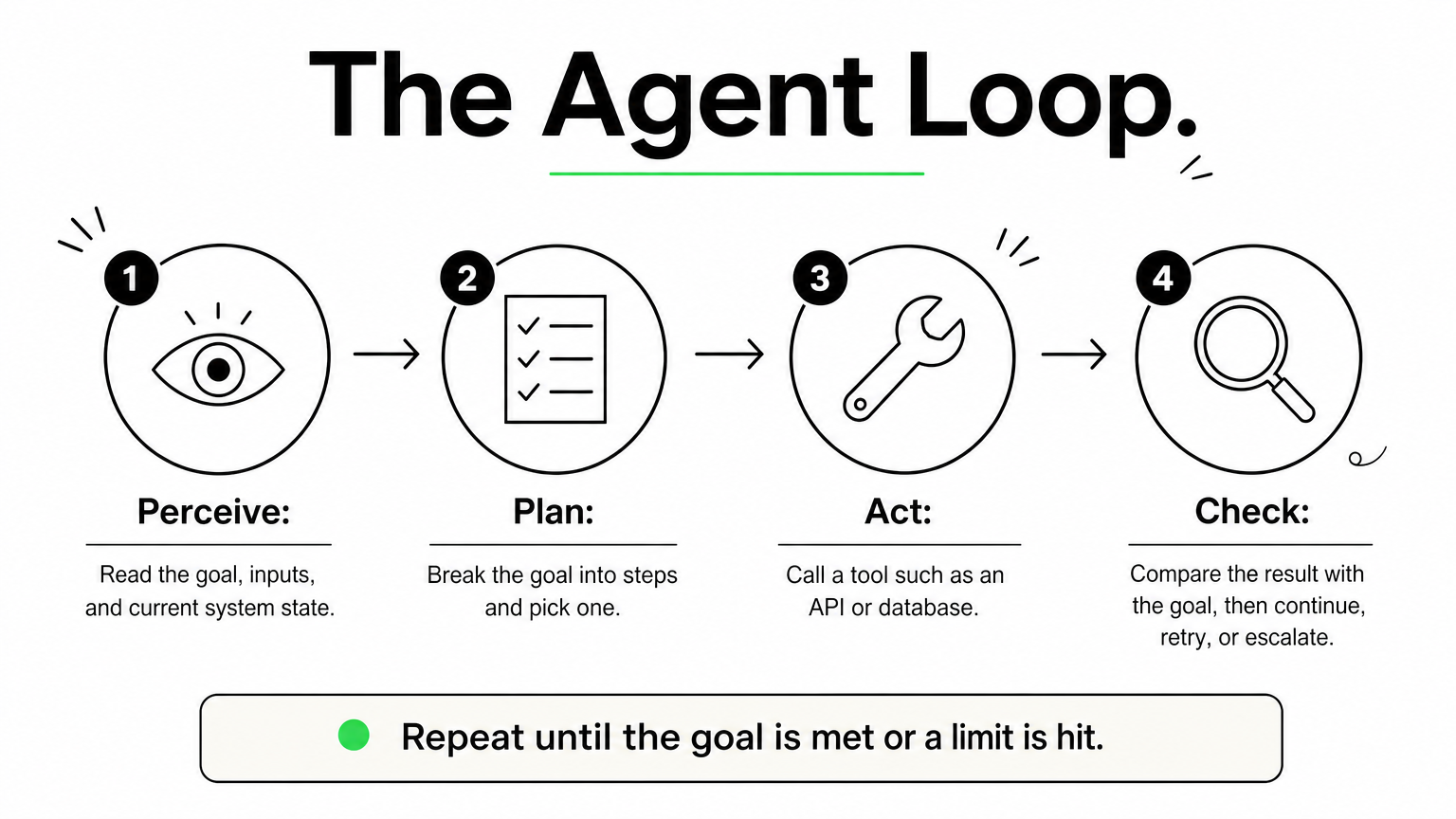
Every agent cycles through the same four moves until the goal is met or it hits a limit you set.
Perceive: read the goal, the inputs, and the current state of your systems.
Plan: break the goal into steps and pick the next one.
Act: call a tool, such as an API, a database query, or a browser.
Check: compare the result with the goal, then continue, retry, or escalate to a person.
Most production failures happen in the check step. An agent that cannot tell a failed action from a successful one will keep going confidently in the wrong direction, and that is how small errors compound.
An agent is only as autonomous as its ability to verify its own work.
The building blocks
Four components make that loop possible, and you should be able to name each one in any agent you evaluate.
Component
Job
Example
Reasoning model
Plans and decides
A large language model
Tools
Take real actions
CRM API, SQL, email
Memory
Holds context across steps
Task log, vector database
Guardrails
Limit what it may do
Spending caps, approval gates
When a vendor demo looks impressive, ask about the last two rows. Memory and guardrails separate a prototype from something you can safely leave running overnight.
Autonomous AI agents vs. agentic AI and other agents
Autonomous agents and agentic AI
Agentic AI is a way of building systems: you give a model a goal, let it plan, call tools, and adapt to results. An autonomous agent is a specific system built that way and allowed to run with minimal supervision. Some agentic systems keep a person approving every step, so they are agentic without being autonomous.
Agentic describes how a system is designed. Autonomous describes how much freedom you give it.
That distinction matters when you read vendor claims. A product marketed as "agentic" may still stop and ask you before every action.
How other agent types compare
The table below places autonomous agents next to the tools they are most often confused with.
Type
How it decides
Example
Chatbot or assistant
Responds to each prompt, takes no independent action
FAQ bot
Rule-based bot (RPA)
Follows fixed scripts, stops on surprises
Invoice-entry bot
Copilot
Suggests, and you approve
Code completion
Autonomous agent
Plans and acts toward a goal
Claims triage agent
Multi-agent system
Several agents split and review the work
Researcher, writer, and reviewer agents
Most teams should treat autonomy as a dial, not a switch. Start with a copilot that drafts while you approve, then move low-risk actions to full autonomy once your logs show consistent accuracy over a few hundred runs. Refunds, payments, and anything customer-facing can stay behind an approval gate much longer.
Real-world examples of autonomous AI agents
Examples across industries
Autonomous AI agents already run in production, mostly where work is repetitive and spans several systems. The table shows the use cases by industry we see most often, along with the part people still own.
Handles scheduling and prior-authorization paperwork
Staff make clinical decisions
Logistics
Reroutes shipments when delays hit
Dispatchers handle exceptions
Software
Triages bug reports and drafts fixes
Engineers review code
Notice what these have in common. Each agent has bounded authority, and a named person owns the exceptions. None of them is a free-roaming digital employee.
The best first agent has a narrow job, clear limits, and a person who owns the exceptions.
Choose based on integration depth and logging, not demo polish. Run a two-week pilot on one real workflow, and check whether you can replay every action the agent took. If you cannot, keep looking.
How to evaluate and deploy autonomous agents safely
Safe adoption comes down to two habits: judging the agent before you commit, and widening its authority only as evidence builds. The checks below work whether you buy a platform or build your own.
Questions to ask before you commit
Put the same five questions to every vendor and internal team, before any pilot starts:
Can you replay every action, input, and tool call?
Which permissions does the agent hold, and can you limit them per task?
What triggers escalation to a person?
How is accuracy measured, and on whose data?
Where does your data go, and who can see it?
Vague answers to the first two are a dealbreaker. If you operate in healthcare, banking, or insurance, add your compliance team to this AI governance and compliance review on day one, not after the pilot.
Roll out autonomy in stages
Most failed pilots hand an agent too much freedom too early. Autonomous AI agents should earn trust in steps, with a human checkpoint at every stage:
Shadow mode: the agent proposes actions and people perform them. Compare its choices with theirs.
Approval mode: the agent acts only after a person signs off.
Limited autonomy: the agent handles low-risk actions alone, under spending caps and rate limits.
Full autonomy: the agent runs on its own, with alerts and a tested kill switch.
Earn autonomy with logged results, not with a good demo.
Move up a stage only when your logs show steady accuracy across a few hundred runs. Drop back a stage after any serious incident.
Finally, give the agent an owner. One named person should watch the dashboards, review exceptions, and decide when to expand scope. Without that owner, monitoring becomes nobody’s job, and quiet failures pile up unnoticed.
Where autonomous agents fit next
Autonomous AI agents are not digital employees, and they are not smarter chatbots. They are goal-driven software that plans, acts, and checks its own work inside limits you set. The teams that get value from them pick one narrow, high-volume workflow, keep a person on the exceptions, and widen authority only as their logs prove accuracy.
That is the whole playbook. Understand the loop, separate agentic design from real autonomy, and ask hard questions about replay, permissions, and escalation before you sign anything. Do that, and autonomy becomes a dial you control instead of a risk you inherit. Skip it, and errors compound faster than savings.
If you want a senior team to help scope your first pilot, talk to Hatzs Dimensions about building autonomous AI agents that are production-ready, with guardrails and monitoring included from day one.
People use the terms interchangeably, and that causes real problems when you scope a project or evaluate a vendor. If you are comparing AI agents vs agentic AI, the short version is this: they are not the same thing, and mixing them up leads to mismatched budgets and expectations.
An AI agent is a single software component built to complete a defined task, such as answering support tickets or pulling data from a CRM. Agentic AI is the broader approach, where one or more agents plan, decide, and act toward a goal with minimal human direction. Think of agents as the workers and agentic AI as the system that coordinates them. Both differ from generative AI, which creates content when prompted but does not act on its own.
Below, we define each term, show how they relate, and walk through practical examples. We also explain where generative AI fits. Our senior engineers have shipped enterprise AI systems into production for over 7 years, so the guidance here comes from real deployments, not theory. By the end, you will know which one your use case calls for.
Why the difference between AI agents and agentic AI matters
Most teams first hit this distinction in a budget meeting. Someone asks for "an agentic AI solution," engineering hears "a chatbot with a few tools," and finance hears "a platform." The label sets the scope, and a wrong label means a wrong estimate. Settling the agentic AI vs AI agents question early also keeps your project plan honest before any code is written.
It changes what you scope and budget
A single AI agent has a narrow job, a short list of tools, and a clear finish line. Think of an agent that classifies inbound support tickets and drafts replies. You can scope it in a short discovery phase and test it against a fixed set of real examples.
Agentic AI is a different build. You are designing several agents, the logic that hands work between them, shared memory, and rules for when the system must stop and ask a person. The orchestration layer takes most of the effort, not the individual agents. Teams that price an agentic system like a single agent usually run out of budget at integration.
It changes your risk profile
An agent that drafts a reply can be wrong in a small, visible way. A system that plans its own steps, calls your billing API, and updates customer records can be wrong in ways that compound before anyone notices. Autonomy raises the cost of every mistake, so the controls you need grow with it.
The more freedom a system has to act, the more it needs guardrails, logging, and a human checkpoint.
The table below shows how the same questions get different answers depending on what you are building.
Question
Single AI agent
Agentic AI system
Scope
One defined task
A goal that spans many tasks
Main build effort
Prompts, tools, evaluation
Orchestration, memory, guardrails
Impact of an error
Usually limited to one output
Can cascade across steps and systems
Oversight needed
Spot checks and sampling
Audit trails and approval gates
Regulated industries feel this most. In banking, insurance, and healthcare, compliance teams ask what a system is allowed to do on its own. "It’s an agent" does not answer that. They want defined decision boundaries and a clear AI governance record of who approved what.
It changes how you evaluate vendors
Vendors use both terms loosely. A product with one model call and a button can end up marketed as "agentic." Four questions cut through the pitch:
Does it plan multiple steps on its own, or follow a fixed script?
Which systems can it act on, and with what permissions?
What happens when it fails or is unsure?
Can you see and audit every action it takes?
Clear answers tell you whether you are buying a capable single agent or a coordinated system. Both can be the right purchase. The problem starts when you pay for one and expect the other.
How to tell AI agents and agentic AI apart in practice
Definitions only help if you can apply them to a real system. When you review a demo, an architecture diagram, or your own backlog, run a few simple tests instead of trusting the label. The tests below settle most debates about AI agents vs agentic AI in a few minutes, and they look at behavior, not marketing.
Four tests you can run on any system
Each test asks what the system does, not what the vendor calls it. Count how many rows lean right in the table. One is a hint. Three or four means you are dealing with agentic AI.
Test
Leans toward an AI agent
Leans toward agentic AI
Goal
A defined task, such as "classify this ticket"
An outcome, such as "resolve this customer’s issue"
Planning
Follows a path someone designed
Builds and revises its own steps
Coordination
One component does the work
Several agents hand work to each other
Memory
Context lasts one session
State persists across tasks and days
Planning is the most telling test. An agent walks a path that an engineer drew. An agentic system chooses its own path, changes it when a step fails, and decides when the goal is met.
One request, two designs
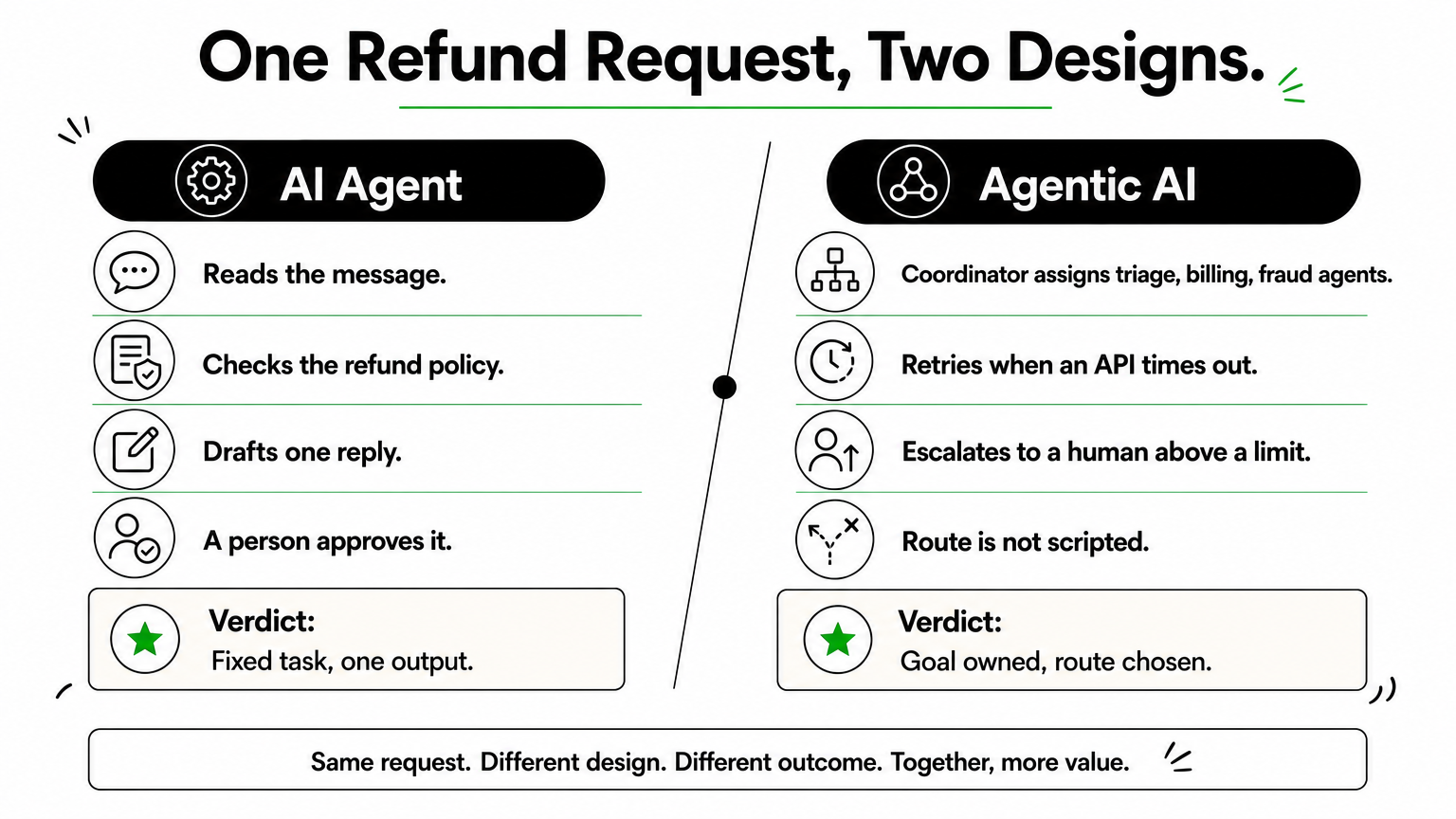
Consider a customer refund request. Built as an AI agent, the system reads the message, checks the refund policy, and drafts a reply for a person to approve. The task is fixed and the output is one reply.
Agentic AI treats the same request as a goal: resolve this refund. A coordinator assigns a triage agent, a billing agent, and a fraud-check agent, retries when an API times out, and escalates to a human when the amount passes a set limit. Nobody scripted the exact order of those steps.
If one component finishes a named task, it is an agent. If the system chooses the route to an outcome, it is agentic AI.
Where the line blurs
Plenty of products sit in the middle. A single agent with a loop and five tools can plan within one task without any coordination. Call it an agent with agentic traits, and ask what it can do without a person. That answer, not the label, should drive your risk review and your budget.
How generative AI, AI agents, and agentic AI compare
Three terms get blurred together in most vendor decks, so it helps to place them on one scale. Generative AI creates, an AI agent acts, and agentic AI pursues a goal. Each step up adds capability, and each adds risk.
Generative AI produces, it does not act
Generative AI takes a prompt and returns content such as text, code, images, or summaries. Ask it for a refund email and you get a polished draft. It does not send the email, check the refund policy, or notice that the customer has written twice. A person carries every output into the next system, so a human stays in the loop for each step.
Side-by-side comparison
The table shows where the three differ on the points that affect cost and oversight.
Generative AI
AI agent
Agentic AI
Core job
Create content
Complete a defined task
Reach a goal across tasks
Starts when
You write a prompt
A trigger or request arrives
A goal is set
Acts on systems
No
Yes, through a few tools
Yes, across many systems
Planning
None
Follows a designed path
Builds and revises its own plan
Human role
Uses every output
Approves or samples
Sets goals and limits
Notice that the jump from generative AI to an agent is about access to tools. The jump from an agent to agentic AI is about who decides the route. Those are different engineering problems with different price tags.
They stack, they do not compete
Most AI agents run on a generative model. The model reads the request and reasons about it, and the agent wraps that model with instructions, tools, and a task. Agentic AI then coordinates several of those agents. The same model can sit under all three, which is why the labels confuse buyers.
Generative AI is the engine, an AI agent is a vehicle built around it, and agentic AI is the fleet with a dispatcher.
So the agentic AI vs AI agents question is about scope, not about which model you license. You can start with one agent, prove it on real data, and add coordination later. Building in layers lets you add autonomy only where your testing shows it is safe.
Real-world examples of AI agents and agentic AI
AI agent examples make the split concrete. Across industries the pattern repeats: an agent owns one task, while an agentic system owns an outcome.
Examples of single AI agents
Most production AI today is agents. Each has a single trigger, a few tools, and a clear finish line, so you can measure accuracy on a fixed test set before launch. Typical examples:
A support agent that tags tickets and drafts replies
An accounts payable agent that extracts invoice lines and posts them to your ledger
A sales agent that qualifies inbound leads and books meetings
Examples of agentic AI systems
Agentic AI appears where work crosses systems and the route changes case by case. The table shows one industry at both levels, with the agentic version owning the whole outcome.
Industry
AI agent
Agentic AI
Insurance
Extracts data from a claim form
Runs a claim from intake to payout recommendation, checks coverage, flags fraud, routes exceptions
Logistics
Predicts a delivery delay
Reroutes the shipment, rebooks the carrier, notifies the customer
Banking
Summarizes a KYC document
Runs the onboarding review, requests missing documents, escalates edge cases
The difference between agentic AI vs AI agents is less about intelligence and more about how much of the journey the system owns.
Start narrow, then connect
Nothing in the agentic column is exotic. Each row is several agents plus coordination, memory, and escalation rules. The practical path is to deploy one agent first, prove it on real data, then connect it to others.
Also watch for cosmetic claims. A demo that runs a scripted five-step flow is an agent with a long script. Ask the vendor to show the system recovering from a failed step. If it cannot, it is not choosing its own route.
How to decide which approach fits your business
Choosing between AI agents vs agentic AI is a business decision before it is a technical one. Three questions drive it: how predictable the work is, how costly a mistake would be, and whether your systems are ready. Start with the work, not the technology, because the right answer changes from one process to the next inside the same company.
Match the approach to the work
Look at the process you want to improve and count the decisions inside it. Fixed steps with a clear finish line point to an agent. Variable routes across several systems point to agentic AI.
Choose a single AI agent when the task repeats, inputs look alike, and success is easy to measure. Invoice extraction and ticket tagging fit this.
Choose agentic AI when each case needs different steps and the goal is an outcome, such as handling a claim or recovering a delayed shipment.
Choose neither yet when the process is undocumented. If your own team cannot describe the steps, software cannot learn them.
Check your readiness
Next, test your AI readiness by checking whether your foundations can support autonomy. An agent needs clean access to the right data and a few reliable APIs. An agentic system also needs shared memory, logging, and approval gates, and those take real engineering time to build and test.
Risk tolerance matters just as much. If an error touches money, health records, or legal exposure, limit what the system can do alone and keep a person at the final checkpoint. Teams in banking and insurance often start with agents that recommend, then let them act only after months of clean results.
Give a system the least autonomy that solves the problem, then grant more only as your evidence builds.
Match the engagement model
Budget shape follows scope. A single agent with a defined task suits a fixed-price project, since you can test it against real examples and know the finish line. An agentic system grows as you add agents, tools, and rules, so a dedicated team usually fits better. Either way, pilot one workflow first. Measure error rate, time saved, and how often a person had to step in, then decide whether the next workflow earns more freedom.
Common misconceptions, including ChatGPT and agent types
Three myths come up in almost every scoping call. Each one leads to the wrong purchase or the wrong level of oversight, so it pays to clear them up before the AI agents vs agentic AI discussion goes any further.
Myth: ChatGPT is agentic AI
A plain chat session is generative AI. You type a prompt, it returns text, and you decide what happens next. Nothing acts on your systems and nothing pursues a goal after the reply appears.
The line moves when tools enter the picture. Give a model a browser, your calendar, or code execution plus a task, and it behaves like a single AI agent. Even then it is one agent. It is not a coordinated system with shared memory, escalation rules, and several specialized agents.
Myth: agentic means no humans
Agentic describes who chooses the route, not who is accountable. Production systems keep approval gates on anything touching money, records, or legal exposure. Teams that remove people entirely usually put them back after the first costly error.
Autonomy is a setting you tune per workflow, not a switch you flip for the whole system.
Myth: the classic agent types are the same as agentic AI
Textbook AI, such as Russell and Norvig’s Artificial Intelligence: A Modern Approach, sorts agents into five types. These describe how one agent decides, not how many agents work together.
Type
How it decides
Example
Simple reflex
Fixed if-then rules on current input
Spam filter rule
Model-based
Rules plus a memory of the world
Inventory monitor
Goal-based
Picks actions that reach a target
Route planner
Utility-based
Weighs trade-offs to maximize a score
Dynamic pricing engine
Learning
Improves from feedback
Recommendation engine
A goal-based agent is still one agent. Agentic AI is a system-level property: several agents, any of these types, coordinated toward an outcome. So when someone says "it’s a learning agent, so it’s agentic," ask how many components share the goal and who decides the route. Those two answers settle it.
Putting the two terms in their place
The difference comes down to scope. An AI agent completes a defined task, while agentic AI coordinates several agents toward a goal and chooses its own route. Generative AI sits underneath both, creating content but not acting. Once you see that, the AI agents vs agentic AI debate stops being about labels and starts being about how much of an outcome you want a system to own.
For your own projects, test behavior instead of trusting vendor names. Start with one agent, prove it on real data, and add autonomy only where results justify it. Give a system the least autonomy that solves the problem, and keep human checkpoints wherever money, records, or compliance are at stake.
If you are weighing agentic AI vs AI agents for a real workflow, our senior engineers can help you size it. You can scope an AI agent pilot with Hatzs Dimensions and get a plan that fits your process and risk level.
Every engineering team is testing open source ai coding agents right now, and most are drowning in options. GitHub’s ecosystem alone lists dozens of forks and clones, each claiming to write, debug, or refactor code faster than the last one. If you’re a CTO or engineering lead trying to pick a tool that won’t get abandoned in six months, that noise gets expensive fast.
This list cuts through the marketing and answers the real question: which open source agents actually hold up in production workflows. We ranked each tool on code quality, community activity, integration depth, and how well it handles real repositories rather than toy demos. You’ll see where each one fits, whether that’s solo development, enterprise codebases, or regulated environments that need auditable, self-hosted AI.
We built this guide from the same lens we use when advising clients on moving AI from hype to real business impact at Hatzs Dimensions: production readiness matters more than hype. Below you’ll find eight agents worth testing in 2026, what makes each one different, and practical notes on where they fall short so you can match the tool to your actual workflow instead of the demo video.
1. OpenHands for scaling agent workflows across teams
OpenHands (formerly OpenDevin) is the closest thing the open source world has to a full engineering department in a box. Instead of a single chat window that suggests code, it runs autonomous agents that can plan a task, write code, execute it in a sandboxed environment, and iterate on the results without you babysitting every step. That distinction matters if you’re evaluating open source ai coding agents for anything beyond quick snippets.
How it works
OpenHands spins up an isolated Docker container for each session, giving the agent a real shell, a real file system, and the ability to run tests, install dependencies, and browse the web for documentation. The agentic loop is the core idea: the agent breaks a ticket into subtasks, executes them, checks the output against expected behavior, and self-corrects before handing you a diff. You can run it through a CLI, a lightweight web UI, or wire it into CI so agents pick up issues automatically.
The teams getting the most value from OpenHands treat it like a junior engineer with unlimited patience, not a magic autocomplete.
Who it’s for
Engineering leads managing multiple repositories and backlog items are the natural fit here, especially teams already comfortable with containerized dev environments. It also suits organizations experimenting with multi-agent orchestration, where one agent reviews another’s output before a human ever sees the PR. Solo developers can use it too, but the setup overhead (Docker, API keys, sandbox configuration) is more than you need for a single-file script.
Standout features
What separates OpenHands from lighter-weight assistants is its benchmark performance and its willingness to let the agent fail safely inside a sandbox rather than touching your live environment directly.
SWE-bench performance: OpenHands has posted some of the strongest open source results on SWE-bench, a benchmark that tests whether agents can resolve real GitHub issues end to end.
Multi-agent delegation: You can configure specialized sub-agents for planning, coding, and browsing, each handling a different part of the task.
Event stream architecture: Every action and observation is logged as an event, which gives you a full audit trail of what the agent did and why, useful for teams that need to explain AI-driven changes to compliance reviewers.
Extensible tool integration: Agents can call custom tools, hit internal APIs, or query documentation, which makes it adaptable to enterprise stacks rather than locked into a fixed toolset.
Pricing and licensing
OpenHands is released under the MIT license, so you can self-host, modify, and redistribute it without licensing fees. The catch is that it isn’t a free lunch on the model side. You still pay for whatever LLM backend you connect, whether that’s an API from a commercial provider or a self-hosted open weight model running on your own GPUs. Budget for token costs accordingly, since autonomous multi-step agents burn through context far faster than a single chat completion. For teams weighing self-hosted infrastructure against managed AI deployment, this is exactly the kind of tradeoff we help clients model out at Hatzs Dimensions, before they commit engineering hours to a rollout.
2. OpenCode for terminal-first development
OpenCode strips away the browser tabs and IDE panels and puts the agent right where a lot of senior engineers already live: the terminal. It’s built for developers who find switching between a chat window and their editor slows them down more than it helps, and it treats the command line as a first-class interface rather than an afterthought bolted onto a GUI product.
How it works
Running OpenCode drops you into an interactive terminal UI (TUI) where you describe a task in plain language and watch the agent read files, propose diffs, and execute shell commands in real time. It supports multiple LLM providers through a simple config file, so you can point it at Anthropic, OpenAI, or a local model without touching source code. Sessions are scriptable too, which means you can pipe tasks in from other tools or trigger runs as part of a build pipeline.
If your team already lives in tmux and vim, OpenCode meets you there instead of asking you to change habits.
Who it’s for
OpenCode fits developers and small teams who spend most of their day in a shell and resent context-switching to a browser for AI help. It’s a strong match for backend engineers working on servers without a display, DevOps teams automating repetitive fixes, and anyone who prefers keyboard-driven workflows over point-and-click interfaces. Enterprises running headless build servers will also find it easier to integrate than GUI-dependent alternatives.
Standout features
Speed and low overhead define OpenCode’s appeal, and its feature set reflects a preference for minimalism.
Provider-agnostic model support: Swap between hosted APIs and local models without rewriting configs.
Session persistence: Resume interrupted tasks without losing context.
Lightweight footprint: Runs on modest hardware, no GPU required unless you’re self-hosting the model.
Scriptable automation: Integrates cleanly into existing CI/CD pipelines.
Pricing and licensing
OpenCode is open source and free to self-host. As with most open source ai coding agents, model costs are separate and depend entirely on which provider you connect.
3. Cline for VS Code power users
Cline lives inside VS Code as an extension, which makes it the easiest entry point on this list if your team already builds there every day. Rather than asking you to learn a new interface or jump into a terminal, it puts an autonomous coding agent directly in the sidebar, reading your open files, running commands, and proposing changes you approve before they touch disk. For teams comparing open source ai coding agents that need zero workflow disruption, Cline is the pragmatic choice.
How it works
Cline works through a plan-and-act loop: you describe what you want, it reads relevant files in your workspace, drafts a plan, then executes changes step by step while showing you a diff at each stage. It can run terminal commands, install packages, and even take screenshots of a running app to check its own work visually. Every action requires your approval by default, though you can loosen that for trusted, low-risk tasks. It connects to Anthropic, OpenAI, or local models through Ollama, so you’re not locked into one LLM provider.
Cline’s real advantage isn’t intelligence, it’s that it never leaves the editor you already trust.
Who it’s for
Cline suits developers who want agentic capability without abandoning VS Code’s ecosystem of extensions, linters, and debuggers. It’s a good fit for frontend and full-stack teams iterating quickly on UI work, since the screenshot-checking feature catches visual bugs a text-only agent would miss. Freelancers and small shops also gravitate toward it because setup takes minutes, not a DevOps sprint.
Standout features
Cline’s approval-gated design and visual feedback loop set it apart from agents that act first and explain later.
Human-in-the-loop approvals: Nothing executes without your sign-off unless you explicitly enable auto-approve.
Browser and screenshot tools: The agent can preview a running app and self-correct based on what it sees.
Model Context Protocol support: Extend the agent with custom tools via MCP servers.
Checkpoints: Roll back to any prior state if a change goes sideways.
Pricing and licensing
Cline is Apache 2.0 licensed and free to install from the VS Code Marketplace. You pay only for API usage on whichever model provider you connect, with no subscription fee to Cline itself.
4. Aider for git-native pair programming
Aider treats your codebase as a conversation with git at the center, not an afterthought. Every change the agent makes gets committed automatically with a descriptive message, so your history reads like a changelog written by a very disciplined pair programmer. Among open source ai coding agents, Aider stands out for how tightly it couples itself to version control rather than treating commits as a manual cleanup step you do later.
How it works
You run Aider from the command line inside any git repository, and it builds a map of your codebase using tree-sitter to understand function signatures and file relationships without loading everything into context. When you describe a change, it edits the relevant files directly, runs your test suite if you ask it to, and commits the diff with a message it writes itself. You can undo any commit instantly since every edit is a normal git commit, which makes experimentation low-risk.
Aider’s git-first design means every AI edit is just another commit you can diff, blame, or revert like any other.
Who it’s for
Aider fits developers who already think in commits and want an agent that respects that workflow instead of working around it. It suits solo developers and small teams maintaining mature codebases where traceability matters, and it works well for anyone nervous about letting an agent touch production code without an easy undo button.
Standout features
Aider’s repository mapping and commit discipline are what keep it usable on large, unfamiliar codebases.
Repo map via tree-sitter: Understands code structure without dumping the whole repo into context.
Automatic git commits: Every change is versioned and reversible.
Voice-to-code input: Dictate instructions instead of typing them.
Broad model support: Works with Claude, GPT, Gemini, and local models through simple config flags.
Pricing and licensing
Aider is Apache 2.0 licensed, completely free to run, and asks nothing beyond whatever LLM API costs you incur.
5. Goose for a self-hosted agent runtime
Goose, built by Block, is designed to run as an extensible agent runtime rather than a single-purpose tool bolted onto an editor. It’s built for teams who want to define their own agent behaviors, connect custom tools, and run everything on infrastructure they control. Among open source ai coding agents, Goose stands out for treating the agent itself as a platform you configure rather than a fixed product you just install.
How it works
Goose operates through extensions, small plugins that give the agent new capabilities like running shell commands, querying a database, or hitting an internal API. You describe a goal, and Goose plans the steps, calls the extensions it needs, and executes them in sequence, checking its own output along the way. It runs from the CLI or a desktop app, and because it’s built with Model Context Protocol (MCP) support baked in, connecting it to existing internal tooling takes far less custom glue code than agents that expect you to write your own integrations from scratch.
Goose’s extension model turns the agent into infrastructure you shape, not a black box you just prompt.
Who it’s for
Goose suits platform teams and internal tooling groups who want an agent runtime they can extend rather than a fixed assistant. It’s a strong fit for organizations already running self-hosted infrastructure and comfortable maintaining their own extensions over time. Teams without dedicated platform engineers will find the setup more involved than plug-and-play alternatives like Cline.
Standout features
Goose’s extensibility and provider flexibility are what make it useful beyond a single workflow.
Extension architecture: Add new tool capabilities without forking the core agent.
MCP-native: Connects to existing MCP servers with minimal configuration.
Multi-model support: Works with Anthropic, OpenAI, Google, and local models.
Session recipes: Save and reuse common agent workflows as templates.
Pricing and licensing
Goose is Apache 2.0 licensed, free to self-host, and backed by Block’s engineering team. As with the rest of this list, model API costs run separately based on whichever provider you connect.
6. Kilo Code for broad platform coverage
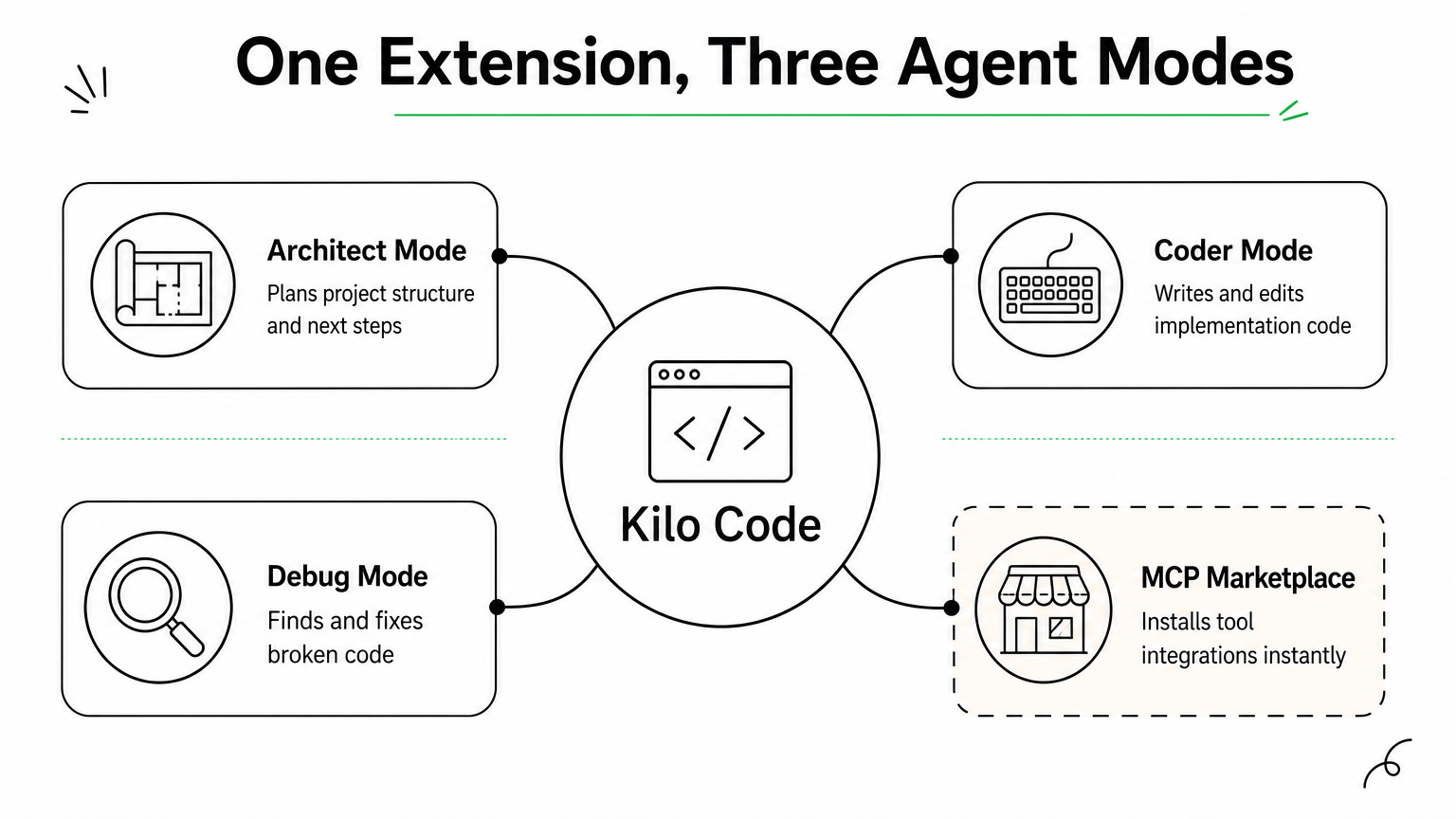
Kilo Code combines ideas from several earlier open source agents into one extension that runs across VS Code, Cursor, and other VS Code forks without extra configuration. It positions itself as a merger project, pulling the best parts of Roo Code and Cline into a single codebase, which means you get multi-mode agent behavior and broad editor support in one install instead of juggling separate extensions for different tasks.
How it works
Kilo Code operates through distinct modes, Architect for planning, Coder for implementation, and Debug for troubleshooting, each tuned with different prompts and permissions for the task at hand. You switch modes depending on where you are in a project, and the agent adjusts its behavior accordingly rather than treating every request the same way. It also includes a built-in MCP marketplace, letting you browse and install tool integrations without hand-writing connector code yourself.
Kilo Code’s mode-switching means the agent behaves like planner, builder, or debugger depending on what the job actually calls for.
Who it’s for
Developers who bounce between VS Code and Cursor on different machines benefit most from Kilo Code’s cross-editor compatibility. It also suits teams that want structured agent modes rather than one generic chat loop, particularly when juniors need guardrails during implementation while seniors want faster architecture planning. Teams already invested in Roo Code or Cline will find the transition nearly frictionless.
Standout features
Kilo Code’s mode system and marketplace give it flexibility that single-purpose extensions lack.
Multiple specialized modes: Architect, Coder, Debug, and custom modes you define yourself.
Cross-editor support: Works in VS Code, Cursor, and Windsurf without separate builds.
MCP marketplace: Install tool integrations directly from the extension.
Checkpoint history: Step back through prior agent states when a change misfires.
Pricing and licensing
Kilo Code is open source and free to install from the VS Code Marketplace, with an optional hosted credit system for teams that don’t want to manage their own API keys. Self-hosted model connections remain free beyond whatever provider costs you incur.
7. Tabby for air-gapped code completion
Tabby takes a different angle than every agent above it on this list: instead of chasing autonomous task completion, it focuses on fast, private code completion you can run entirely disconnected from the internet. If your organization can’t send code to a third-party API for legal or security reasons, Tabby is one of the few open source ai coding agents built specifically for that constraint rather than treating it as an afterthought.
How it works
Tabby runs as a self-hosted server that serves code completions to IDE plugins for VS Code, JetBrains, and Vim, using open weight models like StarCoder or CodeLlama that you download and run on your own hardware. It indexes your private repositories locally, so completions are grounded in your actual codebase and naming conventions instead of generic public training data. Because nothing leaves your network, teams in regulated industries can deploy it inside an isolated VPC or even a fully air-gapped environment with no outbound connectivity at all.
Tabby’s real pitch isn’t smarter completions, it’s completions that never leave your building.
Who it’s for
Banks, healthcare providers, defense contractors, and any team under strict data residency requirements or AI governance and compliance obligations are the obvious audience here. Tabby also suits organizations that already run GPU infrastructure for other workloads and want to repurpose it for developer tooling instead of paying per-token fees to an external vendor.
Standout features
Tabby trades autonomous task execution for airtight privacy and predictable infrastructure costs.
Fully offline operation: No API calls to external providers, ever.
Self-hosted RAG over your codebase: Completions reference your actual repos, not just general patterns.
Multi-IDE plugin support: One server backs VS Code, JetBrains, and Vim clients.
Team analytics dashboard: Tracks completion acceptance rates across your engineering org.
Pricing and licensing
Tabby is released under Apache 2.0 and free to self-host indefinitely. Your only real cost is the GPU hardware needed to run the model, which scales with team size rather than usage volume.
8. SWE-agent for autonomous issue resolution
SWE-agent, built by researchers at Princeton and Stanford, was designed from the start to answer one question: can an agent take a raw GitHub issue and produce a working, tested fix without a human writing a single line? It’s less a product and more a research-grade tool that happens to work well enough for production use, which makes it one of the more academically rigorous open source ai coding agents on this list.
How it works
Instead of giving the agent unrestricted shell access, SWE-agent wraps everything in an Agent-Computer Interface (ACI), a purpose-built set of commands for viewing, editing, and searching files that’s tuned specifically for how language models reason about code. The agent reads an issue description, locates the relevant files using its search commands, edits them, runs the test suite, and iterates until tests pass or it hits a retry limit. This constrained interface is what drives its strong benchmark scores rather than raw model size.
SWE-agent proves that a narrower, well-designed toolset often beats giving an agent unrestricted access to your shell.
Who it’s for
Engineering teams with a large backlog of well-scoped bugs get the most value here, since SWE-agent shines on issues with clear reproduction steps and existing tests. Research teams benchmarking agent performance, and organizations building their own agent tooling on top of a proven ACI pattern, are also a strong match.
Standout features
SWE-agent’s benchmark pedigree and transparent design make it a reference point for anyone building custom agents.
SWE-bench origin: The benchmark and the agent were developed together, so results are well-documented and reproducible.
Configurable ACI: Swap in your own command set for different languages or repo structures.
Trajectory logging: Full record of every command and observation for debugging or research.
Model-agnostic: Works with GPT-4, Claude, and open weight models interchangeably.
Pricing and licensing
SWE-agent is MIT licensed and free to run, with model API costs as your only ongoing expense.
Picking the right agent for your stack
None of these eight tools is a universal answer, and that’s the point. OpenHands and SWE-agent push hardest on full autonomy for teams ready to hand over entire tickets. Cline, OpenCode, and Kilo Code meet you inside the editor or terminal you already use, with far less setup friction. Goose gives platform teams a runtime to shape, Aider keeps git at the center of every edit, and Tabby solves the one problem the others can’t: running completions where no code leaves your building.
Questions worth asking before you commit: does your team need autonomy or assistance? Does compliance require self-hosted, air-gapped tooling? Can your engineers maintain extensions, or do they need something that installs in minutes? Answer those honestly and the shortlist gets short fast.
If you’d rather skip the trial-and-error and get a recommendation matched to your actual codebase and compliance requirements, talk to Hatzs Dimensions about building a strategic roadmap for AI adoption.
Most enterprises are not failing at AI because the technology is immature. They are failing because they attempt to deploy AI onto infrastructure, workflows, and teams that were never designed to support it. The enterprise AI readiness gap is not a technology problem — it is a strategy and execution problem, and it manifests differently depending on where an organization sits on the maturity curve.
According to McKinsey’s 2025 State of AI report, while over 72% of organizations have experimented with AI in at least one business function, fewer than 25% have successfully scaled those experiments beyond a single department. The gap between experimentation and enterprise-wide value is where most initiatives stall — and where competitive advantage is decided.
This article delivers a concrete framework: three deployment paths for closing the AI readiness gap, a decision matrix to help you choose the right one, and the failure modes that derail even well-resourced organizations.
Key Takeaways
Over 72% of organizations have run AI experiments, but fewer than 25% have scaled them successfully
Poor data infrastructure is the single most common reason AI pilots fail to reach production
Organizations that invest in AI governance frameworks before deployment reduce incident rates by up to 60%
The right adoption path depends on your current data maturity, internal capability, and deployment timeline — not on what competitors are doing
What Makes Enterprise AI Readiness Uniquely Challenging
AI readiness is not a single capability — it is a composite of data infrastructure quality, organizational change management, governance frameworks, and technical talent. Most readiness assessments focus on only one of these dimensions and miss the others entirely.
The required conditions for enterprise-grade AI deployment span clean, governed data pipelines; integration architecture that connects AI outputs to business workflows; cross-functional alignment between IT, operations, and business leadership; and observability tooling that makes model behavior auditable. Organizations that are strong in one dimension but weak in others deploy systems that underperform or create operational risk.
The challenge is compounded by the pace of change. Tooling that was best practice eighteen months ago is being replaced by new orchestration frameworks, foundation model APIs, and deployment standards. Organizations building internal capability must invest in learning infrastructure that can keep pace with the field — not just the current state of it.
A practical benchmark: if your organization has run more than two AI pilots that did not reach production, the barrier is almost certainly readiness, not technology. Three paths lead forward.
The Scale of the AI Adoption Gap
The gap between AI ambition and AI execution is widening at the enterprise level. Global AI spending is on track to exceed $300 billion annually by 2026, with the majority allocated to tools and platforms rather than the organizational change required to use them effectively.
The pressure shows up most acutely at the data layer. Studies consistently show that data quality and accessibility issues are the primary blockers for 67% of failed AI initiatives — not model performance. Organizations that invest in data infrastructure first consistently outperform peers who start with model selection. A 2025 Gartner survey found that companies with mature data governance practices were 2.5 times more likely to achieve measurable AI ROI within 12 months.
At the talent layer, the challenge mirrors the broader technology market. Demand for engineers with production-grade AI deployment experience significantly outpaces supply. But the more acute shortage is in AI product managers and business analysts who can translate model outputs into workflow changes — roles that are rarely included in AI hiring plans but are critical to actual value realization.
The governance gap is equally serious. Enterprises deploying AI without defined risk frameworks, model monitoring, and escalation protocols are accumulating technical and regulatory debt that becomes increasingly expensive to unwind as deployment scales.
Three Paths to Close the AI Readiness Gap
No single route works for every organization. The right path depends on your current data maturity, internal capability, deployment timeline, and risk tolerance. The comparison below provides an objective starting point.
Dimension
Path 1: Foundational Build
Path 2: Accelerated Partnership
Path 3: Hybrid Transformation
Time to first production deployment
12–18 months
6–10 weeks
10–16 weeks
Estimated Year 1 investment
$300K–$600K
$100K–$220K
$150K–$350K
Internal capability retained
High
Low without transfer plan
High with structured handoff
Risk profile
Lower long-term
Higher if vendor-dependent
Balanced
Best-fit organization
Well-resourced, long runway
Fast-moving, constrained
Most mid-market and enterprise
Path 1: Foundational Capability Building
Foundational capability building is the right long-term investment for organizations whose AI ambition is central to competitive strategy and who have the runway to execute it properly. The practical path does not start with model selection — it starts with a data and governance audit.
A credible foundational program runs in three phases. First, a cross-functional team conducts a 4–6 week data infrastructure assessment, identifying quality gaps, access bottlenecks, and governance weaknesses. Second, a 3–4 month infrastructure remediation phase establishes clean data pipelines, access controls, and monitoring baselines. Third, the first AI use case is deployed on this stabilized foundation — not before.
The critical investment is not technology but organizational alignment. Foundational builds fail when AI initiatives are treated as IT projects rather than business transformation programs. Executive sponsorship and defined business outcome metrics must precede the first line of architecture.
Path 2: Accelerated Partnership
Accelerated partnership provides immediate access to AI deployment expertise for organizations that cannot afford to wait. A partner team with production-grade experience brings pre-built frameworks, proven architecture patterns, and implementation speed that can compress a 12-month build into 8–10 weeks for well-defined use cases.
The tradeoff is dependency and knowledge transfer risk. Organizations that engage AI partners without specifying documentation standards, architecture handoffs, and internal team embedding requirements often find themselves unable to maintain, monitor, or modify the systems they have paid to build. Every partnership engagement must include milestone-based knowledge transfer as a contractually accountable deliverable — not a goodwill intention.
For PE-backed companies, fast-moving scale-ups, and organizations facing competitive pressure with limited internal bandwidth, this path delivers the fastest time to measurable value. The key is selecting a partner that treats knowledge transfer as a product, not an afterthought.
Path 3: Hybrid Transformation
The hybrid transformation model is the most practical choice for most enterprises in 2026. External specialists handle readiness assessment, architecture design, and initial deployment. Internal teams embed with those specialists and learn by building. After 3–4 months, the internal team owns operations and iteration while the external partner provides architectural guidance for the next use case.
This model reduces Year 1 investment by 30–50% compared to a full foundational build. More importantly, it accelerates internal capability by 6–9 months compared to self-directed programs, because engineers and analysts absorb production-grade patterns from practitioners who have solved the same problems across multiple industries. That tacit knowledge transfer is the primary value delivered — the deployed AI system is secondary.
The hybrid model also handles the senior talent shortage without requiring a permanent high-cost hire. Organizations gain expert judgment during the highest-risk phases — architecture and initial deployment — while building sustainable internal capacity for ongoing operations and iteration.
Common Failure Modes in Enterprise AI Adoption
Most enterprise AI initiatives fail at execution, not conception. Four failure modes appear consistently across organizations navigating the readiness gap.
Failure Mode 1: Starting with the model instead of the data. Organizations that begin AI initiatives by selecting tools and models before auditing their data infrastructure consistently underperform. Models are only as good as the data they operate on. A 2025 Deloitte analysis found that 58% of failed AI projects traced the primary cause to data quality issues that were known before deployment began. Prevention requires a data readiness assessment as the mandatory first milestone.
Failure Mode 2: Treating AI deployment as an IT project. AI systems that improve business outcomes require business outcome ownership. When AI initiatives live entirely within IT without a business sponsor defining success metrics, they optimize for technical performance rather than business value. A chatbot with high resolution rates but declining customer satisfaction scores is a deployment failure, not a success. Every AI initiative needs a business lead accountable for outcomes.
Failure Mode 3: Skipping governance until something goes wrong. AI systems operating at scale without defined monitoring, intervention protocols, and audit trails create regulatory and reputational risk that compounds over time. Governance frameworks are consistently deprioritized in favor of deployment speed — until an incident makes the cost of that decision concrete. Governance architecture must precede production deployment, not follow it.
Failure Mode 4: Measuring inputs instead of outcomes. Organizations that track AI project metrics — models deployed, APIs integrated, hours invested — without measuring business outcome metrics — revenue influenced, cost reduced, decisions improved — cannot demonstrate ROI and lose executive support before value is realized. Success metrics must be defined in business terms before the first deployment begins.
How HATZS Approaches the AI Readiness Challenge
HATZS approaches enterprise AI adoption through an integrated readiness-first methodology that addresses data infrastructure, organizational alignment, and governance before a single model is deployed. Our engagement model combines embedded expertise with deliberate internal capability transfer — ensuring that every client team we work with ends the engagement more capable than when it began.
Our process starts with a structured AI Readiness Assessment: a 3–4 week diagnostic that evaluates data quality, infrastructure architecture, governance maturity, and internal capability across the dimensions that most directly predict deployment success. The output is not a report — it is a prioritized action plan with defined milestones, resource requirements, and risk flags.
From there, HATZS works with each client to select the deployment path that matches their constraints. Whether through a foundational build, accelerated partnership, or hybrid transformation engagement, our teams bring production-grade patterns from cross-industry deployments and codify those patterns into documentation, runbooks, and training that empower internal teams to own and evolve their AI systems long-term.
Across recent client engagements, organizations working with HATZS have reduced time-to-first-production-deployment by an average of 12 weeks compared to internally estimated timelines, while simultaneously closing data infrastructure gaps that had previously blocked 2–3 prior AI initiatives.
Conclusion
The enterprise AI readiness gap is a solvable problem — but only if it is diagnosed correctly. Organizations that treat AI adoption as a technology procurement decision will continue to fund pilots that never scale. Organizations that treat it as a business transformation initiative, with the data infrastructure, governance, and organizational change requirements that transformation demands, are the ones deploying AI that changes outcomes.
The decision framework is straightforward. If your organization has an 18-month runway and strategic AI ambition, invest in foundational capability. If you need production deployment within a quarter and have a well-defined use case, engage an experienced partner with a non-negotiable knowledge transfer component. For most organizations, the hybrid transformation model delivers the optimal balance of speed, cost control, and sustainable internal capability.
Start with one honest question: when your last AI pilot failed to reach production, what was the actual reason? The answer determines your path.
Ready to assess your organization’s AI readiness and select the right deployment path? HATZS’s advisory team helps technical leaders and business executives understand where they stand and what it takes to move forward. Contact us to schedule an AI Readiness Assessment.
HATZS is a technology consulting and AI solutions firm helping mid-market and enterprise organizations design, deploy, and scale AI initiatives that deliver measurable business outcomes.
Frequently Asked Questions
What is the enterprise AI readiness gap? The AI readiness gap describes the distance between an organization’s intention to deploy AI and its actual capacity to do so successfully at scale. It encompasses data infrastructure quality, governance maturity, internal talent, and organizational alignment. Most enterprises have significant gaps in at least two of these dimensions.
How long does it take to close an AI readiness gap? It depends on the depth of the gap. Organizations with mature data infrastructure and existing technical capability can move to production deployment in 8–12 weeks with the right external support. Organizations with significant data quality or governance deficits typically require 12–18 months for foundational remediation before reliable production deployment is achievable.
What is the most common reason AI pilots fail to reach production? Data quality and accessibility issues account for the majority of failed AI transitions from pilot to production. This is followed by lack of business outcome ownership and absence of governance frameworks. Model performance is rarely the primary failure cause.
Should we build AI capability internally or work with a partner? Neither pure option is optimal for most organizations. Full internal builds take longer than competitive pressures allow. Full outsourcing without knowledge transfer creates dependency that becomes expensive over time. A hybrid model — where external experts lead architecture and initial deployment while internal teams embed and learn — delivers faster deployment and sustainable internal capability simultaneously.
What governance capabilities are required before deploying AI in production? At minimum: logging of model inputs and outputs, monitoring dashboards with defined alert thresholds, human-in-the-loop intervention mechanisms for high-stakes decisions, rollback protocols, and defined escalation paths for anomalous behavior. These should be designed and validated in staging before any production deployment.
How do we evaluate an AI consulting partner? Evaluate on three dimensions: documented case studies showing production deployments (not prototypes), a sample architecture document or assessment output demonstrating systems thinking quality, and a clearly specified knowledge transfer methodology with milestone-based handoff criteria. Partners who cannot provide all three should not reach the shortlist.