AI agents integration is the work of connecting an AI agent to the data sources, tools, and business systems it needs, so it can read current information and take real actions instead of only generating text. In practice, that means giving the agent secure access to your CRM, help desk, database, or ERP through APIs, webhooks, or a standard such as the Model Context Protocol, with permissions that match what the agent is allowed to do.
A language model on its own knows only its training data and whatever you paste into the prompt. Integration is what lets it check an order, update a ticket, or route a lead. This guide explains why integration decides whether an agent works, how to build it step by step, which methods and platforms fit which job, and how to keep the result secure.
Hatzs Dimensions builds AI agents and the data and integration layers behind them for companies ranging from Series A startups to Fortune 500 teams. The advice below comes from that production work.
Why AI agents integration matters
Integration matters because an agent is only as useful as the systems it can see and change. Without it, even a strong model guesses, and those guesses show up as wrong answers your users notice.
An agent without integrations can only talk
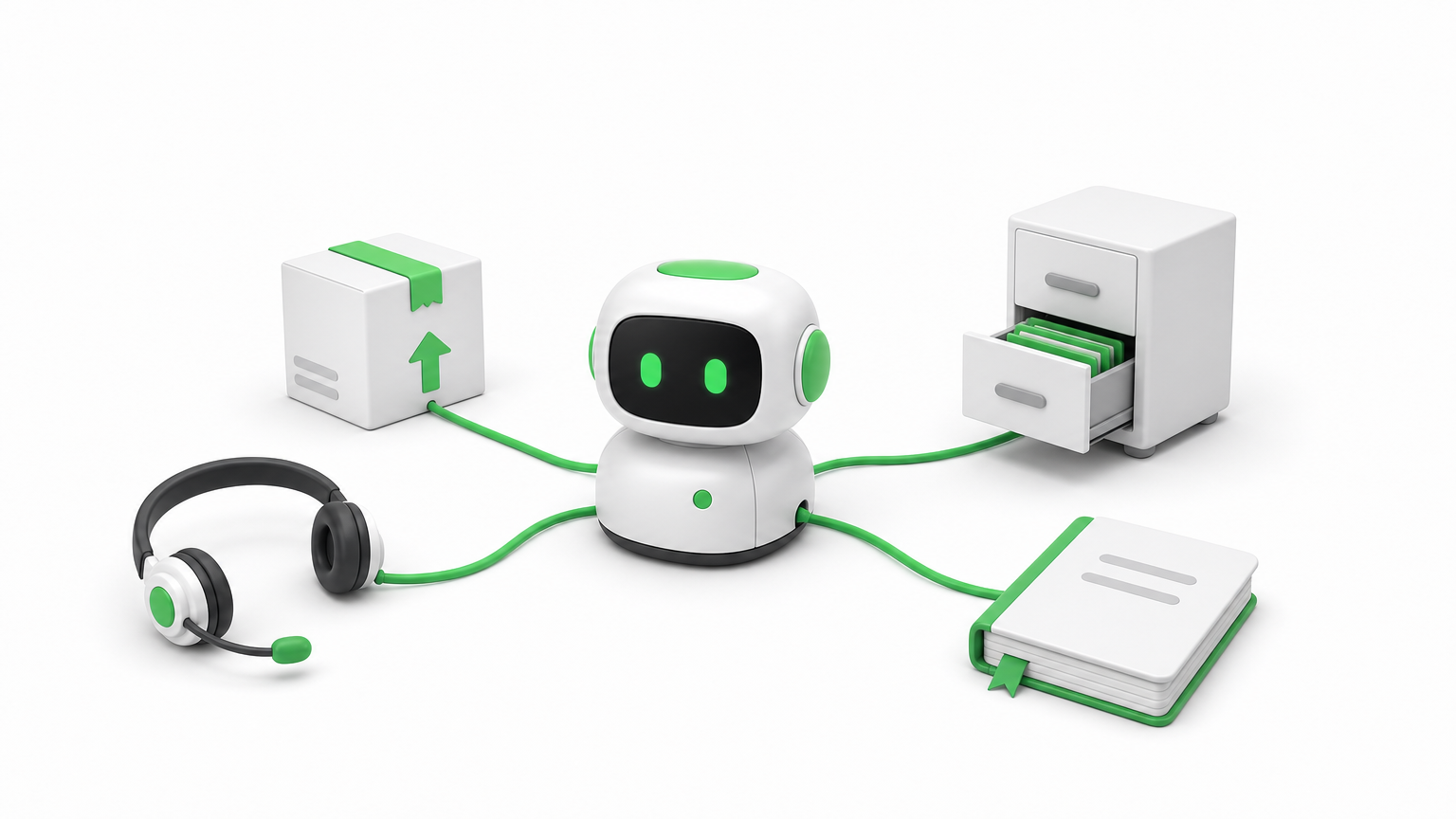
An unconnected agent works from its training data and the text in the prompt. It cannot know that a customer’s order shipped this morning, that a contract renewal is due Friday, or that an invoice was already paid. Integration fixes this in two directions. Read access gives the agent current context, and write access lets it act on that context by updating a record or sending a message.
This is also what separates an agent from a chatbot. A chatbot answers a question. An agent completes a task across several systems. That is why ai agents integration is usually the hardest and most valuable part of an agent project, more than the choice of model.
An agent is only as capable as the systems it can read and the actions it is allowed to take.
What integration changes in practice
The same model behaves very differently depending on what you connect it to. Here is how the connections shape four common AI agent use cases.
Agent
Reads from
Acts on
Support agent
Help desk, order system, knowledge base
Drafts replies, updates ticket status, starts a refund request
Flags mismatched invoices, prepares entries for review
Notice that every row needs at least two systems. Real business processes rarely live in one application, so the value of the agent grows with the number of systems it can coordinate.
Where the payoff shows up
Connected agents tend to pay off in three places. Accuracy improves because answers come from live records, not memory. Speed improves because the agent handles the handoffs between tools that people used to do by hand. Auditability improves because every read and write goes through a connection you can log and review.
How to integrate AI agents with your systems
Integrate one workflow at a time. Define the job, list what the agent must read and write, connect it with the least access that works, test on real data, and release it behind human approval before you loosen the controls.
Define the job and map every read and write
Start with a single workflow that has a measurable result, such as first-response time on support tickets. Then list every piece of data the agent must read and every action it must write. That list is your integration spec. If it includes a system that nobody on your team can describe, you have found your first risk.
The seven steps to build and release
Follow this order. It keeps the scope small and surfaces problems while they are cheap to fix.
Pick one workflow with a clear owner and a number you can track.
List the systems and the exact reads and writes the agent needs.
Set up authentication with OAuth or scoped API keys, using the minimum permissions.
Define each tool with strict input and output schemas, so the agent never guesses parameters.
Test on real, messy data, including empty fields, duplicates, and failed calls.
Release behind human approval for any action that changes money, access, or customer records.
Monitor and widen, adding autonomy only where the logs show the agent is reliable.
Most teams rush step 5 and pay for it later. Test data is clean, and production data is not.
Start narrow, connect with the least access that works, and widen only after the agent earns trust.
Clean up messy data before the agent sees it
Agents misread ambiguous data. A field called "status" could mean employment status in one system and record status in another, and an agent that picks the wrong meaning can take the wrong action. The fix is to normalize data into a consistent schema and describe every field in plain language inside the tool definition.
Return only the fields the task needs. Smaller, cleaner responses cut cost and latency, and they leave less room for the model to wander. For retrieval-heavy agents, this cleanup also makes the embeddings you store more accurate.
Choosing integration methods and platforms
The right method depends on how predictable the workflow is. Use direct APIs, webhooks, or a unified API for fixed workflows, and use tool calling through MCP when the agent must decide which tool to use. For most teams, a platform that manages authentication and logging saves months.
The main methods side by side
Method
Best for
Watch out for
Direct API calls
Core systems you control and depend on
Maintenance when vendors change endpoints
Webhooks
Real-time triggers such as a new qualified lead
Retries, duplicate events, and signature checks
SDKs
Vendors that provide ready-made client libraries
Version drift and uneven vendor support
MCP servers
Agents that choose tools dynamically
Server quality varies, and token handling needs care
Low-code iPaaS (Zapier, n8n, Workato)
Fast, visible workflows and internal automation
Limited custom logic and little data normalization
Unified API
Many apps in one category, such as HR or CRM
Narrow coverage and limited access to custom fields
Agent integration platform
Managed authentication, tool execution, and logs
Added vendor dependency and cost
Most production systems combine two or three of these. An agent might read through an API, receive events through webhooks, and send notifications through a low-code workflow.
A simple rule for picking
Ask whether the steps are known in advance. If the workflow is static, as in "when a ticket arrives, look up the order, then draft a reply," a plain API or unified API integration is cheaper, faster, and easier to test. If the agent has to decide between many tools based on a free-form request, a tool-calling approach through the Model Context Protocol fits better.
Predictable flows should stay predictable. Do not give an agent freedom where a fixed sequence would do the job.
Use fixed integrations for fixed workflows, and give the agent tool choice only where the task truly varies.
Build, buy, or bring in a partner
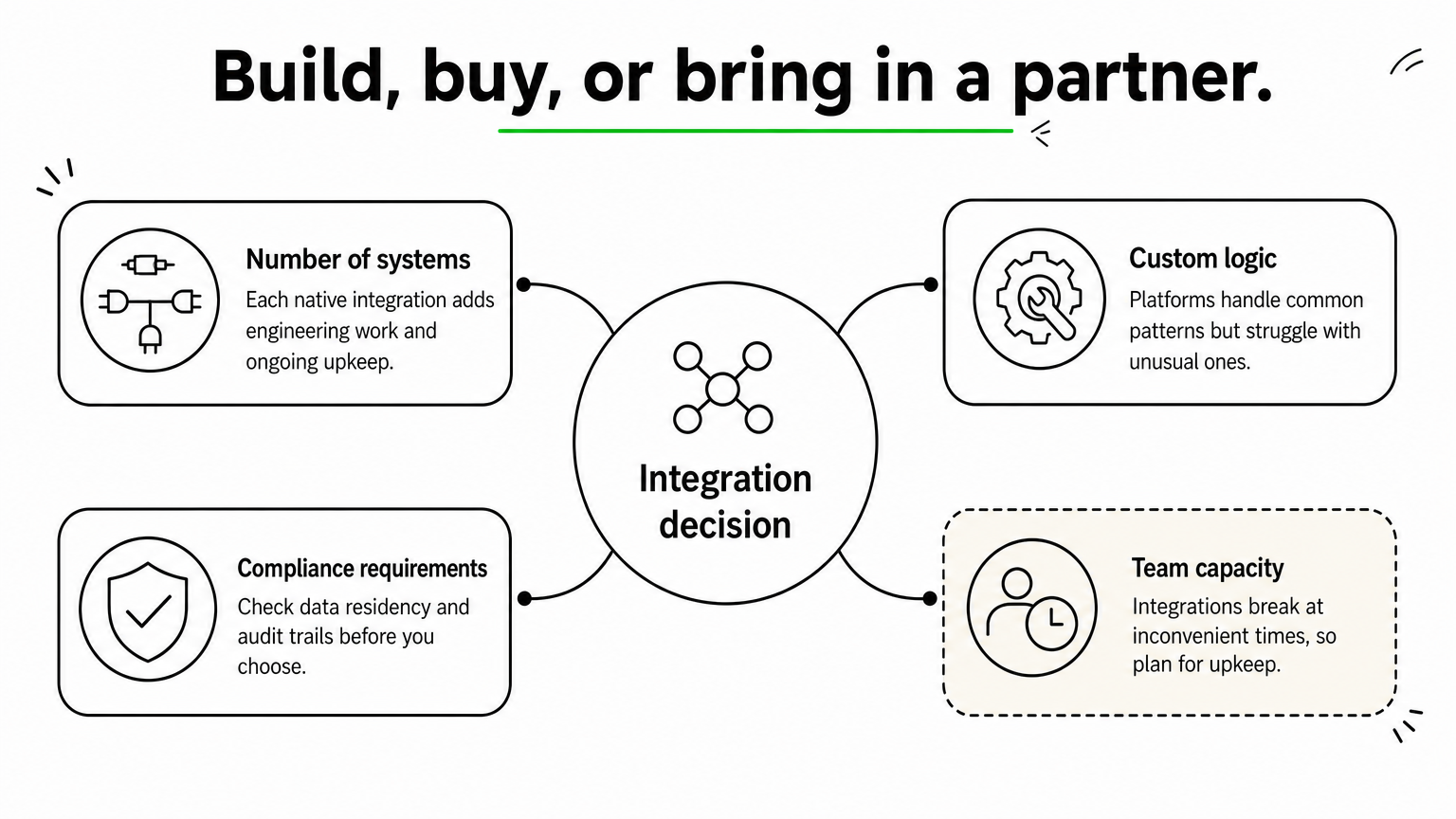
Weigh four factors. Count the number of systems you must connect, since each native integration takes real engineering and ongoing upkeep. Consider how much custom logic you need, because platforms handle common patterns well but struggle with unusual ones. Check compliance requirements such as data residency and audit trails. Finally, be honest about team capacity, because integrations break at inconvenient times.
If your engineers are better used on the product itself, buy the commodity connections and build only the parts that differentiate you. A partner with senior engineers can design that split with you and own the delivery.
Securing and operating integrated agents
An integrated agent holds real access to real systems, so security is part of the design, not a final check. Enforce user-level permissions, treat outside content as untrusted, and log everything the agent does.
Respect permissions on every call
The agent must never reveal or change anything the requesting user could not reach directly. If a user asks about a file they cannot open, the agent should return nothing about it, regardless of how the request is phrased. Pass the user’s identity through to each connected system where possible, and give any shared service account the least privilege it needs.
Treat outside content as untrusted
Agents read emails, tickets, documents, and web pages, and any of those can contain hidden instructions. This is called prompt injection, and it has caused real data leaks in agent setups that connected to code repositories. Defend against it by keeping retrieved text separate from instructions, allowlisting the tools each agent may call, and requiring human confirmation for high-risk actions such as deleting records or sending payments.
Monitor, retry, and plan for change
Integrations fail. Tokens expire, rate limits hit, and vendors change their APIs. Build for that from day one:
Log every tool call with its inputs, outputs, and errors.
Retry with backoff, and make write actions idempotent so a retry never creates a duplicate.
Alert on error spikes and on unusual volumes of reads or writes.
Track API versions and test again whenever a connected vendor announces a change.
If you cannot see what your agent did and why, you cannot trust it with more access.
Start with one connected workflow
AI agents integration comes down to a few decisions. Give the agent current data to read and limited actions to take. Match the method to how predictable the workflow is. Test on messy data, enforce permissions on every call, and log everything. Teams that follow this order ship agents that people actually rely on.
Pick the workflow where a missing connection costs you the most today, and build that one first. If you want a senior team to design and run the integration layer with you, have Hatzs Dimensions build your AI agent integrations from discovery through deployment and support.
The best AI agents builder is the one your team can actually maintain. If nobody on your team writes code, start with a no-code platform like Zapier, Gumloop, or Relay.app. If you have engineers and want control over hosting and cost, look at n8n, Dify, or LangChain. If the agent touches regulated data or core systems, a custom build from a partner like Hatzs Dimensions is the safer path. A good pick connects to the apps you already use, lets you swap models, shows what the agent did, and pauses for human approval before risky actions.
The problem is that dozens of AI agents tools promise all of this. Demos hide the hard parts, and free plans run out the moment you test real volume. This guide compares ten AI agent development tools and platforms, from free and no-code to fully custom. For each one you get how it works, who it suits, its strengths and limits, and what it costs.
We build production AI agents for enterprises and growth-stage companies at Hatzs Dimensions, so we know where self-serve platforms hold up and where they break. We list ourselves first as the custom option, and we tell you plainly when a platform is the better choice.
What an AI agents builder does and how to choose one
What an AI agents builder actually does
An AI agents builder is software that lets you give an AI model a goal, connect it to your tools and data, and let it decide which steps to take. You write the instructions, the model reasons about the situation, and the agent calls tools such as your CRM, inbox, or database to finish the job. The builder supplies the model connections, the tool integrations, and the controls around them.
The distinction that matters most is agent versus workflow. A workflow follows a fixed path, so the same input produces the same steps every time. An agent picks its own steps from the tools it has. Most platforms below build both, and the better ones let an agent call workflows as tools. If you are new, build the reliable workflow first, then let an agent decide when to run it. Without solid tools, even a strong model has nothing useful to do.
An agent is only as useful as the workflows and tools you give it.
Four ways to build an AI agent
Yes, you can build your own AI agent, and you do not need to be a developer to do it. The agent development tools in AI fall into four groups:
No-code platforms (Zapier, Gumloop, Relay.app, Lindy): describe the job in plain English or arrange blocks on a canvas. Setup takes minutes to hours.
Low-code builders (n8n, StackAI, Dify): a visual canvas plus code nodes when you need them. They handle complex logic but have a steeper learning curve.
Code frameworks (LangChain, CrewAI, AutoGen): full control in Python or JavaScript. You own testing, hosting, and monitoring.
Custom builds by a partner: a team designs, ships, and runs the agent against your own systems.
Nearly every self-serve option has a free plan or trial. Use it to prove one workflow before you pay for anything.
Six criteria for choosing agent development tools
Score every AI agent tool against the same six questions before you look at price.
Model flexibility. Different models are better at writing, coding, and research. A platform locked to one vendor limits you later.
Integration depth. List the apps your team already uses and check that each one is covered natively, not through a fragile custom API call.
Human approval and guardrails. The agent should pause before it sends external email, deletes records, or spends money.
Observability. You need run logs, error handling, and a way to replay a failed run.
Data control and compliance. Check SOC 2, HIPAA, and GDPR coverage, and whether you can self-host or deploy in your own cloud.
Pricing model. Per-execution, per-task, credit, and per-seat pricing behave very differently at volume.
Run a one-week pilot on a single, boring, high-volume task. Estimate a month of real usage from that pilot, then compare it with each platform’s pricing model.
1. Hatzs Dimensions: custom-built AI agents
How it works
Hatzs Dimensions is not a self-serve AI agents builder. It is a software development and AI company that designs, builds, and runs agents inside your own systems. The work follows a four-stage delivery process: discovery and planning, design and prototyping, development and testing, then deployment and support. Related services cover GenAI consulting, intelligent automation, data engineering and integration, and AI governance and compliance.
In a build vs. buy decision, custom makes sense when a platform’s ceiling becomes your ceiling. An agent that reads from a legacy claims system, follows audit rules, or serves thousands of customers needs your own architecture, your own guardrails, and a model choice you control. You get an agent shaped around your process instead of a process bent around a template.
When the agent touches core systems or regulated data, build it properly instead of configuring a template.
Who it suits
CTOs, CIOs, VPs of engineering, founders, and product leaders at mid-sized and large companies are the usual buyers. Hatzs Dimensions works across banking, financial services, insurance, healthcare, retail, logistics, and SaaS, so regulated and complex environments are familiar ground.
Good fit: the agent must integrate with internal systems, pass a compliance review, or scale beyond platform limits.
Good fit: you have no in-house AI engineers, or you have outgrown a no-code tool.
Poor fit: you want a personal assistant running by this afternoon. Use a platform below.
Strengths and limits
The strengths come from the team and its track record. Weigh them against the trade-offs of any custom project.
A senior-only engineering team with 7+ years of experience shipping enterprise-grade AI into production.
100+ experts across AI, data, cloud, and product engineering, so one partner covers the agent, the data pipeline, and the infrastructure.
250+ clients worldwide and 98% client retention, with results such as a 30% cut in insurance operations costs and 300% more lead conversion capacity.
Limit: a first working version takes longer than on a no-code tool.
Limit: the cost is higher than a monthly subscription, so the use case should justify it.
Pricing
There is no public price list, because scope drives AI agent development cost. Engagements run on two models: fixed-price projects when the scope is defined, and dedicated teams when requirements will evolve.
A practical path is to prototype the first workflow in a cheap platform from this list. Then bring that prototype and its lessons into discovery, so the custom build starts from proven requirements.
2. n8n: low-code control for technical teams
How it works
n8n is a workflow automation platform with a visual canvas, and as an AI agents builder it is the strongest pick for technical teams. You connect nodes for triggers, apps, code, and an AI Agent node built on LangChain. The agent gets a model, memory, and a set of tools, and it decides which tool to call. You can chain several agents, add approval steps at any point, and connect outside tools over MCP.
Hosting is the real differentiator. You can run n8n on your own servers or use n8n’s cloud, which matters for data residency and air-gapped environments. Pricing counts executions, and a full workflow run is one execution no matter how many steps it has, so complex agents cost less than on task-based tools.
n8n trades a gentler learning curve for control over hosting, data, and cost.
Who it suits
Developers, technical operations teams, and automation agencies get the most from n8n. Non-technical teams usually stall during setup.
Good fit: you need self-hosting, strict data residency, or custom API logic.
Good fit: your agents run long, multi-step workflows where per-task pricing would hurt.
Poor fit: marketing or HR teams who want to build without engineering help.
Strengths and limits
n8n offers a large community and a deep template library, so you rarely start from a blank canvas.
A big library of community templates and plenty of tutorials.
Code nodes let you drop into JavaScript when the visual blocks run out.
Execution-based pricing stays predictable on complex workflows.
Limit: the interface is less welcoming to beginners.
Limit: self-hosting means you handle servers, patches, and uptime, and organization-wide governance is largely a do-it-yourself job.
Pricing
The self-hosted Community edition is free. Cloud plans start with Starter at $20 a month billed annually for 2,500 executions, and Pro runs about $50 a month billed annually for 10,000 executions. The self-hosted Business plan is $800 a month billed annually with 40,000 executions, and Enterprise is custom. Month-to-month billing costs a bit more. Remember that self-hosting is free of license fees, not free of infrastructure and maintenance time.
3. Zapier Agents: no-code reach across 9,000 apps
How it works
Zapier is the veteran automation tool, and it now works as an AI agents builder inside the same editor. You describe the agent in plain English, and Zapier’s Copilot builds the workflow for you. Agents can browse the web, use live data sources, and act across 9,000+ connected apps. Zaps can also include agentic steps, so a workflow loops through tool calls while keeping run history and error handling.
Safety controls are a selling point. Zapier offers AI Guardrails that scan for sensitive data, prompt injection, and toxic output, and it supports human approval steps. You can call models from Anthropic, OpenAI, and Google inside one agent, and Zapier MCP lets tools like Claude or ChatGPT reach its app library.
If your tools are mainstream and your team is non-technical, Zapier gets an agent running fastest.
Who it suits
Zapier suits business teams that already live across many SaaS apps and want agents without involving engineering.
Good fit: sales, support, and operations teams with long app stacks.
Good fit: companies that need audit logging and SOC 2 Type II coverage.
Poor fit: teams that need self-hosting, or that must confirm HIPAA coverage first.
Strengths and limits
The breadth of integrations is hard to match, and the platform is stable and well documented.
Maintained integrations with thousands of apps, so connections rarely break.
Human-in-the-loop approvals and guardrails built in.
Model flexibility inside a single agent.
Limit: agents are priced separately from the core Zapier plans, so you may pay for two.
Limit: costs climb as task volume grows.
Pricing
Zapier has a free plan with 100 tasks a month. Professional starts at $19.99 a month billed annually. Agents have their own plans: Agents Free includes 400 activities a month, and Agents Pro is $33.33 a month billed annually for 1,500 activities. Team and Enterprise tiers add shared workspaces, SSO, and admin controls. Estimate your monthly task volume first, because that number decides what you pay.
4. Gumloop: shared agents for whole teams
How it works
Gumloop is a no-code AI agents builder built around a visual canvas. Agents are the primary interface, and existing workflows become callable tools that agents invoke when needed. Anyone with the right permissions can create an agent or skill, and the rest of the organization can run it. A skills system lets an agent update its own playbook when you correct a mistake, so the same error does not repeat.
Gumloop supports 35+ AI models without extra API keys and hosts MCP servers so you can connect agents to tools with an MCP endpoint. It has around 100 native integrations, fewer than Zapier, and it adds a browser agent for sites without APIs.
Gumloop works best when many people will share and improve the same agents.
Who it suits
Marketing, sales, and operations teams that want a shared library of agents will feel at home. Think of an SEO brief agent that copywriters reuse, or a weekly task triage agent.
Good fit: teams rolling out agents company-wide with unlimited seats.
Good fit: users who want to choose between several AI models.
Poor fit: niche stacks that need integrations beyond the native library.
Strengths and limits
Gumloop is newer than the big automation names, which shows in both directions.
Unlimited seats on paid plans, billed on credits at the org level.
Agents improve as people give feedback and edit them.
Limit: a smaller community and ecosystem than Zapier or n8n.
Limit: credit usage varies by step type, so costs are harder to forecast at scale.
Limit: higher-end controls such as VPC deployment sit on the custom Enterprise tier.
Pricing
There is no permanent free plan, but new accounts get a 14-day free trial of Pro. Pro starts at $37 a month, or about $30 a month billed annually, with 20,000 credits and unlimited seats and agents. Enterprise is custom and adds role-based access control, SCIM and SAML, audit logs, and VPC options. Test with your real workflow during the trial, since credit burn tells you more than the price list.
5. Relay.app: the easiest first agent
How it works
Relay.app is the lightest AI agents builder on this list. You name your agent, write a short job description, and build the first workflow in minutes, without reading documentation. Agents run on triggers, workflows are visual with an AI assistant beside them, and tables store your data. MCP server support connects the agent to outside tools.
Human approval is part of the design, so you can put a person in the loop before an agent acts. Relay is SOC 2 and GDPR compliant, which covers many small-business security questions.
Relay.app is the quickest way to learn what an agent can do for your team.
Who it suits
Relay suits solo operators and small teams that use mainstream apps and want to test agents without a heavy platform.
Good fit: a team of a few people automating its first workflows.
Good fit: anyone who wants every feature on a free plan to evaluate.
Poor fit: HR, finance, or sales operations teams with niche tools, and anyone who needs enterprise governance.
Strengths and limits
Relay trades depth for simplicity, and you should expect to outgrow it if usage expands.
Simple onboarding and a free plan that includes all platform features.
Clear, visual workflows that non-technical users can read.
Limit: the integration library is a fraction of Zapier’s.
Limit: advanced features such as step-level filters and built-in error handling are thin.
Limit: audit logs and granular permissions are missing.
Pricing
The free plan includes all features with 200 steps a month. Paid plans start at $19 a month for 750 steps, and a Team plan from $59 a month covers 1,500 steps and up to 10 users. AI credits are tracked separately from standard steps, so watch both counters during your trial.
6. Lindy: an AI teammate for inbox and sales
How it works
Lindy works like an AI teammate more than a blank-canvas AI agents builder. You describe what you want in plain English, and it builds agents that handle inbox triage, meeting prep and follow-up, lead qualification, and support tasks. You can message it by text, and it also works inside Slack threads and mentions. It connects to tools such as Gmail, Slack, Salesforce, and Notion, and it learns from your corrections over time.
The flow editor underneath is simpler than in n8n or Zapier. Branching and fallback paths are limited, so Lindy is stronger at repeated personal or team tasks than at complex business processes.
Lindy shines at high-frequency admin work that is too small for a full workflow builder.
Who it suits
Executives, founders, salespeople, and support teams get the best results.
Good fit: you want an assistant that preps meetings, drafts replies, and updates the CRM.
Good fit: a customer support or sales team wants specialized agents quickly.
Poor fit: you need to orchestrate cross-department processes with complex logic.
Strengths and limits
Lindy is fast to start and clear in focus.
A simple interface and a wide integration range for its focus areas.
Plain-English setup with no canvas wiring.
Limit: every active user is billed, so cost grows as you roll it out.
Limit: large jobs such as research reports can burn through credits quickly.
Limit: it is not built for deep, branching business workflows.
Pricing
Lindy offers a free trial with starter credits. Paid plans are billed per user and by credits: entry plans sit roughly in the $30 to $50 per user per month range depending on tier and billing, and higher tiers add credits and computer use. The Enterprise tier adds audit logs and HIPAA support with a signed BAA. Confirm current rates on the pricing page, then multiply by the number of people who will actually use it.
7. StackAI: enterprise agents on internal data
How it works
StackAI is an enterprise AI agents builder with a drag-and-drop interface. Its strength is grounding agents in your own information. Built-in data loaders and knowledge bases feed retrieval-augmented generation (RAG), so the agent answers from your documents, databases, and APIs instead of guessing. You can export code to extend workflows outside the platform.
Deployment is flexible: cloud, Virtual Private Cloud, or on-premise for strict data rules. Compliance coverage includes SOC 2, HIPAA, and GDPR on the Enterprise tier.
StackAI fits when the hard part is trusted internal data, not clever prompts.
Who it suits
Mid-sized and large organizations in regulated industries, such as wealth management, construction, and logistics, are its core audience.
Good fit: agents must answer from internal documents and databases.
Good fit: security review requires VPC or on-prem deployment.
Poor fit: a small startup that only needs a couple of simple agents.
Strengths and limits
StackAI feels more modern than many legacy enterprise tools, and it leans toward production use.
A clean builder interface and useful templates.
RAG pipelines, APIs, and webhooks for agents that touch internal systems.
Limit: there is a learning curve, and some users report a smaller integration set.
Limit: debugging gets harder as workflows grow.
Limit: compliance features are locked to the Enterprise tier.
Pricing
The free plan gives you 500 runs a month, 2 projects, 1 seat, and community support. Enterprise is custom priced and adds dedicated infrastructure, dedicated solution engineers, SSO, and access controls, and it requires a sales call. Use the free plan to test one data-heavy agent before you start that conversation.
8. OpenAI Agent Builder and ChatGPT workspace agents
How it works
OpenAI offers two routes. Agent Builder is a visual canvas where you drag and drop nodes, connect tools, and design agentic workflows. ChatGPT workspace agents live inside ChatGPT: you describe the job, connect tools, and deploy it, and the agent becomes a shared resource for your team. Workspace agents can also be used in Slack.
Admin controls are a strong point. Roles set who can browse, run, build, and publish agents, and a Compliance API gives admins visibility into each agent’s configuration and run history. As an AI agents builder, though, both options run on OpenAI’s models only.
If your team already lives in ChatGPT, the shortest route to a working agent is the one you already pay for.
Who it suits
Teams that have standardized on ChatGPT Business or Enterprise will get the least friction.
Good fit: your workflows sit in Gmail, Outlook, SharePoint, Slack, GitHub, HubSpot, or Atlassian.
Good fit: you want admin governance without adding another vendor.
Poor fit: you need Claude or Gemini for some tasks, or wide app coverage.
Strengths and limits
The appeal is low friction and shared governance.
One login and one bill with your existing ChatGPT workspace.
Shared agents with granular permissions.
Limit: you cannot swap in other vendors’ models.
Limit: the connector set is narrow compared with automation platforms.
Limit: it suits individual and team tasks better than complex multi-system workflows.
Pricing
Workspace agents are included with ChatGPT Business, listed at about $20 per user per month, and higher plans, with credit-based usage on top. Agent Builder pricing follows OpenAI’s platform usage terms, so check the current pricing page before you budget. Model choice is limited here, so price the lock-in alongside the monthly fee.
9. Dify: open-source platform between easy and technical
How it works
Dify is an open-source platform for building LLM apps and agents. It sits between easy-to-use and developer-focused tools. You design agents and workflows on a visual canvas, attach knowledge bases for retrieval, and connect tools and model providers. You can self-host it or use its hosted version.
That mix makes it one of the more practical AI agent development tools for small engineering teams. Developers get an API and control over the stack, while less technical teammates can still read and adjust a workflow visually.
Dify gives a small team a visual builder without giving up the option to self-host.
Who it suits
Dify suits startups, internal tool teams, and developers who want an open-source AI agents tool they can run themselves.
Good fit: you want to prototype RAG apps and agents quickly.
Good fit: you want to avoid vendor lock-in on models and hosting.
Poor fit: you need a polished library of thousands of app connectors.
Strengths and limits
Open-source flexibility is the main draw.
Self-hosting for data control, plus a visual interface for collaborators.
Support for many model providers, so you can switch as models improve.
Limit: you manage deployment, updates, and security when self-hosting.
Limit: enterprise governance and app integrations are not as deep as on commercial platforms.
Pricing
The open-source edition is free to self-host, so your costs are servers and model API usage. Dify also sells hosted plans, and their tiers change, so check the current pricing page. Budget for a developer who owns the deployment, because that person is the real cost.
10. LangChain and LangGraph: code-first agent development
How it works
LangChain is an open-source framework for developers who want low-level control. It provides components for models, prompts, tools, memory, and retrieval in Python and JavaScript. LangGraph, its companion library, models an agent as a graph of steps with state, which suits long-running, multi-step agents with branches and loops. Optional hosted tooling covers tracing and evaluation.
Other code frameworks compete here. CrewAI organizes several role-based agents that collaborate. Microsoft’s AutoGen is open source under the MIT license, but it is now in maintenance mode, and Microsoft Agent Framework is its successor. For new projects, check the framework’s current status first.
Code frameworks give you full control, and full responsibility for testing and operations.
Who it suits
Engineering teams building agents as part of a product, or with requirements no platform meets, should start here.
Good fit: custom tool use, unusual architectures, or deep integration with your codebase.
Good fit: teams with the skills to test, monitor, and host agents in production.
Poor fit: business teams with no developers, who should use a platform or a partner.
Strengths and limits
Flexibility is unmatched, but nothing is handled for you.
No platform ceiling, no per-task fees, and full ownership of the code.
A large community and many examples.
Limit: APIs change quickly, so upgrades take effort.
Limit: you build your own approvals, logging, evaluation, and deployment.
Limit: reaching production safely takes more time than any no-code route.
Pricing
The frameworks are free and open source. You pay for model API calls, infrastructure, engineering time, and any hosted tracing or evaluation service you add. For most teams, engineering hours are the biggest cost. If that makes the economics unclear, a build partner can take on the engineering while you keep the requirements.
AI agent builders compared side by side
The comparison table
Here is every option on one screen. Prices reflect published plans and can change, so confirm them before you commit.
Tool
Type
Free option
Paid pricing
Best for
Hatzs Dimensions
Custom build
None, quote-based
Fixed-price or dedicated team
Regulated, complex, or scaled agents
n8n
Low-code
Free self-hosted Community edition
Cloud from $20/month billed annually
Technical teams, self-hosting
Zapier Agents
No-code
Free plan, Agents Free
Professional from $19.99/month, Agents Pro $33.33/month, both billed annually
Teams with many apps
Gumloop
No-code
14-day trial
Pro from $37/month
Shared team agents
Relay.app
No-code
Free plan, 200 steps
From $19/month
Small teams, first agent
Lindy
No-code
Free trial with starter credits
Per-user plans
Inbox, meetings, sales, support
StackAI
Low-code
Free plan, 500 runs
Custom enterprise
Regulated, data-heavy agents
ChatGPT workspace agents
Platform-native
None separate
Included with ChatGPT Business, about $20/user/month
Teams already in ChatGPT
Dify
Low-code, open source
Free self-hosted
Hosted plans vary
Self-hosted LLM apps
LangChain
Code framework
Free, open source
Optional hosted tooling
Engineering teams
Which AI agent builders are free
Several options are free in a lasting way, though every one has a catch. The self-hosted n8n Community edition, Dify, and LangChain cost nothing in license fees, but you pay for hosting and model usage. Zapier, Relay.app, and StackAI have free plans with caps on tasks, steps, or runs. Gumloop and Lindy offer trials instead of permanent free plans.
For a free AI agent builder with no code, Relay.app and the Zapier free tiers are the easiest starting points. For free with full control, self-host n8n or Dify. Whatever you choose, treat the free tier as a test bench for one real workflow, not as a production plan.
A free plan proves the idea; real volume decides the price.
Costs that hide outside the plan price
The sticker price is rarely the whole bill. Model usage is the first hidden cost. Some platforms bundle it into credits, while others ask you to bring your own API keys. Second, per-seat billing punishes broad rollouts, so a tool that looks cheap for one person gets costly for fifty.
Engineering time is the third. Self-hosting and code frameworks look free until someone has to patch servers, rotate credentials, and debug failed runs at midnight. Count those hours at your real internal rate before you decide that open source is the cheaper option.
How to pick the right AI agents builder
Pick by team and skill level
Match the tool to who will build and own the agent, not to the longest feature list.
No developers, mainstream apps: Zapier or Relay.app.
Shared agents across a department: Gumloop.
Personal or team assistant for inbox and sales: Lindy.
Engineers who want control and self-hosting: n8n or Dify.
Product engineering team building agent features: LangChain and LangGraph.
Regulated data, internal documents, strict security review: StackAI, or a custom build from Hatzs Dimensions.
Already standardized on ChatGPT: workspace agents.
Choose the tool for the person who will maintain the agent in six months, not the one demoing it today.
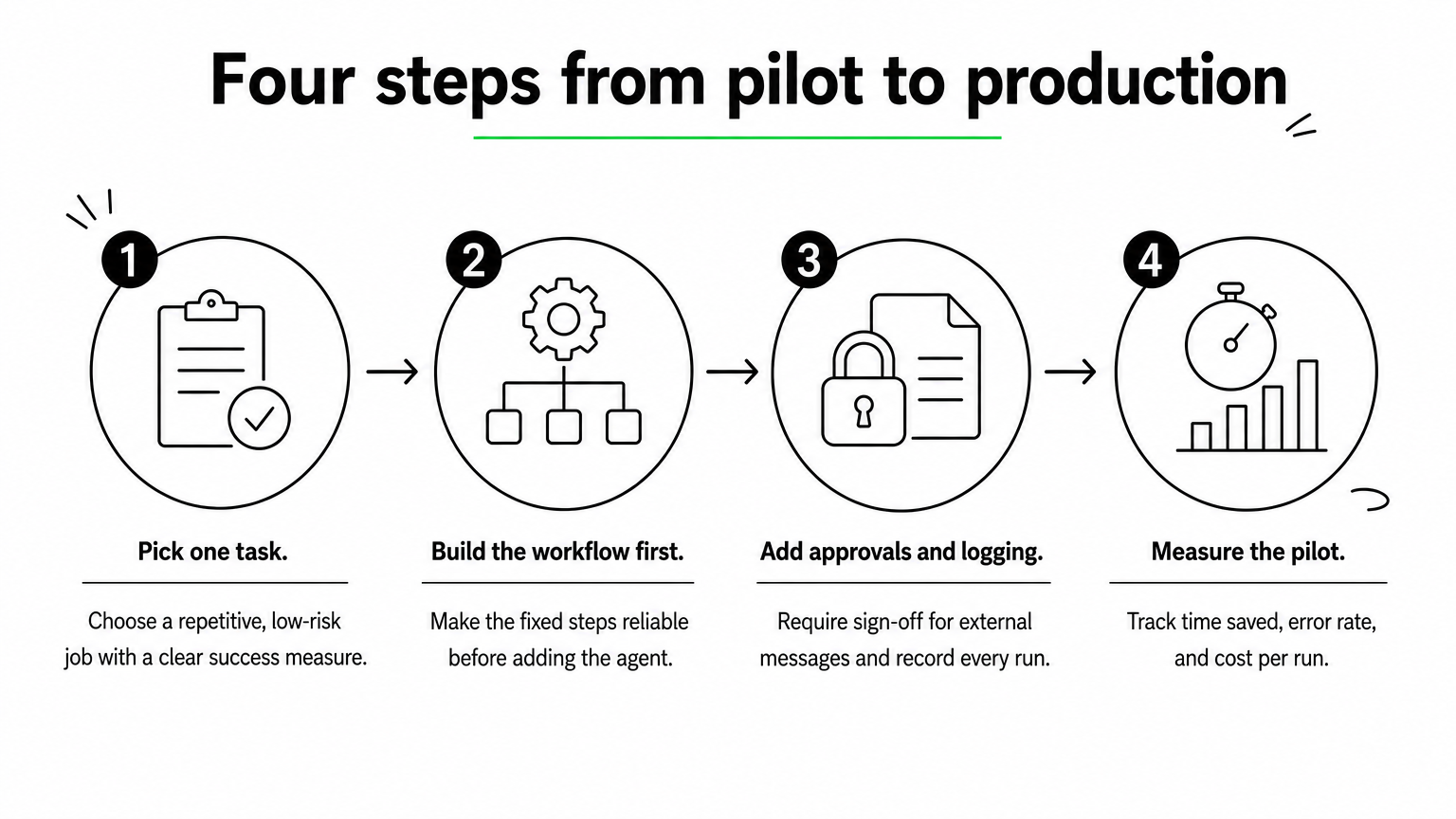
A four-step path from pilot to production
Most agent projects stall because teams jump from a demo to a rollout. This sequence keeps risk small.
Pick one task. Choose a repetitive, low-risk job with a clear success measure, such as lead qualification or support triage.
Build the workflow first. Get the fixed steps reliable, then give the agent its tools and instructions.
Add approvals and logging. Require human sign-off for external messages and record every run.
Measure for two to four weeks. Track time saved, error rate, and cost per run. Expand only if the numbers hold.
Mistakes that stall agent projects
The most common mistake is automating a process nobody has written down. If you cannot describe the steps and the exceptions clearly, an agent cannot follow them. Write the process in plain language first, and use that text as the agent’s instructions.
Another trap is ignoring AI governance requirements until the end. Security review, data access, and audit trails take longer than building the agent. Ask for them in week one, especially in banking, healthcare, or insurance. Finally, do not pick a platform on model hype alone. Models improve every few months, so favor tools that let you switch.
Start with one workflow, then scale
The right AI agents builder comes down to who builds, who maintains, and how sensitive the data is. No-code tools like Zapier, Gumloop, Relay.app, and Lindy get a first agent live fast. n8n, Dify, and LangChain reward teams that want control. StackAI and custom builds handle regulated, data-heavy work. Pick one workflow, set a measurable goal, and run a short pilot before you commit.
If your agent needs to work inside core systems, follow compliance rules, or scale across the business, bring in a team that has done it before. Talk to Hatzs Dimensions about scoping a custom AI agent, with a fixed-price project or a dedicated team.